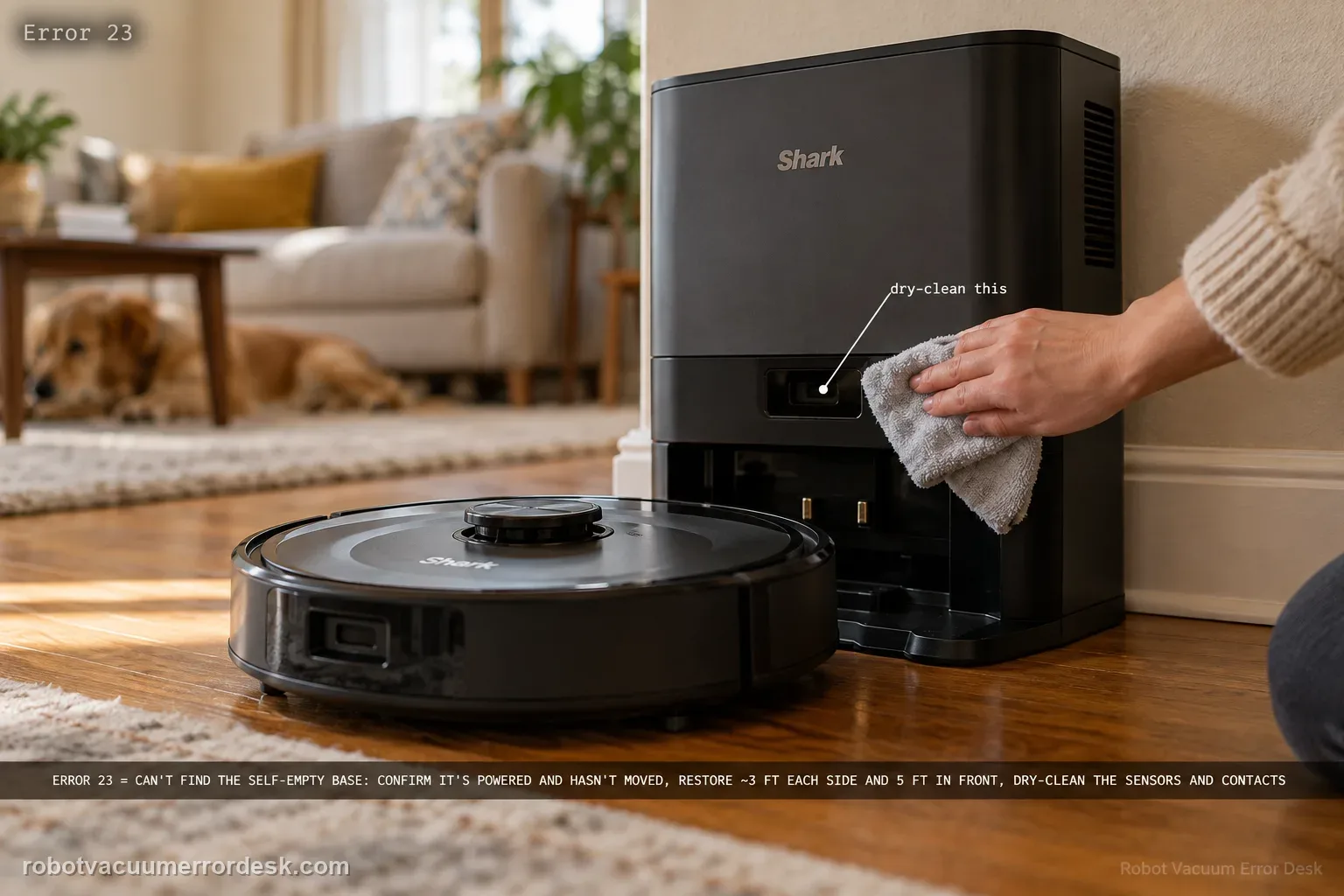
On the RV2300-series Shark Matrix, Error 23 means the robot cannot find the Self-Empty Base. Treat that as a localization/base-acquisition problem before treating it as a battery problem. Confirm the base is powered and has not moved, restore the owner-guide clearance of roughly 3 ft (1 m) on each side and 5 ft (1.5 m) in front, clear the approach, dry-clean sensors and charging contacts, and make sure the wheels are not dragging. Then place the robot a short distance directly in front of the powered base and command Dock. If that short test passes, long-route mapping or base permanence is the stronger suspect. If it fails with the base clearly powered and visible, the base-detection path is ready for Shark support.
Confirm the exact model and exact code, light pattern or symptom.
Run the lowest-risk physical or software check first.
Use each pass condition to decide what the result actually narrows down.
Confirm this is the right issue
- The Matrix explicitly reports Error 23.
- The robot searches near the Self-Empty Base but does not acquire it.
- The base was moved after mapping or furniture now crowds the approach.
- A short return test is needed to separate base detection from whole-home navigation.
What’s most likely causing this
Self-Empty Base is unplugged or not in a reliable powered state
Base was moved from the location the robot expects
Approach clearance is below the RV2300-series placement guidance
Sensors, contacts or wheel motion are compromised by debris
Base-detection/navigation fault remains after a simplified short-range test
Reading your test result
| What you observe | What it narrows down | Next move |
|---|---|---|
| Base has no confirmed power | The docking target itself is not in a known working state. | Fix the base power condition before interpreting Error 23 as navigation failure. |
| Base was moved after mapping | The robot may be searching for a previous stable reference. | Restore a permanent location and retest before deleting maps. |
| Short Dock test succeeds | Close-range base detection works. | Investigate long-route navigation, base permanence and room approach conditions. |
| Short Dock test still returns Error 23 | The simplified setup still cannot acquire the base. | Record the approach and escalate to Shark after one final sensor/wheel check. |
| Robot finds base but fails to charge | Base acquisition succeeded; the failure stage changed. | Switch to the Shark Matrix not-charging diagnostic. |
Do not factory-reset by default. Use the exact model’s reboot/network-reset procedure only when the manufacturer path calls for it.
Work through these checks in order
Verify that Error 23 is the active Shark code
Read the robot/app state and confirm that the Matrix is actually reporting Error 23. The RV2300-series owner guide defines this code as 'Robot cannot find the Self-Empty Base.' That wording matters: it tells you to prove power, base visibility and navigation first, not to replace the battery or open the robot. If the robot reaches the base but will not charge, use the charging guide instead because that failure happens after base acquisition has already succeeded.
Prove the Self-Empty Base has power
Check the wall outlet, power lead and base connection before evaluating navigation. A powerless base cannot provide the normal docking target and can make the robot search indefinitely. Keep the base on a stable hard surface and avoid using extension arrangements that introduce an uncertain connection. The point of this step is to convert 'the base should be on' into a known condition. If the base has an expected indicator behavior, note it, but do not rely on one light alone if the model conserves indicator power.
Restore the published 3 ft / 5 ft approach zone
The RV2300-series guide calls for about 3 ft (1 m) of open space on each side and 5 ft (1.5 m) in front of the base, on a level bare floor. Remove rug edges, cords, baskets and furniture legs from that zone. Error 23 is especially easy to misdiagnose when the base technically remains accessible but the final approach has become narrow or angled. Keep the base from sliding while the robot climbs onto it.
Return the base to a permanent mapped location
If the Self-Empty Base was moved after mapping, restore it to the previous working location before deleting the map. Shark recommends choosing a permanent base position because the robot uses that stable reference during returns. A moved dock can produce a navigation symptom even when every sensor and wheel is healthy. Run the next test with the base fixed in one place; moving it again while troubleshooting changes the target and makes each result less comparable.
Dry-clean sensors, contacts and the mobility path
Use the owner-maintenance approach on sensors and charging contacts, and remove hair or debris from the front wheel and accessible drive-wheel areas. The goal is not to turn Error 23 into a charging diagnosis; it is to make sure the robot can steer accurately and see/approach the base without contamination. A dragging wheel can cause repeated arcs near the dock, while dirty surfaces can complicate the last part of the return. Reinstall any removed owner-serviceable parts fully before the test.
Run a controlled short Dock test
Place the Matrix a short, straight distance in front of the powered base, facing it, and command Dock. Keep the room unchanged while the robot approaches. A successful result proves that the robot can detect and use the base under simplified conditions. If Error 23 appears even here, the evidence is much stronger for a base-detection/localization fault than for general room mapping. If the short test passes, use a normal mission next without moving the robot or base.
Escalate a repeatable short-range failure
If Error 23 returns during the clear short test with a powered, stationary base, correct 3 ft/5 ft clearance, clean sensors and free wheels, record a video showing the approach and the base indicator. Tell Shark whether the robot ever reaches the charging contacts and whether manual placement charges normally. Those details distinguish 'cannot find the base' from 'finds it but cannot charge,' which are two different support branches and should not be merged into one vague docking complaint.
Contact Shark when Error 23 remains repeatable from a short straight approach with the Self-Empty Base powered, fixed in place, surrounded by the owner-guide clearance, and with sensors and wheels clean. Provide a short video, state whether manual placement charges, and note whether the robot ever touches the base. Do not keep remapping while the close-range test still fails; that can erase navigation context without proving the base-detection hardware. If the robot finds the base but does not charge, move to the charging path instead.
Before you contact support, gather this
A reproducible case moves a support call past the basic troubleshooting script faster than “it doesn’t work” does, and it keeps the clues from your own tests on record.
- Exact model name and the error code / voice prompt exactly as shown
- A photo or screenshot of the app error and the time it occurred
- A short list of the checks already completed and what happened after each one
- Firmware/app version if the issue began after a software change
Where this comes from
Shark RV2300 Series Matrix owner guide
The RV2300-series guide defines Error 23 as inability to find the Self-Empty Base and provides placement/clearance guidance for a stable dock approach.
Additional official source: Shark RV2300S/RV2300AE Matrix troubleshooting guide ↗Last editorial review: September 5, 2026Regional note: manufacturer help centers, model suffixes, mains-power requirements and warranty procedures can differ by country. If the source redirects to a local support site, confirm that the model/hardware scope still matches before following a region-sensitive step.
This guide is rated Official series support. See what each evidence label means →
Questions people ask
What does Error 23 mean on a Shark Matrix robot?
On the RV2300-series Matrix, the owner guide defines Error 23 as the robot being unable to find the Self-Empty Base. That makes base power, base placement, approach clearance and robot navigation the first things to test. It does not by itself mean the battery is defective. If the robot reaches the base but then will not charge, switch to a charging diagnosis because the base-finding stage has already succeeded.
How much clearance does the Shark Matrix Self-Empty Base need?
The RV2300-series owner guide calls for roughly 3 ft, or 1 m, of open space on each side and 5 ft, or 1.5 m, in front of the base on a level bare floor. Treat those dimensions as a diagnostic setup. Remove rug edges, cords and furniture from that zone, keep the base from sliding, then repeat the same short Dock test.
Can moving the Shark Matrix base cause Error 23?
Yes. A robot that previously returned reliably can become inconsistent if the Self-Empty Base is moved or rotated from its stable mapped location. Restore the base to a permanent position before deleting maps or replacing parts. Then test from a short straight approach. If close-range docking works again, the evidence points toward base-location/navigation context rather than a failed battery or charging circuit.
Why run a short Dock test for Shark Matrix Error 23?
A short clear approach removes most whole-home route complexity. If the Matrix finds and docks on the base from nearby, the basic base-detection and final approach can work, so long-route mapping, clutter or base movement become stronger suspects. If Error 23 still appears in the simplified setup, the failure is much closer to the base-detection/localization path and is more useful to document for Shark support.
When should I contact Shark about Matrix Error 23?
Escalate when Error 23 repeats from a clear short approach with the Self-Empty Base powered, fixed, given the recommended clearance, and with sensors and wheels clean. Record a video and note whether the robot ever reaches the contacts or charges when placed manually. That evidence separates a true cannot-find-base problem from a later charging problem and helps support avoid repeating basic placement checks.
Did this diagnostic narrow the fault?
Use this as an editorial signal, not a popularity counter. If a feedback address is configured you can email the note; otherwise you can copy it for your own support record.