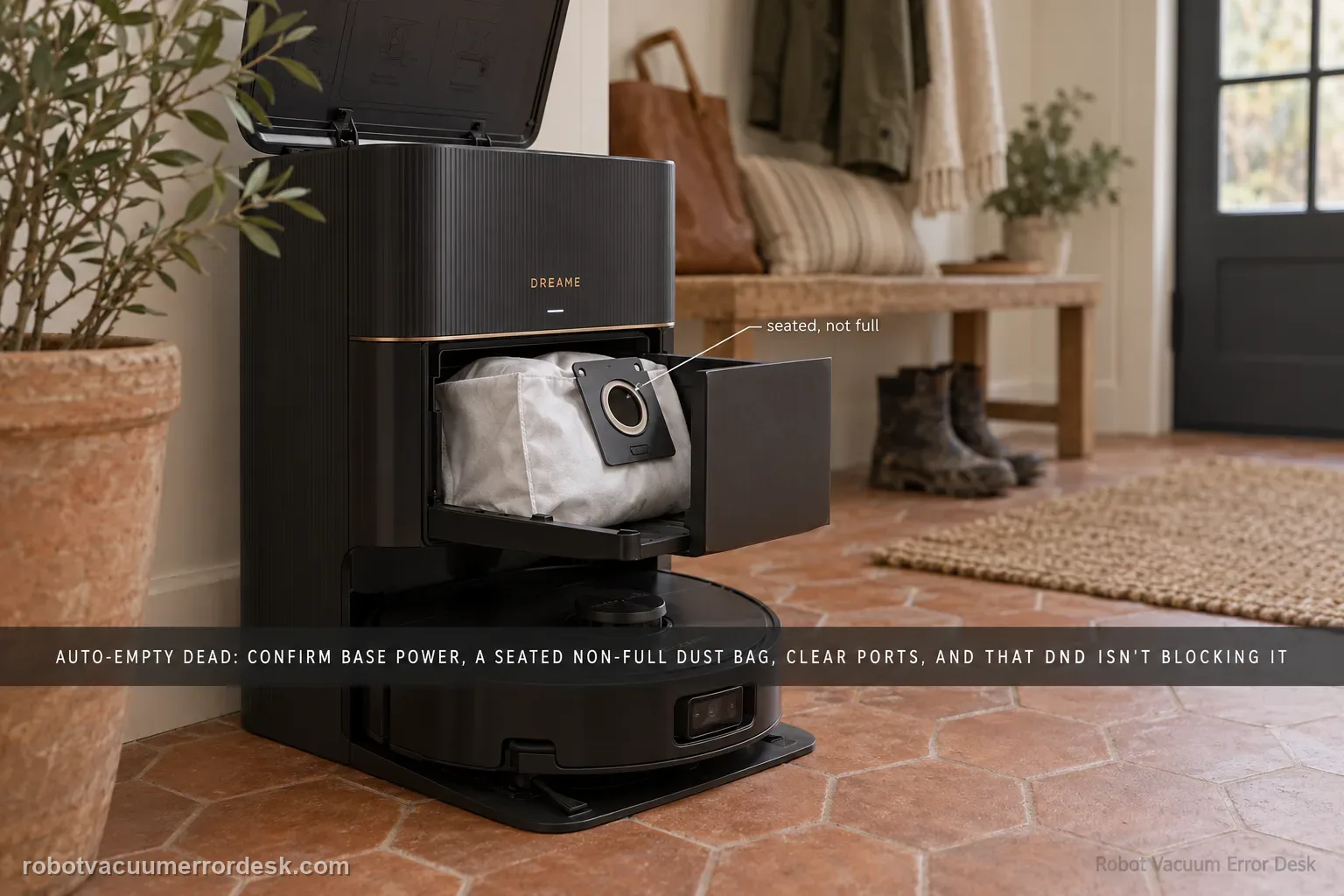
Dreame’s current X40 Ultra dust-collection page separates a cycle that never starts from one that runs but moves little debris. Confirm the station is powered, the dust bag is correctly installed and not full, and the robot/base/dust-box collection ports are clear. In Dreamehome, make sure Dust Collection is enabled and remember that DND blocks dust-collection commands. Clean the charging-contact window that carries station communication, then run one controlled empty cycle and inspect whether debris actually moved.
Confirm the exact model and exact code, light pattern or symptom.
Run the lowest-risk physical or software check first.
Use each pass condition to decide what the result actually narrows down.
Does this match your problem?
- The X40 docks normally but the base does not empty the robot bin.
- A dust-collection cycle starts weakly or leaves debris in the robot.
- The dust bag or dock ports may be full, blocked or mis-seated.
Most likely causes
Base station not powered
Dust bag full or incorrectly installed
Station dust-collection ports or robot dust outlet blocked
Dust-collection control disabled in the app
Charging electrode window dirty enough to affect the station handoff
What your test result means
| What you observe | What it narrows down | Next move |
|---|---|---|
| No auto-empty sound after docking | Trigger/settings or station readiness is the first branch. | Verify base power, bag installation and dust collection enabled in app. |
| Bag is full or not seated correctly | Station may inhibit or weaken collection. | Replace/reseat the bag and clear the surrounding port. |
| Cycle runs but robot bin stays full | Trigger is proven; airflow/transfer path is suspect. | Clear station ports and robot dust-box outlet. |
| Manual empty works but automatic empty does not | Hardware can transfer dust; automatic trigger/configuration remains. | Review app dust-collection settings and docking event. |
| Ports clear + manual cycle still ineffective | Owner-level airflow checks are exhausted. | Contact Dreame with cycle sound/video and bin evidence. |
Do not factory-reset by default. Use the exact model’s reboot/network-reset procedure only when the manufacturer path calls for it.
Run these checks in order
Prove base power and dust-bag installation
Dreame starts with the base station powered and the dust bag correctly installed. Re-seat the bag and confirm the station is actually on before changing app settings.
Empty/replace a full bag and clear station dust ports
If the bag is full, service it. Inspect the dust-collection ports for packed debris or paper that can block airflow during the empty cycle.
Confirm dust collection is enabled in the app
Open Dreamehome and confirm the Dust Collection function is enabled. Dreame’s current X40 article also states that dust-collection commands are not executed during Do Not Disturb. Check the active DND window before treating a silent station as a fan or bag-detection fault. For a clean proof, test outside DND with the same bag and port condition.
Clean the charging electrode window and robot dust outlet
Wipe the charging electrode window, then check whether the dust outlet of the robot dust box is blocked and clean it manually if needed.
Run one manual empty cycle and inspect what remains
Trigger a controlled dust-collection cycle. If the station runs but debris remains, note whether suction noise is normal and whether the robot bin outlet empties at all before escalating.
Classify no-cycle versus weak/ineffective emptying
Listen for whether the station actually starts a dust-collection cycle. No cycle pushes you toward base power, bag detection and app enablement; a cycle that runs but leaves debris shifts attention to ports, the robot dust-box outlet and airflow. Treating those two symptoms as identical wastes the most useful discriminator.
Inspect the robot bin after a controlled manual empty
After the documented bag/port/app/electrode checks, trigger one manual empty cycle and compare debris before and after. Note whether the suction sound is normal and whether material moves at all. If the station runs but nothing leaves the robot bin, the blocked outlet/airflow branch is stronger than a disabled setting.
Check whether the robot arrived after a real cleaning task
Use a completed cleaning return for the automatic-empty test rather than manually placing the robot on the station and assuming the same trigger conditions apply. Note whether a manual empty command works from the app. A working manual cycle paired with a missing automatic cycle is strong evidence that suction hardware can operate while the automatic trigger or station state still needs attention.
If the base is powered, the bag/ports/outlet are clear and app dust collection is enabled but the X40 still cannot empty, save a short video of the empty cycle and contact Dreame instead of opening the station.
What to collect before contacting support
Give support a reproducible case instead of “it doesn’t work.” That reduces repeated basic troubleshooting and preserves the clues from your tests.
- Exact model name and the error code / voice prompt exactly as shown
- A photo or screenshot of the app error and the time it occurred
- A short list of the checks already completed and what happened after each one
- Short video showing the failed docking, mapping or base-station behavior
- Firmware version shown in Dreamehome
Manufacturer evidence
Dreame X40 Ultra Complete — Fails to Collect Dust
Dreame’s current exact-model X40 dust-collection article covers dust-bag installation/fullness, blocked robot/base/dust-box ports, app dust-collection enablement, DND blocking, the charging-contact window and collection-frequency adjustment.
Additional official source: Dreame X40 Ultra support hub ↗Additional official source: Dreame X40 Ultra FAQ guide ↗Last editorial review: September 5, 2026Regional note: manufacturer help centers, model suffixes, mains-power requirements and warranty procedures can differ by country. If the source redirects to a local support site, confirm that the model/hardware scope still matches before following a region-sensitive step.
This guide is rated Official model support. See what each evidence label means →
FAQ
Why does my Dreame X40 Ultra dock but not auto-empty?
First determine whether the dust-collection cycle starts at all. Dreame’s X40 FAQ says to prove base power, correct dust-bag installation and the app’s dust-collection setting. If there is no cycle, stay on that trigger/readiness branch. If the station runs but dust remains, move instead to the station ports, robot dust-box outlet and airflow path.
Can a full dust bag stop X40 Ultra auto-emptying?
Yes. Dreame includes a full or incorrectly installed bag in the X40 dust-collection troubleshooting path. Replace or reseat the bag and inspect the station dust ports while the compartment is open. Then run one manual empty test. Do not replace the suction motor simply because the first automatic cycle failed with a full bag or blocked port.
Why does the X40 auto-empty cycle run but leave debris in the robot?
That means the trigger itself worked, so focus on transfer and airflow. Dreame tells owners to clear the station dust-collection ports, wipe the charging electrode window and inspect the robot dust-box outlet for blockage. A manual empty cycle with before/after bin inspection is useful because it shows whether any debris moves through the path.
Where is the X40 Ultra dust-collection setting?
Dreame’s X40 FAQ directs owners to confirm the dust-collection function is enabled in the app. Open the connected X40 Ultra and review the station/dust-collection controls before chasing hardware. If manual emptying works but automatic emptying does not, that difference is especially important because it proves the station can generate suction while the automatic trigger remains suspect.
When should I contact Dreame about X40 auto-empty not working?
Escalate after the station is powered, the bag is correctly installed and not full, dust collection is enabled, station ports and the robot dust-box outlet are clear, and a controlled manual empty still fails or is abnormally weak. Send a video with the cycle sound and photos of the bin before/after so support can distinguish trigger from airflow failure.
Did this diagnostic narrow the fault?
Use this as an editorial signal, not a popularity counter. If a feedback address is configured you can email the note; otherwise you can copy it for your own support record.