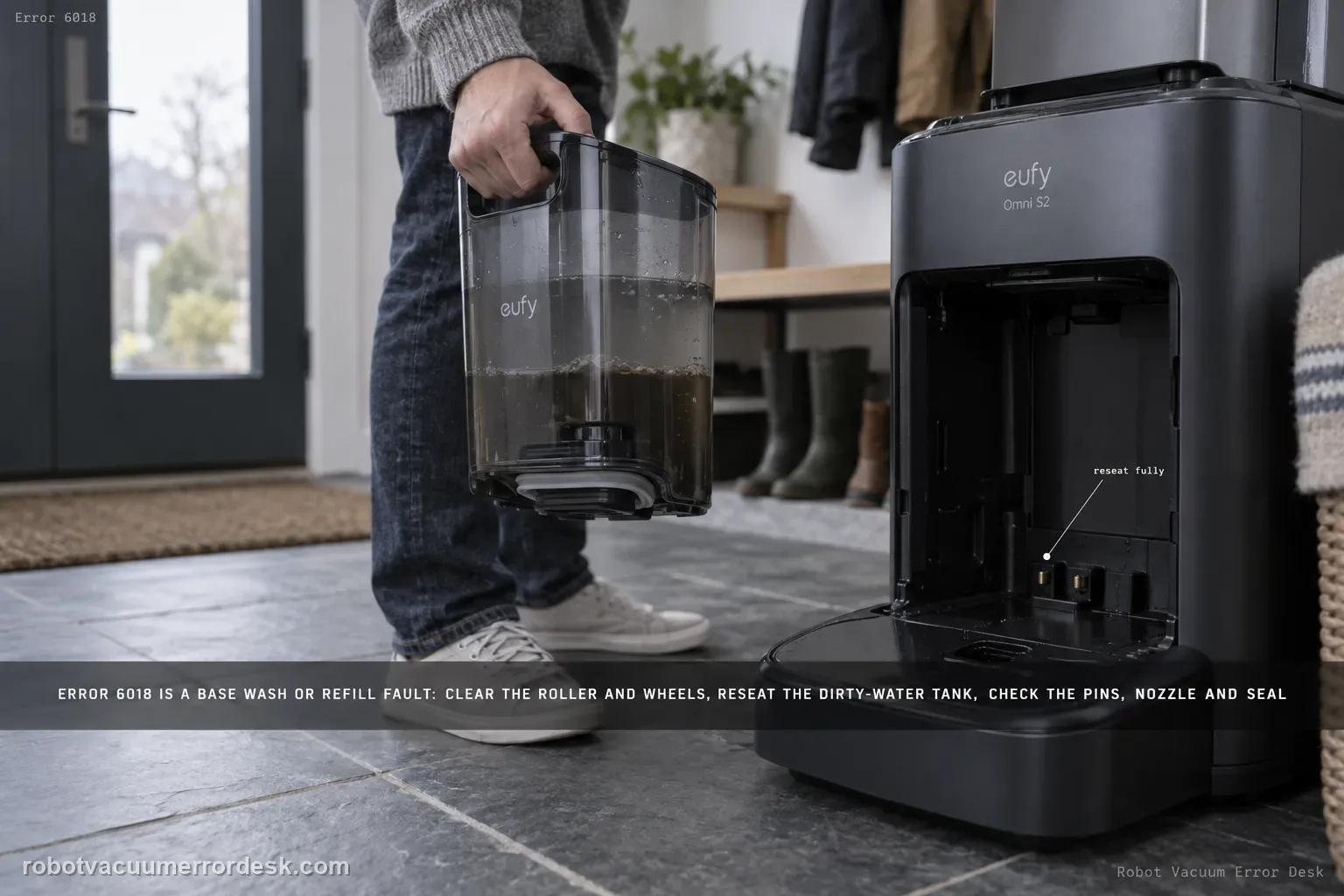
Error 6018 on the eufy Omni S2 means the UniClean base detected a problem during water refilling or mop washing. Do not confuse the model name S2 with older eufy 'Error S2' wheel-module codes. For Omni S2 Error 6018, eufy says to clear the robot's roller/brush/wheels, reseat the dirty-water reservoir, inspect charging pins, inspect the base water-injection nozzle and the screen-module silicone seal, then restart mop washing.
Which external part of the 6018 water path fails inspection?
Confirm the exact model and exact code, light pattern or symptom.
Run the lowest-risk physical or software check first.
Use each pass condition to decide what the result actually narrows down.
Does this match your problem?
- The Omni S2 or app explicitly displays Error 6018.
- The message appears while the base is refilling water or washing the mop.
- Vacuum-only behavior may still work while the wet-system cycle stops.
Most likely causes
Hair or debris is loading the roller, roller brush or wheels during the wash/refill sequence
The dirty-water reservoir is not fully seated
Charging pins are blackened, corroded, rusty or dirty
The base water-injection nozzle is cracked, deformed or damaged
The screen-module silicone seal is displaced, incomplete or damaged
What your test result means
| What you observe | What it narrows down | Next move |
|---|---|---|
| Error 6018 appears during mop washing/refill and robot rollers or wheels are tangled | Robot-side drag remains on eufy’s exact 6018 path even though the message names the base. | Clean roller, roller brush and wheels until they move freely, then retest once. |
| The dirty-water reservoir is loose or visibly not seated | The station may not complete the wet cycle because a required reservoir state is wrong. | Remove and reinstall the reservoir fully before inspecting deeper parts. |
| Charging pins are dirty, blackened, rusty or corroded | Contact condition is abnormal and is explicitly included in the manufacturer’s 6018 checks. | Clean only accessible pins with a dry cloth; photograph damage that does not clean away. |
| The water-injection nozzle is cracked/deformed or the screen seal is displaced | A wet-path hardware/sealing defect is more plausible than software. | Stop repeated wash attempts and document the nozzle/seal condition for eufy service. |
| All external checks pass but 6018 returns at the same wash/refill stage | The owner-serviceable branches are exhausted and the failure is reproducible. | Record the exact stage, photos of nozzle/seal/reservoir and escalate without opening powered wet-station internals. |
Do not factory-reset by default. Use the exact model’s reboot/network-reset procedure only when the manufacturer path calls for it.
Run these checks in order
Clear the robot's roller, roller brush and wheels
Inspect the roller, roller brush and wheels for hair, thread or foreign material and remove it until each user-serviceable component moves freely. eufy starts the 6018 path here, so do not skip robot-side mechanical drag just because the message mentions the base station.
Reseat the dirty-water reservoir completely
Remove and reinstall the dirty-water reservoir so it is fully and securely seated. eufy specifically notes that incorrect reservoir installation can trigger Error 6018 during water handling.
Inspect and clean the charging pins
Look at the robot's charging pins for blackening, corrosion, rust or dirt. Wipe dirty pins gently with a dry cloth. The goal is a clean contact surface, not abrasive removal of plating.
Inspect the water nozzle and the screen-module silicone seal
Check the base station water-injection nozzle for cracks, deformation or damage. Remove the screen module and inspect its silicone seal; eufy says it should be intact, correctly positioned and have no missing or damaged sections.
Restart one mop-washing cycle and watch the exact failure point
After the corrections, restart mop washing once and observe whether Error 6018 clears. If it returns, stop cycling the wet station repeatedly and preserve a photo of the nozzle/seal plus the exact point in the wash/refill sequence where the error appears.
Differentiate 6018 from the “clean water tank empty” 6011 path
Read the exact code in the app before troubleshooting. Error 6018 is the S2 base water-injection/mop-wash abnormal path that includes robot drag, dirty-water reservoir seating, charging pins, nozzle and screen seal. Error 6011 is a separate clean-water-level detection path. Mixing them causes unnecessary tank work and can hide the component eufy actually asks you to inspect for 6018.
Run one observed wash cycle after the external corrections
Reassemble only the user-serviceable pieces, dry the surrounding area and initiate one mop-washing task while watching when the error returns. Note whether the station begins filling, stops before water delivery, or fails later in the wash sequence. A single observed repeat is better evidence than repeatedly cycling a wet station, especially if a nozzle or seal already looks damaged.
Escalate persistent 6018 after all manufacturer-described external checks pass and one observed mop-wash cycle reproduces the code. Send the exact 6018 message, photos of the reservoir seating, charging pins, injection nozzle and screen seal, the failure stage, Device Information and a list of steps already tried. Do not open powered base-station plumbing/electronics or keep cycling a wet station when a nozzle or seal is visibly damaged.
What to collect before contacting support
Give support a reproducible case instead of “it doesn’t work.” That reduces repeated basic troubleshooting and preserves the clues from your tests.
- Exact model name and the error code / voice prompt exactly as shown
- A photo or screenshot of the app error and the time it occurred
- A short list of the checks already completed and what happened after each one
- Device information / activity-log details from eufy Clean when the issue is mapping or routing related
Manufacturer evidence
eufy Omni S2 — Error 6018 Water Injection Abnormal
eufy’s exact Error 6018 article defines the fault as a base water-refill/mop-wash abnormality and prescribes five owner checks: free the robot roller/roller brush/wheels, fully seat the dirty-water reservoir, inspect robot charging pins, inspect the base water-injection nozzle, and inspect the screen-module silicone seal. The S2 manual/model desk and support-information checklist are companion references. Error 6018 stays separate from the Error 6011 clean-water-level path.
Additional official source: eufy — Omni S2 User Guide (T2081) ↗Additional official source: eufy — Omni S2 model support desk ↗Additional official source: eufy — What support needs for S2 technical issues ↗Last editorial review: September 5, 2026Regional note: manufacturer help centers, model suffixes, mains-power requirements and warranty procedures can differ by country. If the source redirects to a local support site, confirm that the model/hardware scope still matches before following a region-sensitive step.
This guide is rated Official model support. See what each evidence label means →
FAQ
What does Error 6018 mean on the eufy Omni S2?
Error 6018 is an Omni S2 base-station water-injection or mop-washing abnormality. eufy’s exact support path checks more than the water tank: robot roller/brush/wheels, dirty-water reservoir seating, charging-pin condition, the base water-injection nozzle and the screen-module silicone seal. Complete those external checks, then run one observed mop-wash cycle to see whether the code returns.
Is eufy Omni S2 Error 6018 the same as older eufy “Error S2”?
No. “Omni S2” is the robot model, while Error 6018 is a numeric base water-injection fault on that model. Older eufy references to “Error S2” can describe a wheel-module problem on different RoboVac families. Use the exact 6018 article and app wording so you do not follow a legacy wheel-code procedure that does not match this station fault.
Can a loose dirty-water reservoir trigger Omni S2 Error 6018?
Yes. eufy explicitly tells S2 owners to verify that the dirty-water reservoir is installed correctly and securely as part of the 6018 procedure. Remove and reseat it fully before deeper diagnosis. If the reservoir is correct but the code returns, continue with charging pins, water-injection nozzle and screen-module silicone seal rather than repeatedly removing the tank.
What should I inspect on the Omni S2 base for Error 6018?
Inspect only the manufacturer-described accessible items: the water-injection nozzle for cracks, damage or deformation, and the screen module’s silicone seal for correct position, completeness and damage. Also check the reservoir seating and robot charging pins. Do not open powered wet-station hardware. If a nozzle or seal is visibly damaged, photograph it and move to support instead of repeated wash cycles.
When should I stop troubleshooting Error 6018 and contact eufy?
Stop after the robot’s roller/brush/wheels move freely, the dirty-water reservoir is seated, charging pins are clean, and the nozzle plus screen seal look intact, yet 6018 returns during a controlled wash. Record the exact failure point and photos of the inspected parts. A repeatable wet-system fault beyond those checks should be serviced rather than investigated by opening the base.
Did this diagnostic narrow the fault?
Use this as an editorial signal, not a popularity counter. If a feedback address is configured you can email the note; otherwise you can copy it for your own support record.