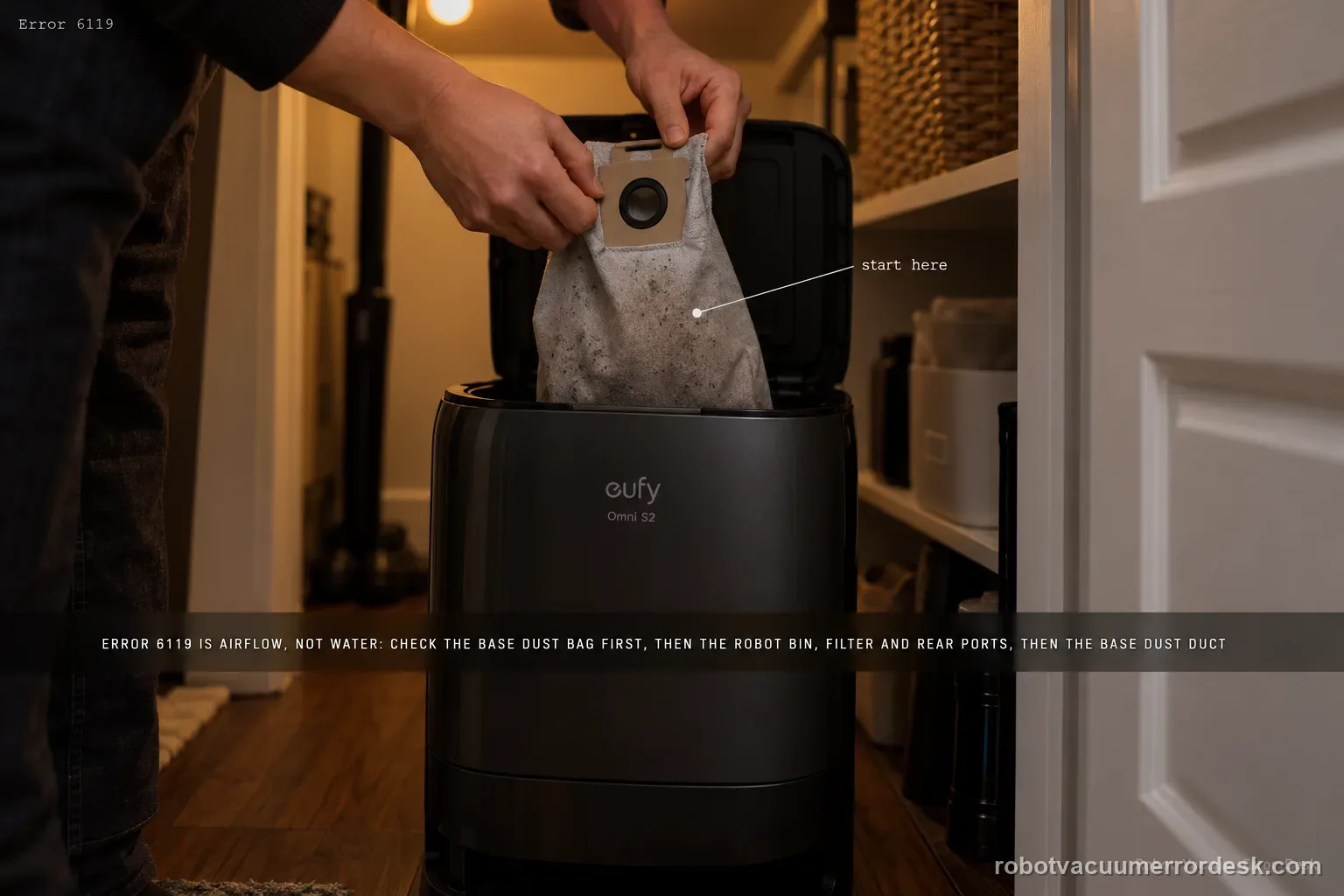
Error 6119 on the Omni S2 is a dust-collection airflow warning, not a water-system error. eufy's exact path starts with the base dust bag, then moves through the robot dustbin/filter and rear dust-collection ports, and finally the base-station dust duct/port. After the airflow path is physically clear, homes with pets or frequent hair buildup can use Standard dust-collection mode and increase collection frequency to reduce repeat blockages.
Where is the first confirmed restriction in the Error 6119 airflow path?
Confirm the exact model and exact code, light pattern or symptom.
Run the lowest-risk physical or software check first.
Use each pass condition to decide what the result actually narrows down.
Confirm this is the right issue
- The Omni S2 base or app explicitly reports Error 6119 or 'Base Station Dust Collection Duct Blocked.'
- Auto-emptying sounds weak, stops, or leaves debris in the robot after a collection attempt.
- The warning is tied to dust collection rather than charging, water refill or mop washing.
What’s most likely causing this
The base-station dust bag is full and restricting airflow
The robot dustbin or filter is loaded with debris
The robot's rear dust-collection ports are blocked
Foreign material is lodged in the base-station dust collection duct or port
Heavy pet hair/debris accumulates faster than the current dust-collection schedule removes it
Reading your test result
| What you observe | What it narrows down | Next move |
|---|---|---|
| Dust bag is full | The base cannot maintain normal collection airflow through a saturated bag. | Replace the bag before cleaning deeper ducts. |
| Robot dustbin or rear dust-collection ports contain packed debris | The blockage is on the robot side before the base duct. | Clean the dustbin/filter and rear collection ports thoroughly, then retest auto-empty. |
| Base collection port/air duct has a visible obstruction | Airflow is restricted inside the accessible station duct path. | Remove the obstruction carefully and run one dust-collection cycle. |
| Bag and robot path are clear but 6119 returns immediately | The simple user-accessible airflow restrictions are not explaining the code. | Photograph the clear bag/ports and record the cycle stage before escalation. |
| 6119 appears with abnormal suction/noise or repeated failed collection | A persistent station airflow fault is more plausible than a one-time debris plug. | Stop repeated auto-empty attempts and contact eufy rather than opening the powered suction system. |
Do not factory-reset by default. Use the exact model’s reboot/network-reset procedure only when the manufacturer path calls for it.
Work through these checks in order
Check the base dust bag before changing settings
Remove the clean-water tank to access the station dust-collection cover, then remove and inspect the dust bag. eufy starts Error 6119 here: if the bag is full, replace it before continuing. Do not assume a strong fan sound means the airflow path is clear; a full bag can preserve noise while still restricting transfer.
Clean the robot dustbin and filter
Remove the robot dustbin and clean it thoroughly. Inspect the filter and the inside of the bin for compacted dust or hair. The goal is to restore the robot-side airflow path before judging the base-station suction.
Clear the robot's rear dust-collection ports
Inspect the dustbin outlet and the robot's rear dust-collection openings for packed debris. These ports are the transfer path from robot to station; a clear base duct cannot empty a robot whose own outlet is plugged.
Inspect and clear the base dust duct/port
Inspect the base station's dust-collection air duct and port for foreign objects or compacted debris. Clean only the user-accessible path. Once it is clear, initiate one manual dust-collection cycle and listen for normal airflow rather than repeatedly running a blocked system.
If debris load is high, reduce the interval between collections
After the physical blockage is cleared, eufy recommends Standard dust-collection mode for homes with pets or frequent hair buildup and allows increased collection frequency. Treat this as recurrence prevention, not as a substitute for clearing an existing obstruction.
Check the airflow path in order from bag to robot, not randomly
Start with the disposable bag, then the robot dustbin/filter and rear dust-collection ports, then the accessible base collection port/duct. That order follows eufy’s exact 6119 article and helps identify where debris actually stopped. If you clean everything simultaneously, you may clear the code but learn nothing about the recurring choke point. Take a quick photo when you find a significant plug so repeated 6119 events can be compared.
Run one emptying cycle with a known-clear path
After replacing a full bag or removing debris, reinstall the robot dustbin/filter correctly and start one dust-collection cycle. Listen for a normal collection attempt and check whether debris transfers into the bag. If 6119 returns with a clear path, do not keep hammering the fan through repeated cycles. Preserve the app code and the point at which collection stops for eufy support.
Escalate Error 6119 when the bag is not full, robot dustbin/filter/rear ports are clear, the accessible base duct/port is clear, and one dust-collection cycle still reproduces the code. Send the exact 6119 message, photos of the bag/ports, a short cycle video, Device Information and the steps tried. Do not open the powered base suction fan or repeatedly run collection against an unresolved airflow restriction.
Before you contact support, gather this
A reproducible case moves a support call past the basic troubleshooting script faster than “it doesn’t work” does, and it keeps the clues from your own tests on record.
- Exact model name and the error code / voice prompt exactly as shown
- A photo or screenshot of the app error and the time it occurred
- A short list of the checks already completed and what happened after each one
- Device information / activity-log details from eufy Clean when the issue is mapping or routing related
Where this comes from
eufy Omni S2 — Error 6119 Dust Collection Duct Blocked
eufy’s exact S2 Error 6119 article defines a base dust-collection duct blockage and gives an ordered airflow path: remove the clean-water tank to access the dust cover, replace a full bag, clean the robot dustbin/filter and rear collection ports, clear the accessible base duct/port, then run a collection cycle. For pet/hair-heavy homes it also recommends Standard dust-collection mode and higher collection frequency. The S2 model desk and support-information checklist provide companion context.
Additional official source: eufy — Omni S2 User Guide (T2081) ↗Additional official source: eufy — Omni S2 model support desk ↗Additional official source: eufy — What support needs for S2 technical issues ↗Last editorial review: September 5, 2026Regional note: manufacturer help centers, model suffixes, mains-power requirements and warranty procedures can differ by country. If the source redirects to a local support site, confirm that the model/hardware scope still matches before following a region-sensitive step.
This guide is rated Official model support. See what each evidence label means →
Questions people ask
What does Error 6119 mean on the eufy Omni S2?
Error 6119 means the S2 base station reports that the dust-collection duct is blocked. eufy’s exact procedure starts with the dust bag, then checks the robot dustbin/filter and rear collection ports, and finally the accessible base dust-collection port/air duct. Work through that airflow path in order, then run one collection cycle to confirm the blockage is actually cleared.
Can a full dust bag cause Omni S2 Error 6119?
Yes. eufy places the dust bag first in the 6119 troubleshooting sequence. Remove the clean-water tank as instructed to access the dust collection area, inspect the bag and replace it if full. A saturated bag can restrict airflow enough to mimic a duct problem, so it should be ruled out before you spend time cleaning deeper robot or station ports.
Where should I look for blockages on the Omni S2 robot itself?
Remove and clean the robot dustbin and filter, then inspect the rear dust-collection ports for packed debris. eufy specifically includes those robot-side openings in the 6119 path. This matters because a station code does not guarantee the obstruction is physically inside the base. Reinstall the dustbin correctly before the final auto-empty test so a poor fit does not create another airflow issue.
Should I open the Omni S2 base if Error 6119 keeps returning?
No. The published owner procedure is limited to the dust bag, robot dustbin/filter/rear ports and accessible base collection port/air duct. If all of those are clear and 6119 returns, record the cycle and contact eufy. Opening the powered suction system adds electrical/mechanical risk and can destroy the clean diagnostic evidence that the accessible airflow path already passed inspection.
When should I contact eufy for repeated Error 6119 on the Omni S2?
Escalate when a fresh/not-full dust bag, clean robot dustbin/filter/rear ports and clear accessible base duct still produce Error 6119. Send photos of the inspected path and a short video or timing note of the failed collection cycle. If you hear abnormal fan noise, mention it explicitly and stop repeated emptying attempts rather than forcing the suction system through a suspected internal restriction.
Did this diagnostic narrow the fault?
Use this as an editorial signal, not a popularity counter. If a feedback address is configured you can email the note; otherwise you can copy it for your own support record.