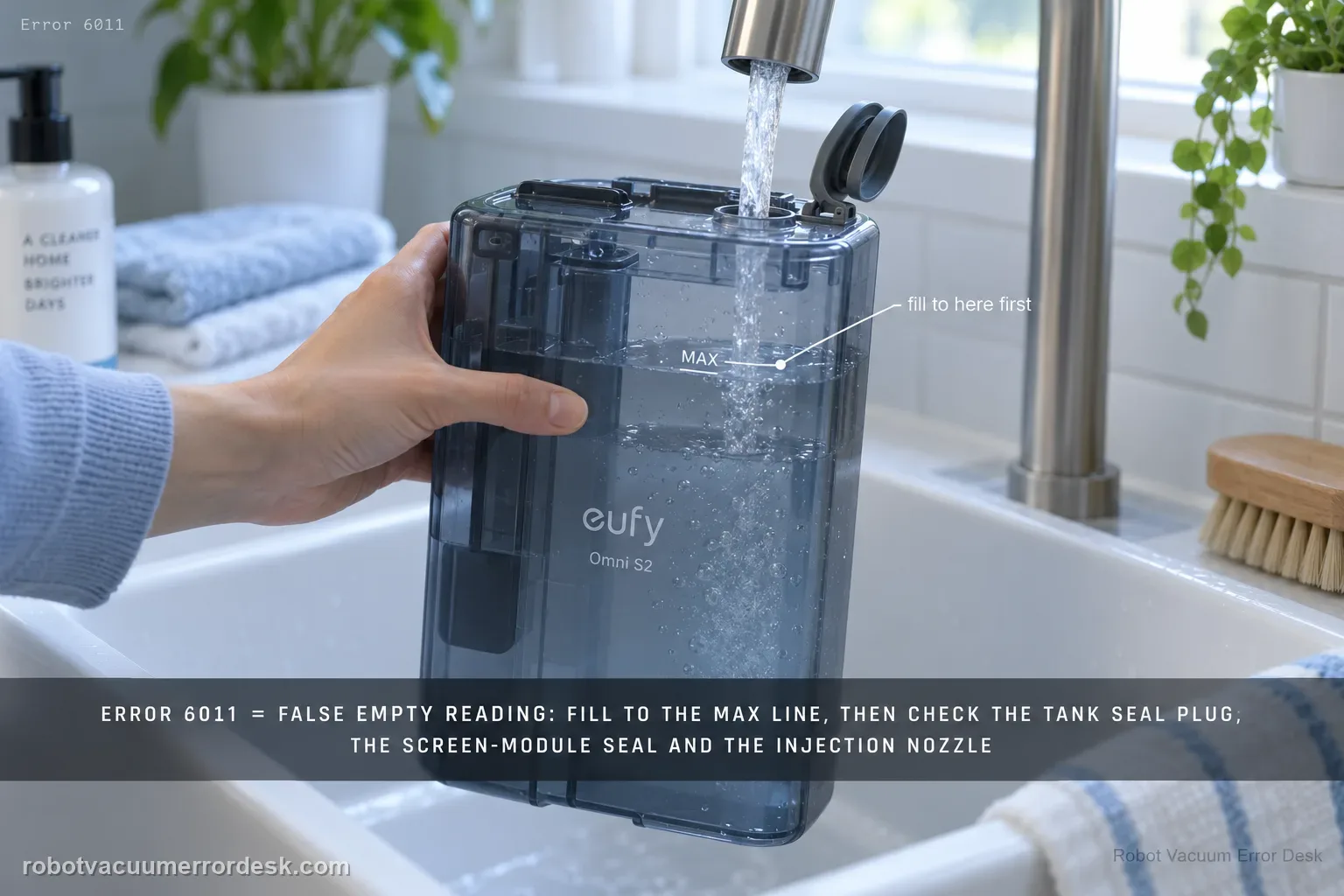
On the Omni S2, Error 6011 is the specific path for a clean-water tank that is reported empty even though water is still present. Start by filling above the minimum and up to the MAX line for the proof test. Then inspect the clean-water tank seal plug, the screen-module silicone seal and screen-module seating, and finally the base water-injection nozzle. This is different from Error 6018: 6011 is a false/failed clean-water-empty detection path; 6018 is a water-injection or mop-wash abnormality.
Does Error 6011 persist with the clean-water tank filled to MAX?
Confirm the exact model and exact code, light pattern or symptom.
Run the lowest-risk physical or software check first.
Use each pass condition to decide what the result actually narrows down.
Does this match your problem?
- The eufy app explicitly shows Error 6011 or says the base-station clean-water tank is empty.
- The clean-water tank visibly still contains water when the warning appears.
- The warning returns after a normal refill, so the problem is no longer explained by a genuinely empty tank.
Most likely causes
Water level is below the sensor's usable minimum even though some water remains in the tank
The clean-water tank seal plug is cracked, deformed, missing material or not seated correctly
The screen-module silicone seal is damaged, incomplete or not sitting flush
The screen module is not fully pressed into its installed position
The base-station water-injection nozzle is cracked, deformed or otherwise damaged
What your test result means
| What you observe | What it narrows down | Next move |
|---|---|---|
| Clean-water level is actually below the minimum line | The alert may be correct rather than a false sensor reading. | Refill clean water up to the appropriate level/MAX line and retest. |
| Tank contains adequate water but seal plug is cracked, deformed or unseated | The station may not detect or deliver water correctly because the sealing condition is wrong. | Reseat the plug if intact; document damage and replace/service rather than forcing a poor seal. |
| Tank and plug look normal but screen module is not installed correctly | The water-detection/flow assembly is not in its expected state. | Remove and reinstall the screen module correctly, checking its sealing surfaces. |
| 6011 appears immediately despite full tank and correct external installation | A false empty-water detection path is stronger than actual low water. | Restart/retest once after reseating; capture the full-tank condition and code if it returns. |
| 6011 persists after level, seal and screen-module checks | Published owner-level causes have been exhausted. | Send photos of water level, seal plug, screen module and exact Error 6011 to eufy; do not open internal sensors/pumps. |
Do not factory-reset by default. Use the exact model’s reboot/network-reset procedure only when the manufacturer path calls for it.
Run these checks in order
Refill to the MAX line for one controlled test
Do not judge the sensor by whether there is merely some water left. eufy's S2 Error 6011 procedure says to confirm the level is above the minimum and refill the clean-water tank up to the MAX line when it is low. This creates a clean test condition before inspecting seals.
Inspect the clean-water tank seal plug
Remove the tank and inspect its seal plug closely. eufy says the plug should be intact, properly seated and free of cracks, deformation or damage. Re-seat it without forcing it. A visibly damaged seal should be documented rather than patched with improvised material.
Inspect the screen-module silicone seal
Check the silicone seal on the screen module. It should be complete, correctly installed and sit flush against the plastic base. Look for cracks, deformation, missing sections or a seal that has rolled out of position after maintenance.
Press the screen module fully into place
Confirm that the screen module itself is fully installed and pressed down securely. eufy notes that it is removed with its two unlock buttons; after any cleaning or inspection, make sure both sides have returned to the correct installed position before testing the water-level warning again.
Inspect the base water-injection nozzle, then retest once
Inspect the silicone water-injection nozzle at the bottom of the base station for cracks, deformation or damage. If the external parts look normal, reinstall the tank and run one controlled station cycle. If Error 6011 immediately returns with a MAX-filled tank and intact seals/nozzle, preserve photos and stop repeatedly cycling the wet system.
Confirm the numeric code before moving into wet-station diagnosis
Error 6011 is specifically the “clean water tank is empty, please add water” message. It is not the same as Error 6018, which eufy treats as a broader water-injection/mop-wash abnormality. If the app shows 6011 while the tank visibly contains sufficient water, that contradiction is itself useful evidence and should lead you through level detection, seal and screen-module installation rather than the 6018 nozzle/charging-pin path.
Retest from a known full-and-seated baseline
After filling the tank appropriately, confirming the seal plug and reinstalling the screen module, place the tank back normally and run one wet function. Photograph the water level before the test. If 6011 returns immediately, support can see that the station reported “empty” against a documented full tank. Avoid repeatedly adding water above the MAX line; excess fill does not fix a detection or sealing problem.
Escalate persistent Error 6011 after water is above the minimum and refilled appropriately, the tank seal plug is intact/seated, the screen-module silicone seal is flush and undamaged, the module is fully installed, and the base injection nozzle is intact. Send the exact code, photos of those parts, Device Information and the steps tried. Do not overfill the tank or open internal sensing/pump hardware.
What to collect before contacting support
Give support a reproducible case instead of “it doesn’t work.” That reduces repeated basic troubleshooting and preserves the clues from your tests.
- Exact model name and the error code / voice prompt exactly as shown
- A photo or screenshot of the app error and the time it occurred
- A short list of the checks already completed and what happened after each one
- Device information / activity-log details from eufy Clean when the issue is mapping or routing related
Manufacturer evidence
eufy Omni S2 — Error 6011 Clean Water Tank Empty
eufy’s exact Error 6011 article defines a false clean-water-empty alert and directs owners to verify the water level, clean-water-tank seal plug, screen-module silicone seal, screen-module seating and the base water-injection nozzle. The S2 manual/model desk and support-information checklist provide companion wet-system and escalation context. Error 6011 remains separate from Error 6018, which is the water-injection/mop-wash abnormal path.
Additional official source: eufy — Omni S2 User Guide (T2081) ↗Additional official source: eufy — Omni S2 model support desk ↗Additional official source: eufy — What support needs for S2 technical issues ↗Last editorial review: September 5, 2026Regional note: manufacturer help centers, model suffixes, mains-power requirements and warranty procedures can differ by country. If the source redirects to a local support site, confirm that the model/hardware scope still matches before following a region-sensitive step.
This guide is rated Official model support. See what each evidence label means →
FAQ
What does Error 6011 mean on the eufy Omni S2?
Error 6011 is the S2 base-station message that the clean-water tank is empty and water should be added. If the tank really is low, refill it. If it already contains sufficient water, eufy’s exact support path moves to the clean-water tank seal plug and screen-module installation/sealing condition. That makes 6011 a different diagnostic from the broader Error 6018 water-injection fault.
Why does my Omni S2 show Error 6011 when the clean-water tank is full?
A full tank with an “empty” alert points away from simple water quantity and toward detection/sealing/installation. eufy tells owners to inspect the clean-water tank seal plug and verify the screen module is correctly installed. Photograph the actual water level, reseat those accessible parts and run one test. If 6011 returns immediately, preserve that contradiction for support.
Should I fill the Omni S2 clean-water tank above the MAX line to clear Error 6011?
No. Fill the tank to the proper level, not beyond the marked maximum. Once adequate water is present, more water does not address a damaged seal plug or incorrectly installed screen module. The useful test is a correctly filled, correctly seated tank with the sealing components intact. If the station still reports empty, document the level and code instead of overfilling.
How is Omni S2 Error 6011 different from Error 6018?
Error 6011 is the clean-water-empty detection message. Error 6018 is a water-injection/mop-washing abnormality with a different checklist that includes robot rollers/wheels, dirty-water reservoir, charging pins, injection nozzle and screen-module silicone seal. Read the exact numeric code before troubleshooting so a full-tank 6011 case does not get lost inside the broader 6018 station path.
When should I contact eufy about repeated Omni S2 Error 6011?
Escalate when the clean-water tank is filled appropriately, the seal plug is intact and seated, the screen module is installed correctly, and 6011 still returns. Send photos showing the actual water level, plug/module condition and the app error. Do not open internal water-level sensors or pumps; the manufacturer’s published owner procedure stops at these accessible installation and sealing checks.
Did this diagnostic narrow the fault?
Use this as an editorial signal, not a popularity counter. If a feedback address is configured you can email the note; otherwise you can copy it for your own support record.