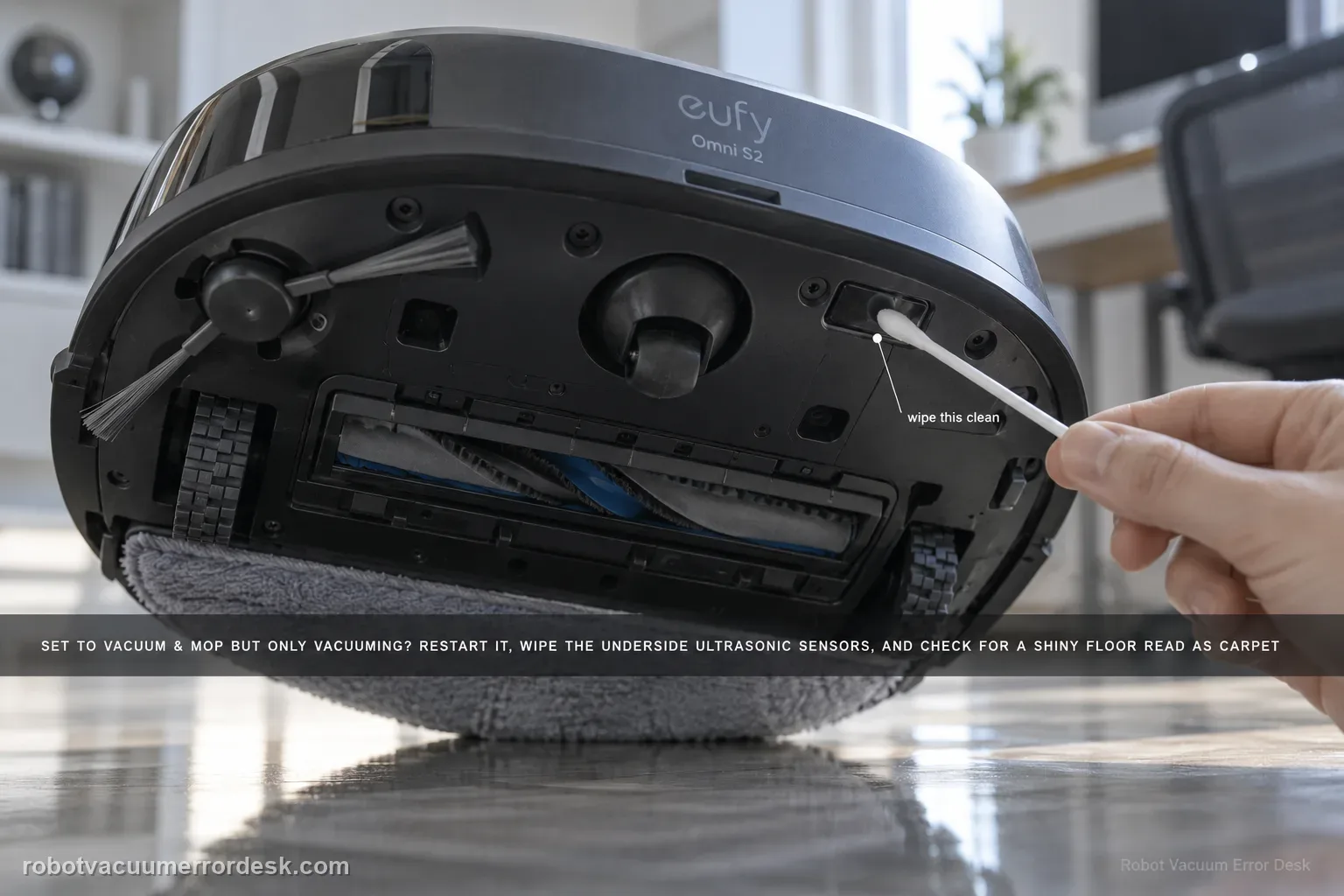
If the Omni S2 is set to Vacuum & Mop but never activates mopping, do not use the weak-cleaning article first: this is a mode/surface-detection problem. eufy's exact S2 path says to restart the robot, clean the underside ultrasonic sensors, consider floors with large gaps or complex/reflective patterns that may be misidentified as carpet, and check multi-floor/no-base-station context. When the S2 cannot detect its base on another floor, it can switch to Vacuum-only to keep the task running.
Does mopping fail everywhere or only on a particular floor/base context?
Confirm the exact model and exact code, light pattern or symptom.
Run the lowest-risk physical or software check first.
Use each pass condition to decide what the result actually narrows down.
Is this the problem you’re seeing?
- The app is set to Vacuum & Mop but the S2 behaves as a vacuum-only robot for the affected task.
- The mop does not engage at all, rather than engaging normally but leaving a weak cleaning result.
- The problem appears only on a certain floor surface or on a floor where the base station is not present.
Likely root causes, ranked
A temporary robot state is preventing the intended mode from starting
Dust or smudges on the underside ultrasonic sensors are affecting floor recognition
Large floor gaps, complex patterns or reflective surfaces are being misidentified as carpet
The robot is cleaning a remote/multi-floor map without detecting the base station
A repeatable floor-recognition or software issue needs logs, photos and device information for support
What the result narrows down
| What you observe | What it narrows down | Next move |
|---|---|---|
| Vacuum & Mop is selected but the S2 immediately behaves as if on carpet | Surface recognition may be suppressing mopping rather than the mode selection being ignored. | Clean the underside ultrasonic sensors and compare an ordinary hard floor. |
| Problem occurs on patterned, reflective or wide-gap tile/wood only | eufy specifically identifies these surfaces as possible false carpet recognition cases. | Photograph the floor and compare with a plain hard surface without changing other settings. |
| Mopping works on plain hard floor after sensor cleaning | The wet system can activate; the issue is recognition/environmental rather than a dead mop mechanism. | Keep the evidence surface-specific and use map/floor controls or support guidance for the problematic area. |
| Mopping never activates on any ordinary hard floor | Surface-specific misclassification is less likely. | Restart, verify mode, inspect sensor cleanliness and then escalate with logs/video rather than repeatedly changing maps. |
| Second-floor/multi-floor use changes behavior away from the base | Base/floor context may be influencing the available wet routine. | Document the floor/base context and compare the same mode near the primary station before assuming hardware failure. |
Do not factory-reset by default. Use the exact model’s reboot/network-reset procedure only when the manufacturer path calls for it.
Checks to run, in sequence
Prove this is 'mop never starts,' not weak mopping
Confirm the task is actually set to Vacuum & Mop and watch the first part of a short run on ordinary hard flooring. If the roller mop activates but cleaning quality is weak, use the poor-cleaning path; if the robot never enters the target area, use the missed-area path. Stay here when the selected combined mode repeatedly behaves as vacuum-only.
Restart the Omni S2 before changing maps or settings
eufy's exact troubleshooting flow starts with a robot restart because a temporary operational state can prevent the intended cleaning behavior. Restart once, then repeat the same small test without deleting maps or resetting Wi-Fi.
Clean the underside ultrasonic sensors with a dry cloth
Gently wipe the ultrasonic sensors on the bottom of the robot with a dry cloth. eufy says dust or smudges can interfere with surface recognition, which matters because the S2 changes behavior when it believes it is on carpet.
Compare the problem floor with a simple hard-floor test
eufy notes that floors with large gaps, patterned/complex designs or reflective surfaces can be misidentified as carpet and push the robot into Vacuum-only behavior. Retest briefly on a simple hard floor. If the issue is surface-specific, photograph the problem flooring rather than repeatedly changing global cleaning settings.
Check multi-floor and base-station context
For cleaning on another floor or where the robot cannot detect its base, eufy says the S2 may automatically switch to Vacuum-only to maintain continuous operation. Start the robot from the base station as documented for remote-floor mopping and follow the multi-floor setup. If the same issue persists, enable logs and preserve floor photos/device information for eufy.
Use a plain hard-floor control to test carpet misrecognition
Choose a simple non-reflective hard-floor area with small joints and run Vacuum & Mop after cleaning the ultrasonic sensors. Then compare the problematic patterned, reflective or wide-gap surface. eufy explicitly notes that some floors can be misidentified as carpet, which causes the S2 to switch away from mopping. A pass on the plain control floor proves the roller/wet function can activate and makes floor recognition the useful lead.
Preserve the exact mode and floor evidence for support
Before changing maps or doing broad resets, capture the app screen showing Vacuum & Mop, a photo/video of the floor pattern and the robot behavior, and enable logs if available. If the S2 vacuums only on a particular surface, that evidence lets eufy analyze recognition. If it vacuums only on every hard floor, the case is materially different and should be described that way rather than as a generic “poor mopping” complaint.
Escalate when Vacuum & Mop is selected, the robot has been restarted, ultrasonic sensors are clean and it still vacuums only on a plain suitable hard-floor control. eufy specifically asks for floor photos/video and logs in recognition cases; include the mode screenshot, Device Information and whether the behavior follows one surface or every ordinary hard floor. Avoid broad map deletion or wet-system disassembly before that distinction is proven.
Information to have ready for support
Support can skip the basic troubleshooting script when you provide a reproducible case. That keeps the results of your checks from getting lost.
- Exact model name and the error code / voice prompt exactly as shown
- A photo or screenshot of the app error and the time it occurred
- A short list of the checks already completed and what happened after each one
- Device information / activity-log details from eufy Clean when the issue is mapping or routing related
Source and evidence level
eufy Omni S2 — Vacuum & Mop Mode Only Vacuuming
eufy’s exact S2 Vacuum & Mop article tells owners to restart, dry-clean the underside ultrasonic sensors, consider floor misclassification on large-gap, patterned/complex or reflective surfaces, and account for multi-floor/no-base operation where the robot may switch to Vacuum-only. The S2 manual/model desk and support-information checklist provide companion mode and escalation context. The fault is kept separate from weak mopping, missed coverage and streaking.
Additional official source: eufy — Omni S2 User Guide (T2081) ↗Additional official source: eufy — Omni S2 model support desk ↗Additional official source: eufy — What support needs for S2 technical issues ↗Last editorial review: September 5, 2026Regional note: manufacturer help centers, model suffixes, mains-power requirements and warranty procedures can differ by country. If the source redirects to a local support site, confirm that the model/hardware scope still matches before following a region-sensitive step.
This guide is rated Official model support. See what each evidence label means →
Common questions
Why does my eufy Omni S2 vacuum but not mop in Vacuum & Mop mode?
eufy says the S2 can suppress mopping when its ultrasonic sensors or floor-recognition logic identify a surface as carpet. Restart the robot, clean the underside ultrasonic sensors and test on a plain hard floor. If mopping works there but not on patterned, reflective or wide-gap flooring, the evidence points toward surface classification rather than a failed mop mechanism.
Can dirty ultrasonic sensors stop the Omni S2 from mopping?
Yes. eufy’s exact Vacuum & Mop troubleshooting tells owners to wipe the ultrasonic sensors on the underside with a dry cloth. Dust or smudges can interfere with surface recognition, and a false carpet classification can make the robot use vacuum-only behavior. Clean the sensors, then retest on an ordinary hard floor before changing maps or assuming the wet system is defective.
Why does the Omni S2 refuse to mop patterned or reflective flooring?
eufy specifically notes floors with large gaps, complex patterns or reflective surfaces as cases that can be misidentified as carpet. Compare the problem floor with a plain hard-floor control while Vacuum & Mop remains selected. If mopping activates only on the control surface, photograph the problematic floor and save logs for support rather than repeatedly resetting the robot.
Is “Vacuum & Mop only vacuums” the same as poor mopping performance?
No. This guide is for a mode where mopping never activates. Poor mopping performance means the roller is working but the cleaning result is weak, streaky or incomplete. The distinction matters: inactive mopping starts with restart, ultrasonic sensor and floor-recognition checks, while weak mopping uses intensity, water, roller cleanliness and soil-type comparisons. Follow the symptom you can actually observe.
When should I contact eufy if Omni S2 mopping never activates?
Escalate after restarting, confirming Vacuum & Mop mode, cleaning the ultrasonic sensors and testing on a plain hard floor, especially if the S2 still vacuums only on every suitable hard surface. Send the selected-mode screenshot, floor photos/video and logs. If the failure occurs only on one patterned/reflective floor, state that clearly because it supports a recognition issue rather than a universal wet-system fault.
Did this diagnostic narrow the fault?
Use this as an editorial signal, not a popularity counter. If a feedback address is configured you can email the note; otherwise you can copy it for your own support record.