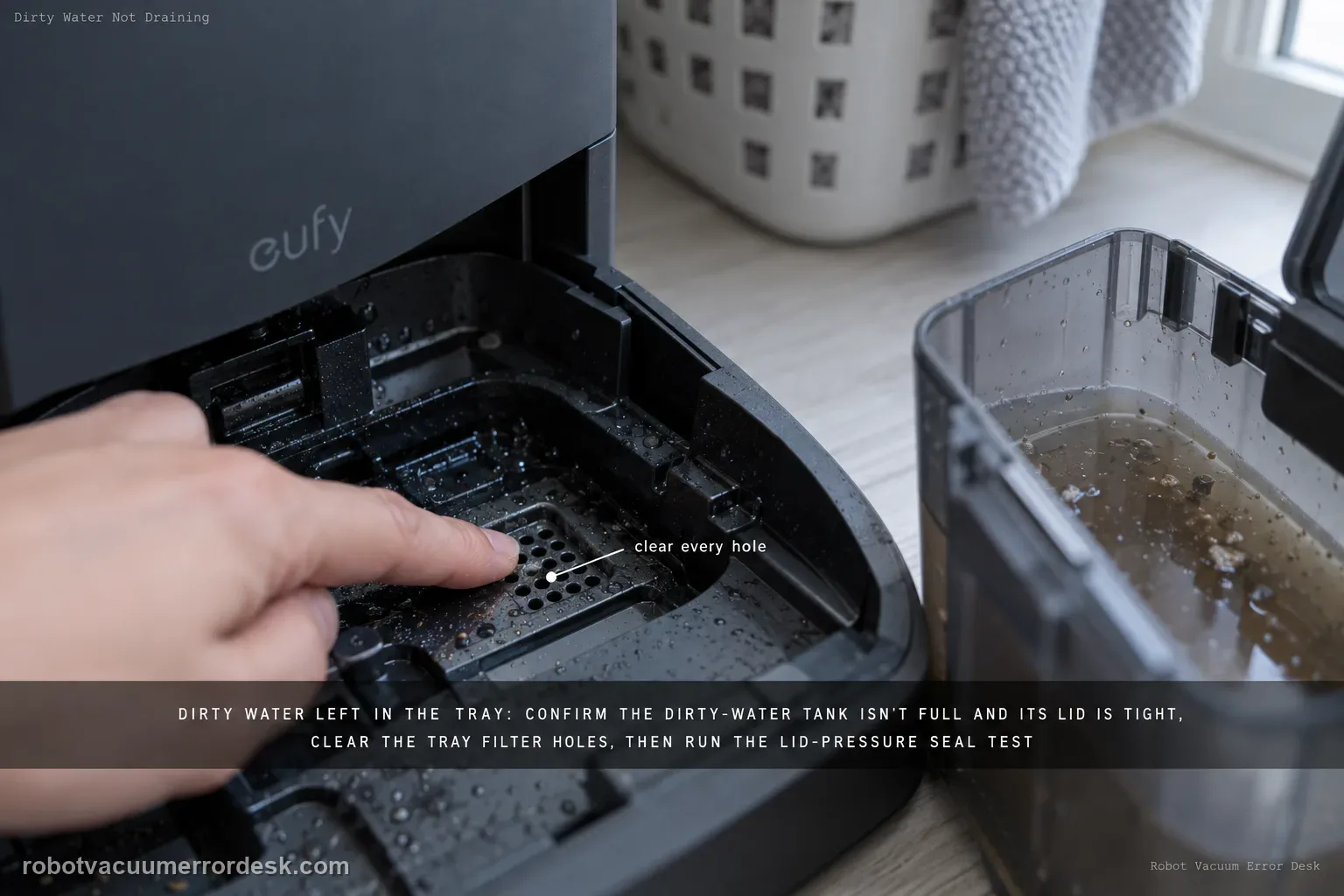
If dirty water remains in the X10 Pro Omni cleaning tray, start with the dirty-water tank: make sure the tank is not full and its lid is tightly closed. Clean clogged tray filter holes, then use eufy’s lid-pressure test during Wash Mop to check whether the dirty-water tank seal ring is leaking. Update firmware and collect logs/photos if the issue persists.
Confirm the exact model and exact code, light pattern or symptom.
Run the lowest-risk physical or software check first.
Use each pass condition to decide what the result actually narrows down.
Does this match your problem?
- Dirty water stays pooled in the Omni Station cleaning tray after mop washing.
- The station reports abnormal cleaning-tray water level or cannot pump dirty water away.
- Pressing down on the dirty-water tank lid changes whether the station drains.
- A useful discriminator is observed: dirty-water tank is at/near maximum.
- A useful discriminator is observed: tank is not full but lid is not airtight.
Most likely causes
Dirty-water tank full or lid not airtight
Cleaning-tray filter holes clogged
Dirty-water tank seal ring mis-seated
Firmware or internal pump/drain fault after external checks
What your test result means
| What you observe | What it narrows down | Next move |
|---|---|---|
| Dirty-water tank is at/near maximum | The station may have nowhere to evacuate additional tray water. | Empty the tank, rinse if needed, close the lid firmly and retest. |
| Tank is not full but lid is not airtight | The drain path can lose the suction/seal needed to move dirty water. | Reseat the lid and tank; use eufy’s lid-pressure test during Wash Mop if needed. |
| Dirty water pools above clogged tray filter holes | Water cannot reach the drain path normally. | Clean the tray/filter holes and start the next test with the tray visibly clear. |
| Drain works only while pressing down on dirty-tank lid | eufy’s pressure test points to a tank-lid seal-ring problem. | Inspect/reseat the seal ring and document damage; do not keep hand-pressing the lid as a permanent fix. |
| Tank/seal/tray pass but station still cannot evacuate | External hydraulic path is cleared; firmware/internal pump/drain fault remains plausible. | Update firmware, reproduce once, upload logs/photos/time and contact eufy rather than opening plumbing. |
Do not factory-reset by default. Use the exact model’s reboot/network-reset procedure only when the manufacturer path calls for it.
Run these checks in order
Give the dirty-water tank capacity and an airtight lid first
Remove and empty the dirty-water tank if it is near maximum, then close the lid firmly and reinstall the tank. eufy notes that either a full tank or a poor lid seal can stop effective suction from the cleaning tray. Do not skip the lid just because the tank clicks into the station; the drain system depends on an airtight path.
Clear the cleaning-tray filter holes
Inspect the filter holes/openings in the cleaning tray and remove lint, hair or sludge that blocks them. A pump cannot evacuate water that cannot reach the drain opening. Rinse/clean the removable tray as permitted, reinstall it flat and keep the station idle while clearing debris. Do not push tools into internal tubing.
Run eufy’s brief lid-pressure test once
Start Wash Mop and press down on the dirty-water tank lid only for the short diagnostic eufy describes. If the tray drains only while that pressure is applied, the result points toward an air leak at the dirty-water tank lid/seal rather than proving that the pump is weak. This is a discriminator, not a permanent way to use the station; release the lid after the observation.
Reposition the dirty-water tank seal ring when pressure changes the result
If the pressure test restores drainage, inspect the dirty-water tank seal ring and reposition it according to eufy’s guidance, then close the lid normally. Run the same Wash Mop test again without hand pressure. A true repair must drain with the tank closed normally; if pressure is still required, the seal/tank remains unresolved and should be replaced or escalated rather than held down during use.
Update firmware before one final reproduction
If the mechanical tank/tray checks are normal and pressure does not explain the problem, make sure the robot/station firmware is current. Then reproduce the failed drain cycle once. The purpose is to pair any logs with the current software state, not to run many extra cycles that leave stale water and change the station condition.
Collect eufy’s support bundle immediately after the controlled failure
eufy asks for Device Information, an Activity Log upload, photos of the accumulated water and the exact local time of the event for deeper analysis. Capture those items after the controlled failed cycle so the log timestamp corresponds to the visible condition. This evidence is more diagnostic than repeating the wash cycle until the tray state changes.
Escalate beyond the tank/tray owner path without opening the station
When the tank has capacity and a normal airtight lid/seal, tray filter holes are clear, pressure does not reveal a seal fault, firmware is current and dirty water still will not evacuate, the remaining pump/internal drain branch is not an owner disassembly task. Stop wet testing, empty standing water as safely accessible and contact eufy with the evidence bundle.
Escalate when the dirty-water tank is empty and properly sealed, tray filter holes are clear, and drainage still fails after the brief lid-pressure test and current-firmware retest. Upload the activity log and record the exact local time with photos of the pooled water. Do not open the station pump or plumbing. If pressing the lid changes drainage, report that explicitly because it strongly narrows the case toward the tank/lid seal.
What to collect before contacting support
Give support a reproducible case instead of “it doesn’t work.” That reduces repeated basic troubleshooting and preserves the clues from your tests.
- Exact model name and the error code / voice prompt exactly as shown
- A photo or screenshot of the app error and the time it occurred
- A short list of the checks already completed and what happened after each one
- Device information / activity-log details from eufy Clean when the issue is mapping or routing related
Manufacturer evidence
eufy X10 Pro Omni dirty-water drain support
eufy’s X10 dirty-water article supplies a strong model-specific diagnostic: tank capacity/lid closure, cleaning-tray filter holes, a lid-pressure test that can expose dirty-tank seal leakage, firmware, and a defined support bundle of Device Information, Activity Log, photos and event time. The manual confirms normal dirty-tank and removable-tray cleaning. This page uses those evidence points rather than generic “clean the base” advice.
Additional official source: eufy — X10 Pro Omni T2351 English manual ↗Last editorial review: September 5, 2026Regional note: manufacturer help centers, model suffixes, mains-power requirements and warranty procedures can differ by country. If the source redirects to a local support site, confirm that the model/hardware scope still matches before following a region-sensitive step.
This guide is rated Official model support. See what each evidence label means →
FAQ
Why is dirty water staying in my eufy X10 Pro Omni cleaning tray?
eufy’s X10 support first checks the dirty-water tank and its seal, then the tray filter holes. A full tank, a lid that is not tightly sealed, or clogged tray filter holes can prevent normal evacuation. Empty/reseat the tank and clean the tray, then run one Wash Mop test. If drainage works only while you press the tank lid, that specifically points toward the lid/seal-ring branch.
What is the dirty-water tank lid-pressure test on the X10 Pro Omni?
With the tank not full and the tray path clean, eufy has owners press down on the dirty-water tank lid while starting Wash Mop. If the station drains only while pressure is applied, the result suggests the lid seal ring is leaking rather than a simple clogged tray. Use the test briefly for diagnosis, then inspect/reseat the seal. Do not hold the lid down permanently as a workaround.
Can clogged cleaning-tray filter holes stop X10 dirty-water drainage?
Yes. eufy explicitly asks owners to clean the cleaning-tray filter holes because debris can keep wash water from reaching the evacuation path normally. Start the next test with the tray and holes visibly clear. If water still remains and added lid pressure changes the result, move to the tank seal branch. If neither cleaning nor seal checks help, preserve logs/photos for the internal pump/drain investigation.
Should I update firmware for an X10 Pro Omni dirty-water drain problem?
eufy includes current firmware and a support-log package in the deeper troubleshooting path. Do the physical tank/lid and tray-filter checks first, then update firmware and reproduce the failure once. Immediately upload the Activity Log and note the local time so support can match telemetry to the event. Firmware should not be used to skip a visibly full tank, loose lid seal or blocked tray hole.
When should I contact eufy about X10 dirty water not draining?
Contact eufy when the dirty-water tank is emptied and tightly closed, the tray/filter holes are clear, the lid-pressure test does not identify a correctable seal issue, and the current firmware still reproduces the failure. Send Device Information, Activity Log, photos of the pooled water and the exact local time. Do not open the internal pump or wet plumbing; the external drain-path checks are complete.
Did this diagnostic narrow the fault?
Use this as an editorial signal, not a popularity counter. If a feedback address is configured you can email the note; otherwise you can copy it for your own support record.