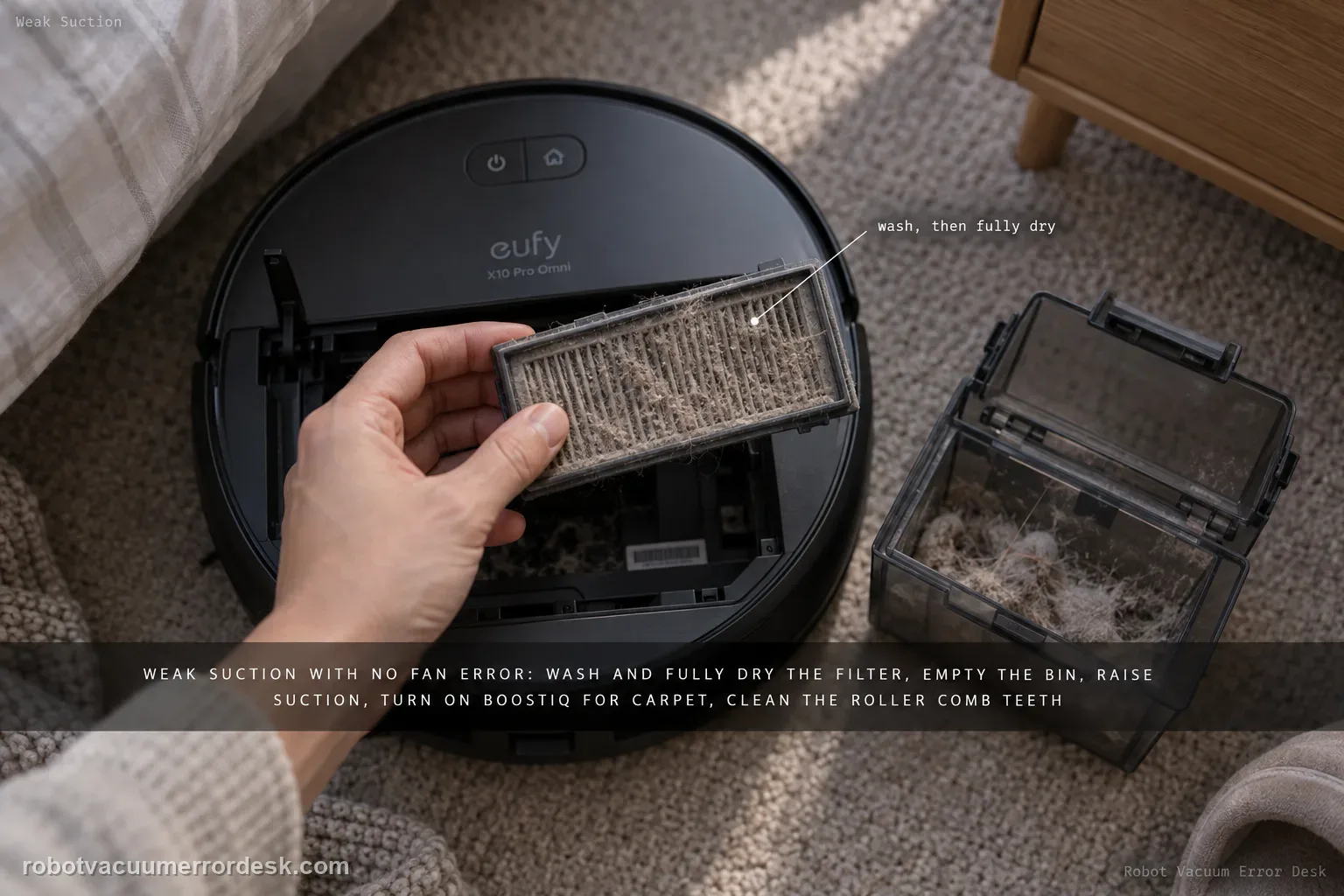
For X10 Pro Omni weak pickup without a suction-fan error, follow eufy’s performance path in order: clean and fully dry the filter, empty the dustbin, raise suction power, enable BoostIQ for carpet, clean the roller-brush comb teeth, then inspect wear items that are easy to miss—the side brush and the rubber strip on the roller-brush guard. eufy says a filter older than about six months that still performs poorly after washing is a replacement candidate.
Confirm the exact model and exact code, light pattern or symptom.
Run the lowest-risk physical or software check first.
Use each pass condition to decide what the result actually narrows down.
Does this match your problem?
- The robot runs without a suction-fan error but leaves visible debris behind.
- Pickup is worse on carpet than hard floor.
- The filter or roller brush has not been serviced recently.
- A useful discriminator is observed: filter is heavily dust-loaded.
- A useful discriminator is observed: dustbin/inlet contains residual packed debris.
Most likely causes
Clogged or aged filter
Dirty dustbin/inlet
Suction setting too low for the surface
BoostIQ not enabled for carpet
Roller-brush comb teeth packed with debris
Side-brush bristles severely worn
Roller-brush guard rubber strip damaged
What your test result means
| What you observe | What it narrows down | Next move |
|---|---|---|
| Filter is heavily dust-loaded | Restricted airflow can reduce pickup before any fan fault is present. | Clean the filter and let it dry completely; replace it if older than about six months and washing no longer restores performance. |
| Dustbin/inlet contains residual packed debris | Air and debris cannot move normally even with a clean filter. | Empty and clean the bin/inlet before changing suction settings. |
| Hard-floor pickup improves at higher suction | The robot hardware can produce more airflow; the previous power setting was part of the complaint. | Choose an appropriate suction level for the debris load instead of treating it as a motor failure. |
| Side-brush bristles are badly worn | Edge/corner debris may not be swept into the main pickup path even when airflow is normal. | Replace the worn side brush, then repeat the same edge-cleaning test. |
| Roller-brush guard rubber strip is torn/deformed | A damaged guard can reduce cleaning performance despite a clean filter and roller. | Replace the damaged guard/strip and repeat the controlled pickup test. |
Do not factory-reset by default. Use the exact model’s reboot/network-reset procedure only when the manufacturer path calls for it.
Run these checks in order
Clean the filter and judge its service age
Inspect the filter for severe blockage, wash it as eufy directs and let it dry completely before reinstalling. eufy adds a useful age discriminator: if the filter has been used for more than about six months and suction does not noticeably improve after washing, replace it. Do not test with a damp filter or without a filter, because that changes airflow and can expose the fan to dust.
Empty and clean the dustbin and inlet
Remove residual debris from the dustbin and the accessible inlet so the air path is not narrowed before the filter. Check for compacted dust at corners/outlet surfaces rather than only dumping loose debris. Reinstall the bin correctly with the filter present. This step keeps the performance diagnosis separate from a missing-bin/filter alert or a true suction-fan error.
Raise suction power on one controlled test area
Choose a small repeatable patch of floor with a known light debris load and increase the X10 suction setting in the app. Run only that area so the effect of suction level is visible. If pickup improves strongly, the previous setting was a meaningful contributor; if it stays poor, keep the same test patch for the mechanical/wear checks below rather than changing many variables at once.
Enable BoostIQ when the weak result is on carpet
For carpet, eufy recommends enabling BoostIQ under Carpet Cleaning so the X10 can raise suction for the higher-load surface. Compare the same small carpet area with the intended feature enabled. Do not judge carpet pickup only from a hard-floor setting; conversely, do not blame BoostIQ when the problem is identical on hard flooring.
Clean debris from the roller-brush comb teeth and dry the brush fully
Inspect the roller brush and comb teeth for packed fibers/debris that keep the brush from working material toward the suction inlet. eufy permits cleaning the roller brush with running tap water; let it dry completely before reinstalling it. Confirm it turns normally and is not in the separate stuck/overcurrent state.
Inspect the side brush for severe bristle loss
eufy’s X10 weak-cleaning article includes a wear check that the earlier WEB31 version omitted: inspect the side brush and replace it if the bristles are severely worn or missing. A worn side brush may not sweep edge/corner debris into the main cleaning path even when vacuum airflow is healthy, which can be perceived as “weak suction.” Compare edge pickup only after this wear item is serviceable.
Inspect the roller-brush guard rubber strip for damage
eufy also tells owners to examine the rubber strip on the roller-brush guard. If that strip is damaged, cleaning performance can drop and eufy recommends replacement. Inspect the strip for tears, missing sections or deformation and reinstall the guard correctly. This is a distinct air/contact-path wear item, not the same as cleaning debris from the roller teeth.
Repeat the same pickup test and keep the fan-error boundary intact
Return to the same small test patch after filter/bin/settings/brush/wear checks and compare pickup. If cleaning is now normal, the before/after result identifies the maintenance or wear branch. If pickup remains poor with all six eufy checks normal, document the surface/settings and contact support. If the robot instead gives an explicit suction-fan error at any point, switch to the dedicated fan-error guide; that hardware alert has a different service threshold.
Contact eufy if poor pickup remains reproducible with a clean dry filter, clear bin/inlet, suitable suction level, BoostIQ used on carpet and a clean roller. Send a before/after test on the same small area. Do not label it a suction-fan failure unless the robot actually reports that error; if it does, preserve the exact message and use the dedicated fan-error path because the escalation evidence changes.
What to collect before contacting support
Give support a reproducible case instead of “it doesn’t work.” That reduces repeated basic troubleshooting and preserves the clues from your tests.
- Exact model name and the error code / voice prompt exactly as shown
- A photo or screenshot of the app error and the time it occurred
- A short list of the checks already completed and what happened after each one
- Device information / activity-log details from eufy Clean when the issue is mapping or routing related
Manufacturer evidence
eufy X10 Pro Omni weak suction support
eufy’s exact X10 weak-suction/poor-cleaning article contains six substantive checks, not five: filter blockage/age, dustbin cleanliness, suction level plus BoostIQ for carpet, roller-brush comb debris, side-brush bristle wear, and damage to the roller-brush-guard rubber strip. It gives an approximate six-month filter replacement decision when washing no longer restores performance. This R52 revision restores the two wear-item branches that were missing from the older article and keeps a hard boundary between ordinary weak pickup and the separate explicit suction-fan hardware alert.
Additional official source: eufy — X10 Pro Omni T2351 English manual ↗Last editorial review: September 5, 2026Regional note: manufacturer help centers, model suffixes, mains-power requirements and warranty procedures can differ by country. If the source redirects to a local support site, confirm that the model/hardware scope still matches before following a region-sensitive step.
This guide is rated Official model support. See what each evidence label means →
FAQ
Why is my eufy X10 Pro Omni suction weak even without an error?
eufy’s performance guide starts with airflow and settings: inspect the filter, empty/clean the dustbin, raise suction power, use BoostIQ under Carpet Cleaning and clean the roller-brush comb teeth. Weak pickup does not automatically mean the fan motor has failed. Use a small repeatable test area after each change. If the robot explicitly reports a suction-fan error, switch to the separate fan-error diagnostic instead.
When should I replace the X10 Pro Omni filter instead of washing it?
eufy says to wash a severely blocked filter and let it dry completely before reuse. The same article notes that if the filter has been used for more than about six months and suction does not noticeably improve after washing, replacement is appropriate. Do not judge a just-washed filter while it is damp. Compare pickup with a fully dry clean filter on the same small test strip before deciding it is worn out.
Does BoostIQ help the eufy X10 Pro Omni on carpet?
Yes. eufy specifically recommends enabling BoostIQ under Carpet Cleaning when troubleshooting poor carpet pickup. It lets the robot increase suction for the higher-load surface. Test the same carpet strip before and after enabling it rather than changing several settings at once. If hard-floor pickup is good but carpet improves only with BoostIQ, the symptom is a surface/settings issue, not strong evidence of a failing suction fan.
Can a worn side brush make the eufy X10 Pro Omni seem like it has weak suction?
Yes, especially at edges and corners. eufy’s X10 poor-cleaning guidance explicitly says to inspect the side brush for significant bristle loss and replace it when severely worn. The fan can be healthy while worn bristles fail to sweep debris into the main cleaning path. Confirm filter/bin/settings first, then judge edge pickup again with a serviceable side brush.
Why should I check the roller-brush guard rubber strip on an X10 Pro Omni with poor pickup?
eufy includes the guard’s rubber strip as a separate performance check. Damage or missing/deformed rubber can reduce how effectively debris is presented to the brush and suction path, so eufy recommends replacing the strip when damaged. This is different from a clogged roller brush: the comb teeth can be clean while a damaged guard still hurts cleaning performance.
Did this diagnostic narrow the fault?
Use this as an editorial signal, not a popularity counter. If a feedback address is configured you can email the note; otherwise you can copy it for your own support record.