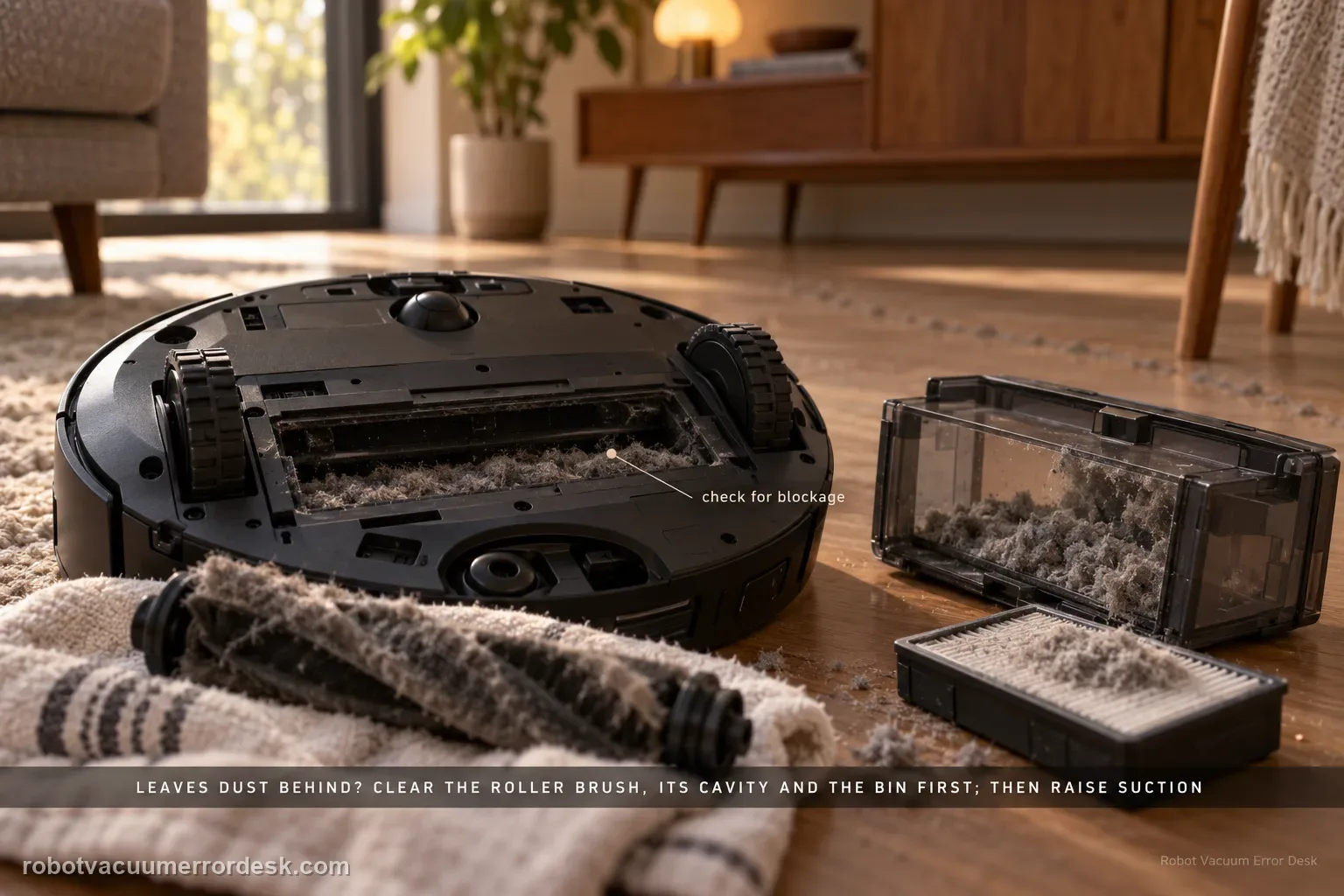
For an X50 that runs but leaves dust or loose debris behind, Dreame’s exact model article starts with blockage, not motor replacement: inspect and clean the roller brush, roller-brush cavity and dust bin. For difficult scenes with accumulated debris or clumps of hair, Dreame recommends more frequent cleaning and a higher suction level, while stubborn material may still need manual removal. The X50 manual adds the maintenance detail that the dust-box filter can be removed, gently tapped, and—if rinsed along with the dust box—must be cleaned with water only, no detergent, and dried completely before reinstalling; it also warns not to clean the filter with a brush, finger or sharp object. Use a small controlled debris strip to prove pickup after each branch. This page is about vacuum pickup, not a side brush failing to reach a corner or the base failing to auto-empty after the cleaning run.
Confirm the exact model and exact code, light pattern or symptom.
Run the lowest-risk physical or software check first.
Use each pass condition to decide what the result actually narrows down.
Confirm this is the right issue
- The X50 drives and vacuums but visible dust, crumbs or hair remain in its path.
- Pickup improves temporarily after clearing the roller brush, brush cavity or dust bin.
- The robot handles light dust but struggles with accumulated debris or clumps of hair.
- You need to separate in-run pickup performance from a station auto-empty problem after the run.
- The main symptom is missed loose debris, not an abnormal noise by itself.
What’s most likely causing this
Paper scraps, particles, hair or a foreign object block the roller brush or roller-brush cavity
Dust bin is obstructed or overfilled enough to interfere with the airflow path
Dust-box filter is clogged or was reinstalled before fully dry
Cleaning frequency is too low for the amount of accumulated debris
Current suction level is insufficient for a demanding debris scene
Persistent vacuum/airflow hardware fault remains after the documented blockage and strategy checks
Reading your test result
| What you observe | What it narrows down | Next move |
|---|---|---|
| Pickup returns after clearing roller/cavity/bin | A physical blockage/feed restriction was the dominant cause. | Keep the same settings and monitor maintenance rather than replacing vacuum hardware. |
| Filter was damp or heavily loaded | Airflow could be restricted even when the brush path looks clear. | Service it per manual and reinstall only when completely dry. |
| Light debris cleans normally, heavy hair pile needs extra pass/suction | The problem is scene load/cleaning strategy rather than zero vacuum function. | Increase frequency or suction deliberately and compare results. |
| Station fails to empty a bin that filled normally | In-run pickup works; the failure is in auto-empty/station airflow. | Use a station auto-empty path instead of changing robot suction. |
| Ordinary debris still remains after clean-path strong-suction test | Documented owner checks no longer explain weak pickup. | Send Dreame a before/after pickup video and stop before fan disassembly. |
Do not factory-reset by default. Use the exact model’s reboot/network-reset procedure only when the manufacturer path calls for it.
Work through these checks in order
Use a controlled pickup strip before changing settings
Choose a clean hard-floor area and a small amount of ordinary dry loose debris that the robot should normally collect. Do not use liquids, sharp material or a giant pile as a stress test. Run one short pass and note what is missed and whether debris reaches the dust bin. This creates a baseline that distinguishes ‘not vacuuming’ from cosmetic dust along an edge that depends on side-brush reach. If the main issue is only one corner or the station later fails to empty the bin, diagnose those separate systems rather than calling all of it weak suction.
Inspect and clear the roller brush
Dreame’s exact X50 article says excessive particles, paper scraps or foreign objects can block the robot and directs owners to check the roller brush. Switch the appliance off before brush service, consistent with the manual’s safety warning. Remove the user-serviceable brush, cut or unwind hair/thread with the provided/appropriate owner tool where allowed, and remove visible debris. Inspect the ends and seating area without opening drive hardware, then reinstall the brush correctly before the next controlled pickup test.
Clear the roller-brush cavity rather than cleaning only the brush surface
Dreame separately calls out the roller-brush cavity because a clean-looking brush can still sit over paper fragments, compacted hair or debris that blocks pickup. With the brush removed and the robot safely off, inspect the accessible cavity and remove loose material. Do not probe deep into ducts with rigid tools or dismantle the suction fan. Reinstall the brush/guard and run the same debris strip. If pickup returns only after the cavity is cleared, you have a concrete airflow/physical-feed cause and do not need to increase suction blindly.
Empty the dust bin and check its filter state
The exact support article includes the dust bin in the blockage check. Empty it fully and inspect the filter. The X50 manual says the filter can be gently tapped to remove dirt and warns not to clean it with a brush, finger or sharp objects. If you choose the manual’s rinse procedure, rinse the dust box and filter with clean water only, use no detergent, and let them dry completely before reinstalling. Never run a suction test with a damp filter because that creates a new airflow problem and can damage the system.
Retest before increasing suction
Repeat the original small debris strip with the cleaned brush/cavity/bin/filter path. If pickup is now normal, blockage was the high-information result; leave settings alone and monitor maintenance intervals. If light ordinary debris is still missed, then use Dreame’s second documented branch: cleaning strategy. This order matters because boosting suction against a blocked path does not prove anything and can make the robot sound louder without moving more debris into the bin.
For demanding scenes, increase frequency and suction deliberately
Dreame says complex cleaning scenes—stubborn material, accumulated debris or clumps of hair—may require higher cleaning frequency and increased suction, and some stubborn material may need manual handling. Change one variable at a time. Try a second pass or higher suction on the same dry test area and compare the amount collected. Do not describe every adhered stain as a vacuum fault: a robot vacuum is not expected to lift material bonded to the floor simply by increasing fan power. Keep the test focused on loose debris.
Record a failure video if clean-path pickup remains poor
Dreame’s exact X50 article asks for a video of the robot operating—especially the scene where it fails to vacuum dust—if the problem continues. Film the prepared debris strip before and after the robot passes, plus the dust bin afterward if useful. State which suction level was used and that the roller brush, cavity, bin and dry filter were already checked. This is much better evidence than opening the fan or guessing at motor wear. Stop if the robot also develops grinding, burning smell or an error message, and route those symptoms separately.
Escalate when the X50 still fails to collect ordinary loose dry debris after the roller brush, brush cavity and dust bin are clear, the filter is correctly serviced and fully dry, and a controlled higher-suction/repeat-pass test does not restore pickup. Dreame asks for video of the robot operating where it fails to vacuum dust. Include the suction level and what maintenance was already completed; do not open the suction fan.
Before you contact support, gather this
A reproducible case moves a support call past the basic troubleshooting script faster than “it doesn’t work” does, and it keeps the clues from your own tests on record.
- Exact model name and the error code / voice prompt exactly as shown
- A photo or screenshot of the app error and the time it occurred
- A short list of the checks already completed and what happened after each one
- Short video showing the failed docking, mapping or base-station behavior
- Firmware version shown in Dreamehome
Where this comes from
Dreame X50 Ultra Complete — Does Not Vacuum Dust
Dreame’s exact X50 article attributes weak dust pickup first to blockages and directs owners to inspect the roller brush, roller-brush cavity and dust bin; for demanding debris scenes it recommends more frequent cleaning and higher suction and asks for a failure video if unresolved. The manual supplies filter-care boundaries: gentle tapping, clean-water-only rinse with no detergent, complete drying, and no brush/finger/sharp-object cleaning of filter media.
Additional official source: Dreame X50 Ultra User Manual ↗Last editorial review: September 5, 2026Regional note: manufacturer help centers, model suffixes, mains-power requirements and warranty procedures can differ by country. If the source redirects to a local support site, confirm that the model/hardware scope still matches before following a region-sensitive step.
This guide is rated Official model support. See what each evidence label means →
Questions people ask
Why is my Dreame X50 leaving dust behind?
Dreame’s exact X50 support page first points to blockage: check the roller brush, roller-brush cavity and dust bin for particles, paper scraps or foreign objects. After those are clear, retest ordinary loose debris. For heavier accumulated debris or clumps of hair, Dreame recommends higher cleaning frequency and suction. That order separates a blocked pickup path from a demanding cleaning scene.
Can I wash the Dreame X50 dust-box filter?
The X50 manual shows the dust box and filter being rinsed with clean water and says not to use detergent, then to dry them completely before reinstalling. It also says not to clean the filter with a brush, finger or sharp object. If you rinse it, do not run the robot while the filter is damp; a wet filter creates an airflow problem instead of proving suction.
Should I just set the X50 to maximum suction?
Not before checking the physical pickup path. Dreame tells owners to clear the roller brush, brush cavity and dust bin first. If ordinary loose debris is still missed after that, increasing suction or cleaning frequency becomes a useful second branch for demanding scenes. Boosting fan power against a blockage can make the robot louder while teaching you very little about the actual cause.
Is poor vacuum pickup the same as auto-empty not working?
No. If debris enters the robot during cleaning but remains in the dust bin after the X50 returns to the station, the in-run vacuum path has already demonstrated pickup and the station’s auto-empty path is the better intent. This guide is for dust that stays on the floor during the cleaning pass, before the base station is asked to empty anything.
What should I film if X50 pickup is still poor?
Dreame specifically asks for a video showing the robot operating, especially the scene where it fails to vacuum dust. Use a small safe patch of ordinary dry debris, film it before and after the robot passes, and note the suction level. Mention that the roller brush, cavity, bin and dry filter were already checked so support can move beyond the basic blockage branch.
Did this diagnostic narrow the fault?
Use this as an editorial signal, not a popularity counter. If a feedback address is configured you can email the note; otherwise you can copy it for your own support record.