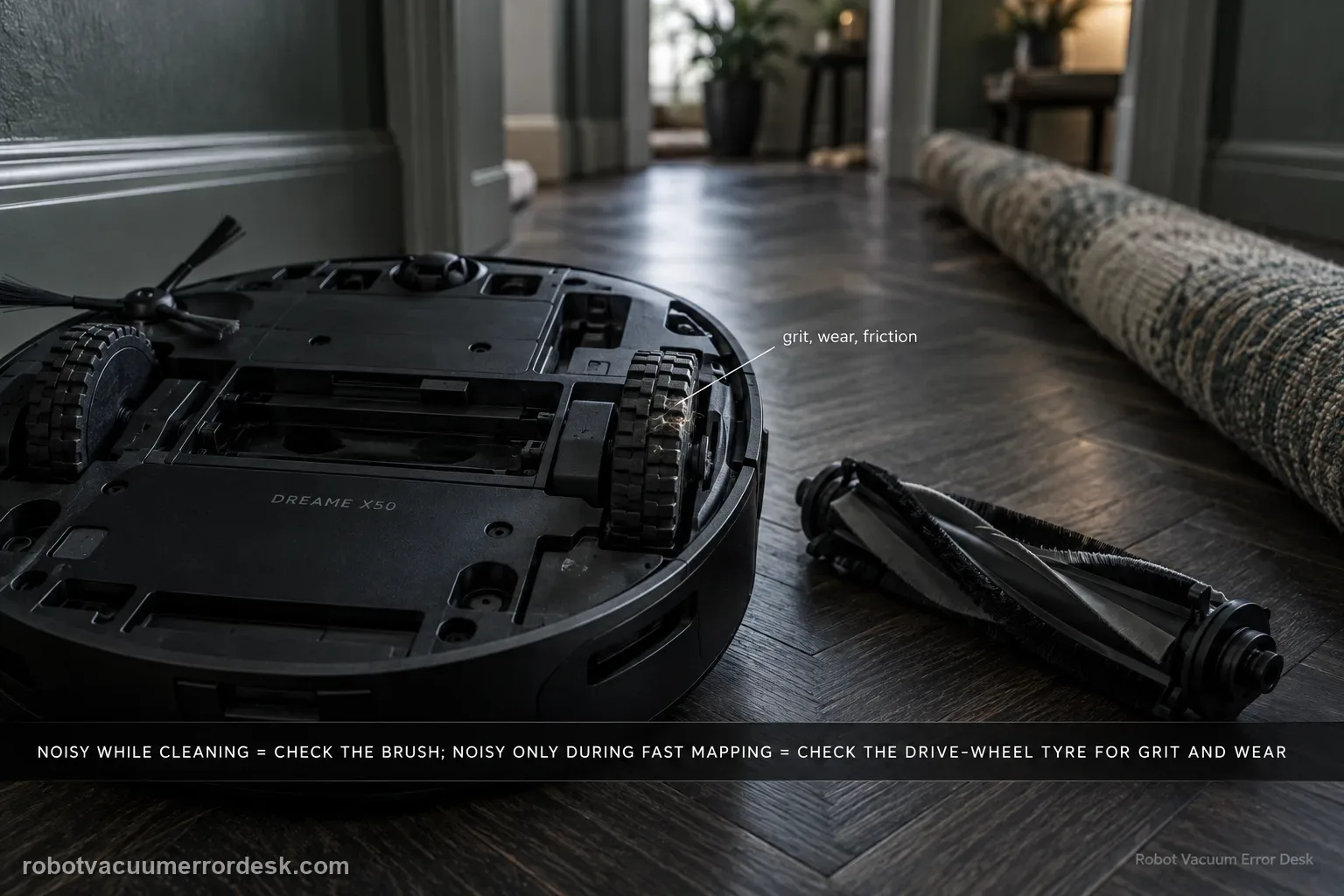
First reproduce when the X50 becomes noisy. Dreame’s exact model article splits the symptom into two scenarios: a strange sound during normal cleaning, where an entangled brush is the first check, and an unusual driving-wheel sound during rapid mapping, where tire/ground friction, debris or wear on the tire are the first owner checks. The X50 manual adds a broader operating-noise branch: a clogged dust-box filter, a hard object in the main brushes or dust box, tangled main/side brushes, or high suction can increase noise. That means the useful test is not ‘does it sound loud?’ but ‘does the sound track brush rotation, suction level, or wheel travel during mapping?’ Do not open a hub motor or fan because an internet post guesses at an internal bearing. Isolate the mode first, service only user-removable parts, then capture the sound for Dreame if it remains frequent or loud.
Confirm the exact model and exact code, light pattern or symptom.
Run the lowest-risk physical or software check first.
Use each pass condition to decide what the result actually narrows down.
Does this match your problem?
- The X50 makes a new scraping, rattling or repetitive sound while cleaning.
- A strange noise appears specifically when the robot drives during Rapid Mapping.
- The sound changes after the main brush is removed/cleaned or after suction level changes.
- The noise seems to come from a wheel/tire only while the robot is moving.
- You want to distinguish normal faint tire/ground sound from a repeatable abnormal mechanical noise without opening the robot.
Most likely causes
Hair or a foreign object is entangled around a user-removable brush
Hard debris is trapped in the main-brush area or dust box
Dust-box filter is clogged and increasing airflow/fan load
Main brush or side brush is tangled
During rapid mapping, tire/ground friction or foreign material/wear on the tire surface produces the sound
A persistent drive or other internal component fault remains after owner-level isolation
What your test result means
| What you observe | What it narrows down | Next move |
|---|---|---|
| Noise disappears after clearing/reinstalling main brush | Brush entanglement or trapped debris was the immediate cause. | Monitor the same cleaning mode; no internal repair is indicated by that result. |
| Noise changes mainly with suction level | Airflow/filter/fan load is more relevant than a wheel fault. | Confirm dry filter/dust path condition and compare Standard/Quiet without masking irregular grinding. |
| Noise appears only during Rapid Mapping wheel travel | Dreame treats this as a tire/drive scenario distinct from cleaning brush noise. | Inspect/clean accessible tire tread and repeat on clean hard flooring. |
| Only faint occasional tire sound remains | Dreame says occasional faint mapping-wheel noise may not affect normal driving. | Observe rather than opening the wheel; escalate if it becomes frequent or loud. |
| Frequent/loud noise persists after matching owner checks | Internal drive/fan/other hardware cannot be safely diagnosed from sound alone. | Send a mode-labelled video to Dreame and stop at the service boundary. |
Do not factory-reset by default. Use the exact model’s reboot/network-reset procedure only when the manufacturer path calls for it.
Run these checks in order
Reproduce the noise in one controlled mode
Start by documenting when the sound occurs. Dreame’s exact X50 article treats cleaning noise and rapid-mapping drive-wheel noise as separate scenarios. Use a clean, open hard-floor area and one normal cleaning run, then—only if the complaint is mapping-related—compare Rapid Mapping. Record whether the sound begins with brush spin-up, changes with suction, appears only while a wheel rolls, or occurs at the base. A station-only noise belongs in a station path rather than this robot-noise page. Mode isolation prevents unrelated components from being cleaned or replaced at random.
For cleaning noise, remove and clear the user-removable brush
Dreame’s exact article says an entangled brush can cause a strange sound while cleaning and directs owners to remove the brush, clear foreign objects, reinstall it and restart the robot. Switch the appliance off before servicing the brush, consistent with the manual’s safety warning that the brush can start unexpectedly. Remove only components the manual presents as routine maintenance. Clear hair/thread and any visible hard debris, reinstall the brush and guard correctly, then run the same short hard-floor test rather than a whole-house cycle.
Check the dust box, filter and other brush load if cleaning noise remains
The X50 manual expands the ‘noise increases’ row beyond the exact support article. It says to check whether the dust-box filter is clogged, whether a hard object is caught in the main brushes or dust box, and whether the main or side brush is tangled. Empty the bin, inspect the accessible brush paths and service the filter only as the manual allows. If you rinse the dust box/filter, Dreame says use clean water only, no detergent, and reinstall only when completely dry. Never test suction with a wet filter.
Compare suction level instead of assuming the fan is damaged
The manual notes that switching suction to Standard or Quiet can reduce operating noise. Use that as a discriminator, not as a permanent way to hide a fault. Run the same clean hard-floor strip at the current level and then at Standard/Quiet. If the sound changes smoothly with expected airflow, record that behavior; if a grinding, scraping or irregular mechanical sound remains unchanged, do not call it normal fan noise merely because suction level changes. The goal is to separate airflow load from wheel/brush contact before escalation.
For rapid-mapping noise, inspect the tire surface without opening the wheel
Dreame’s exact article says Rapid Mapping wheel-motor noise can come from tire-to-ground friction or foreign objects/significant wear on the tire surface. Pause the robot and inspect the accessible tread for stuck debris or obvious surface wear. Clean the tires without disassembling the hub or pulling at internal connections. Repeat the same rapid-mapping movement on a clean hard floor. An occasional faint sound may be observed according to Dreame, but a frequent or louder repeatable sound should not be dismissed after the tire is clean.
Do not turn Dreame’s internal possibilities into DIY repair instructions
The exact article mentions that other factors such as loose connection components in the hub motor may contribute to rapid-mapping noise, but it does not instruct the owner to open the wheel module. Treat that statement as an escalation boundary. If tire cleaning and the controlled test do not change a frequent/loud wheel sound, preserve the evidence instead of removing covers. The same applies to a persistent cleaning sound after user-removable brushes, dust box and dry filter are clear: this site should not invent bearing, fan or gearbox repair without exact owner-service documentation.
Capture a comparison video before contacting support
Record 20–30 seconds that includes the robot starting the relevant mode and the abnormal sound, plus a second short clip if the sound changes after brush/tire cleaning or with suction level. State whether it occurs during normal cleaning or Rapid Mapping, which floor surface was used, and whether the noise is faint/occasional or frequent/loud. That package is much more diagnostic than ‘robot is noisy.’ Stop the test if the sound is accompanied by binding, visible damage, burning smell, repeated fault messages or risk to the floor.
Escalate frequent/loud X50 noise that remains after the matching owner-level branch: clean/reinstall user-removable brushes and clear the dry dust/airflow path for cleaning noise, or clean/inspect the accessible tire surface for Rapid Mapping wheel noise. Send a short mode-labelled video and note floor type, suction level and whether the sound follows brush rotation or wheel travel. Do not open hub motors, fan assemblies or drive modules based on speculation.
What to collect before contacting support
Give support a reproducible case instead of “it doesn’t work.” That reduces repeated basic troubleshooting and preserves the clues from your tests.
- Exact model name and the error code / voice prompt exactly as shown
- A photo or screenshot of the app error and the time it occurred
- A short list of the checks already completed and what happened after each one
- Short video showing the failed docking, mapping or base-station behavior
- Firmware version shown in Dreamehome
Manufacturer evidence
Dreame X50 Ultra Complete — Troubleshooting Abnormal Noise
Dreame’s exact X50 article separates cleaning noise caused first by brush entanglement from Rapid Mapping drive-wheel noise associated with tire/ground friction, tire debris/wear and possible non-owner-serviceable hub factors. The X50 manual additionally lists clogged dust-box filter, hard objects in the brush/dust box, tangled main or side brushes and suction level as operating-noise discriminators.
Additional official source: Dreame X50 Ultra User Manual ↗Last editorial review: September 5, 2026Regional note: manufacturer help centers, model suffixes, mains-power requirements and warranty procedures can differ by country. If the source redirects to a local support site, confirm that the model/hardware scope still matches before following a region-sensitive step.
This guide is rated Official model support. See what each evidence label means →
FAQ
Why does my Dreame X50 make noise only while cleaning?
Dreame’s exact X50 article points first to an entangled brush for a strange sound during cleaning. Remove and clear only the user-serviceable brush, reinstall it correctly and restart. The manual also says a clogged dust-box filter, hard debris in the brush/bin, or tangled main/side brushes can increase noise, so inspect those before assuming an internal motor fault.
Why is the X50 noisy during Rapid Mapping?
Dreame treats Rapid Mapping as a separate scenario. It says tire-to-ground friction, foreign material on the tire surface or significant tire wear can contribute, and it notes other internal drive factors may exist. Clean and inspect only the accessible tire surface, repeat on clean hard flooring, and escalate frequent/loud noise rather than opening the wheel hub.
Can a clogged filter make the X50 louder?
Yes. The X50 manual’s troubleshooting table says increased operating noise can be associated with a clogged dust-box filter and recommends cleaning or replacing it. It also lists hard objects in the main brushes/dust box and tangled main or side brushes. If you rinse the filter, follow the manual: clean water only and reinstall only after it is completely dry.
Is a faint wheel sound always a defect?
Not necessarily. Dreame’s exact X50 noise article says an occasional, very faint sound during rapid mapping may not affect normal driving and can be observed. The useful distinction is repeatability and severity. If the sound is frequent, louder, new, or accompanied by poor movement, clean the accessible tire surface and capture a video for support instead of dismissing it.
Should I open the X50 wheel or fan to find the noise?
No owner-level support source used here tells you to open a hub motor or fan assembly. Dreame mentions possible internal connection factors only as part of the explanation for mapping-wheel noise. After brush, dust-path, suction-level and accessible tire checks, preserve a clear recording and let support handle an internal fault rather than turning a guess into disassembly.
Did this diagnostic narrow the fault?
Use this as an editorial signal, not a popularity counter. If a feedback address is configured you can email the note; otherwise you can copy it for your own support record.