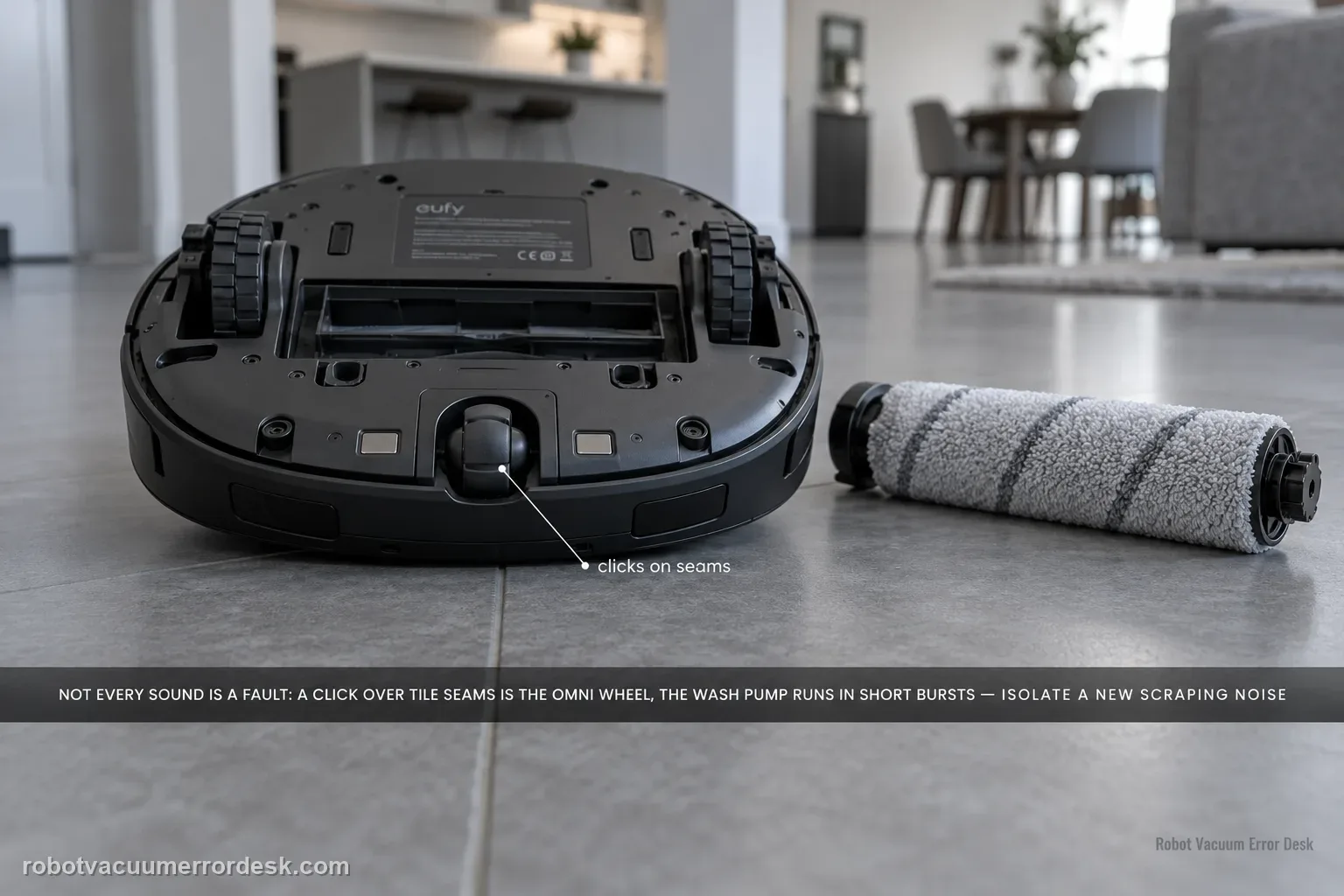
Do not treat every Omni S2 sound as a failing motor. eufy's exact S2 support says a rhythmic click over large tile/wood seams can come from the omni-directional wheel, and the mop-wash pump can run every 40–80 seconds for about 10 seconds as part of normal dirty-water handling. For a new scraping, grinding, persistent rhythmic sound or high-pitched wash-station whistle, isolate the source: brush-cover seating and debris, omni/driving wheels, cleaning roller, dustbin/HEPA airflow, side-brush condition, then the dirty-water reservoir duckbill-valve path described by eufy.
Does the sound match a documented normal S2 condition or persist on a controlled test?
Confirm the exact model and exact code, light pattern or symptom.
Run the lowest-risk physical or software check first.
Use each pass condition to decide what the result actually narrows down.
Is this the problem you’re seeing?
- The S2 has a new clicking, scraping, grinding, whistling or unusually loud sound during cleaning or mop washing.
- The sound can be tied to a repeatable phase such as crossing floor seams, brush rotation, driving, suction or base-station mop washing.
- You want to distinguish a documented normal sound from a user-serviceable obstruction before escalating hardware.
Likely root causes, ranked
Normal omni-wheel clicking over large floor seams
Brush cover installed incorrectly or debris in the roller-brush chamber
Stiff/dirty omni-directional or driving wheel
Debris in the cleaning roller or restricted dustbin/HEPA airflow
Deformed side brush after extended use
Normal mop-wash pump cycling or a dirty-water reservoir duckbill-valve vibration
What the result narrows down
| What you observe | What it narrows down | Next move |
|---|---|---|
| Rhythmic clicking occurs only over large tile/wood seams | eufy documents omni-wheel “da-da-da” seam noise as a normal design-related sound. | Compare smooth flat flooring; if the sound disappears, do not replace a wheel for this symptom alone. |
| Scraping starts after brush-cover service | Incorrect roller-brush cover seating can create direct friction noise. | Reinstall the cover correctly and clear the brush chamber before further diagnosis. |
| Noise follows the roller chamber or wheels across surfaces | Foreign material, scraper damage or wheel contamination is more likely than normal seam clicking. | Clean the accessible moving parts and inspect the roller scraper strip/cover condition. |
| Pump sound occurs every roughly 40–80 seconds for about 10 seconds during mop washing | The timing matches eufy’s documented normal wet-station pump behavior. | Do not treat that timed sound alone as a failure; investigate only if tone/timing or water behavior is abnormal. |
| High-pitched wash/drain whistle persists or mechanical grinding remains after external checks | The noise no longer matches the documented normal patterns. | Use only eufy’s accessible reservoir/duckbill-valve check where applicable, capture video and escalate without powered-base disassembly. |
Do not factory-reset by default. Use the exact model’s reboot/network-reset procedure only when the manufacturer path calls for it.
Checks to run, in sequence
Classify exactly when the sound occurs
Run only a brief controlled clean and note the phase: crossing seams, brush rotation, straight driving, suction, mop washing or wastewater draining. eufy says rhythmic clicking over large tile or wood seams can be a normal omni-wheel interaction, so reproduce the sound once on a smooth flat area before assuming a chassis fault.
Inspect brush-cover seating and the roller-brush chamber
Power the robot down for owner-level cleaning. Confirm the roller brush cover is correctly installed, then remove hair, fibers or hard debris from the roller-brush chamber. Inspect the rubber scraper strip for a torn, detached or visibly damaged section because eufy lists incorrect cover installation, chamber debris and scraper-strip damage among cleaning-process noise causes.
Check omni wheel, drive wheels and cleaning roller
Clean the omni-directional wheel if it feels stiff or has hair/dust buildup. Rotate both driving wheels by hand and compare for blockage or resistance. Remove and clean the roller mop/cleaning roller path before reinstalling it. Change one thing at a time, then use a short test so a change in sound remains diagnostic evidence.
Separate airflow noise and side-brush noise
Clean the dustbin and HEPA filter because eufy notes that restriction can increase fan noise. If a persistent rhythmic sound remains, inspect whether the side brush is contacting the underside; eufy says deformed side-brush bristles can cause this and specifically calls for replacement after more than 180 hours when the brush is worn/deformed.
Judge mop-wash sounds against eufy's timing, then inspect the reservoir path
During mop washing, a periodic pump sound every 40–80 seconds lasting about 10 seconds is documented as normal. A persistent high-pitched whistle during wash/drain is different: eufy attributes it to dirty-water-reservoir duckbill-valve vibration. With the station idle, remove the reservoir and open its cover, locate the two duckbill valves, carefully open the middle valve to about a 4 mm gap, then remove the metal filter and create a similar gap as eufy shows. Stop at this manufacturer-described accessible reservoir adjustment; do not open powered base electronics.
Record the sound in the exact operating phase before touching parts
Noise diagnosis depends heavily on timing. Make a short video that shows whether the S2 is driving over seams, rotating the main brush, turning, auto-emptying or washing the mop. Then reproduce the sound on a smooth floor or with the relevant serviceable component cleaned/reseated. This prevents a normal seam click or periodic wash pump from being mislabeled as a failing motor simply because the sound is unfamiliar.
Use wear/airflow clues only when the sound points to those components
For persistent fan-like noise, clean the dustbin/filter path because restriction can change airflow sound. For a rhythmic side-brush contact sound, inspect deformation and service time; eufy gives a >180-hour worn/deformed side-brush replacement cue. Keep these branches separate from roller-cover scraping and wet-station whistling so you do not replace multiple parts based on one vague “loud” description.
Escalate abnormal noise after tying it to an operating phase and completing only the matching owner-level checks. Send a video that shows the floor, robot motion or wash/drain phase, Device Information and the steps already tried. Treat seam clicking and the documented periodic wash-pump timing as normal when they match eufy’s description. Do not open drive motors, the suction fan or powered base electronics.
Information to have ready for support
Support can skip the basic troubleshooting script when you provide a reproducible case. That keeps the results of your checks from getting lost.
- Exact model name and the error code / voice prompt exactly as shown
- A photo or screenshot of the app error and the time it occurred
- A short list of the checks already completed and what happened after each one
- Device information / activity-log details from eufy Clean when the issue is mapping or routing related
Source and evidence level
eufy Omni S2 — Unusual Noise
eufy’s exact S2 noise article distinguishes normal omni-wheel clicking over floor seams and periodic mop-wash pump sounds from brush-cover/chamber friction, scraper damage, wheel/roller noise, airflow/side-brush issues and a dirty-water-reservoir whistle path. It documents 40–80 second pump intervals lasting about 10 seconds, a >180-hour side-brush wear cue and a manufacturer-described ~4 mm duckbill-valve/filter adjustment for the wash-station whistle.
Additional official source: eufy — Omni S2 User Guide (T2081) ↗Additional official source: eufy — Omni S2 model support desk ↗Additional official source: eufy — What support needs for S2 technical issues ↗Last editorial review: September 5, 2026Regional note: manufacturer help centers, model suffixes, mains-power requirements and warranty procedures can differ by country. If the source redirects to a local support site, confirm that the model/hardware scope still matches before following a region-sensitive step.
This guide is rated Official model support. See what each evidence label means →
Common questions
Is a clicking “da-da-da” sound normal on the eufy Omni S2?
It can be normal when the S2 crosses tile or wood floors with large seams. eufy specifically describes a rhythmic omni-directional-wheel clicking sound on those surfaces and says it disappears on smooth flat flooring. Run a smooth-floor comparison. If the sound vanishes there, the result matches the documented design behavior; if grinding persists everywhere, continue with brush, wheel and debris checks.
Why does my Omni S2 scrape after I cleaned the roller brush?
Recheck the roller-brush cover first. eufy notes that incorrect cover installation can cause scraping or unusual noise, and foreign objects in the brush chamber can create friction too. Remove debris and reinstall the cover normally. If the scraper strip is torn or detached, service that condition. A new noise immediately after maintenance is stronger evidence of reassembly than an internal motor failure.
Is the Omni S2 mop-wash pump supposed to make noise periodically?
Yes. eufy documents a mop-washing pump sound roughly every 40–80 seconds that lasts about 10 seconds as normal behavior. Judge the sound against both timing and function. A pump that follows that interval while water handling is normal is different from a continuous whistle, grinding or a sound accompanied by a wet-system error. Capture a video if the timing does not match.
When should I replace the Omni S2 side brush because of noise?
eufy’s S2 noise guidance identifies deformed side-brush bristles as a possible source of contact noise and gives a replacement cue when the brush is worn/deformed after more than about 180 hours. Inspect the brush rather than replacing it solely by age. If the bristles are straight, clear and not striking the underside, continue diagnosing the actual phase where the sound occurs.
When is unusual Omni S2 noise serious enough to contact eufy?
Escalate grinding, scraping or high-pitched station noise that remains after the matching owner checks: brush-cover/chamber, wheels, roller, filter/airflow, side brush or the manufacturer-described accessible dirty-water-reservoir path. Send a short video showing the operating phase and surface. Do not open drive motors, the suction fan or powered wet-station hardware to chase a sound that persists beyond external service points.
Did this diagnostic narrow the fault?
Use this as an editorial signal, not a popularity counter. If a feedback address is configured you can email the note; otherwise you can copy it for your own support record.