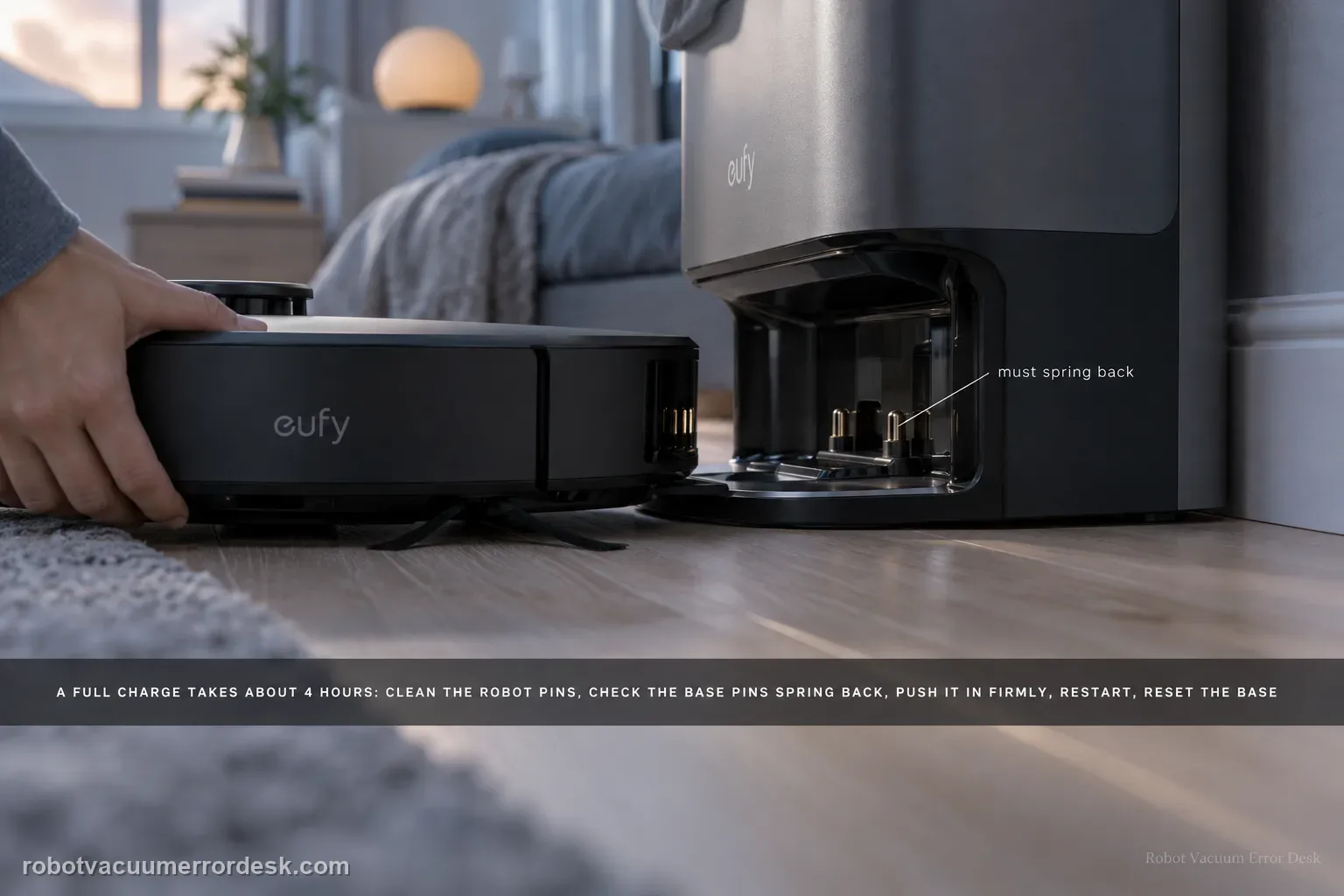
eufy says a normal Omni S2 full charge takes about 4 hours. If the battery does not rise or charging is much slower, clean the robot charging pins, make sure the base pins move and spring back, push the robot fully into the base for firm alignment, restart the robot for 3 seconds, then unplug the base for 30 seconds. If a unit used for more than about a year still charges poorly after those checks, battery aging becomes a documented possibility.
Does battery percentage rise during a firmly seated timed dock test?
Confirm the exact model and exact code, light pattern or symptom.
Run the lowest-risk physical or software check first.
Use each pass condition to decide what the result actually narrows down.
Is this the problem you’re seeing?
- The S2 sits in the base but battery percentage does not increase normally.
- Charging takes far longer than the documented roughly four-hour full-charge baseline.
- The robot shuts down or fails to acknowledge charging when placed in the station.
Likely root causes, ranked
Dust, oxidation or physical damage on the robot charging pins
Base-station pins are dirty, stuck or no longer spring back freely
Robot is not seated deeply enough for firm pin-to-pin contact
A temporary robot or base-station power state is blocking charge detection
Battery aging is reducing charging/battery performance on an older unit
What the result narrows down
| What you observe | What it narrows down | Next move |
|---|---|---|
| Battery does not rise and robot is not firmly seated | Mechanical contact is not yet proven. | Push the robot fully into the base and verify robot/base pins align before judging battery behavior. |
| Robot charging pins are dirty, rusty or blackened | The contact surface itself is abnormal. | Clean with a dry cloth; photograph corrosion/blackening that cannot be removed and escalate. |
| Base pins do not spring back freely | The station contact mechanism may not maintain electrical pressure. | Stop forcing the pin and contact eufy after documenting the stuck contact. |
| Charge level rises normally but slowly toward a full cycle | The observed duration may still be within the model’s normal charging window. | Compare against eufy’s approximately 4-hour full-charge reference before diagnosing a fault. |
| Correct docking and clean moving contacts still produce no charge | External contact/docking causes have been excluded. | Record battery percentage over time and the contact condition, then escalate rather than opening the battery or base electronics. |
Do not factory-reset by default. Use the exact model’s reboot/network-reset procedure only when the manufacturer path calls for it.
Checks to run, in sequence
Use the four-hour baseline before calling charging “slow”
Start from a known battery percentage and note the time. eufy states that a full Omni S2 charge takes approximately four hours under normal conditions. A short observation window is not enough to diagnose slow charging; what matters is whether battery percentage rises and whether the total charge behavior is materially outside that baseline.
Clean and inspect the robot charging pins
Inspect the metal charging pins on the robot and remove dust or debris with a dry, non-abrasive cloth. If they are rusty, blackened or cannot be cleaned back to a normal surface, photograph them rather than sanding or scraping plating away; eufy asks owners to send clear photos when pin condition looks abnormal.
Press-test and clean the base-station pins
Gently press the metal pins in the base. eufy says they should move freely and spring back normally. Clean dirt or oxidation while checking that motion. A pin that sticks down can create an intermittent or one-sided electrical contact even when the robot appears to be parked correctly.
Prove firm docking contact, then restart the robot
Push the S2 fully into the base so robot and station pins align and contact firmly. Then hold the robot power button for 3 seconds to restart it, as eufy recommends for temporary charging-detection/software states. Watch whether the robot now acknowledges charging and whether percentage begins to rise.
Power-cycle the base and evaluate battery age only after contact checks
If charging is still abnormal, unplug the base from the wall for 30 seconds and reconnect it to reset the station power path. If a well-used S2 older than roughly one year still has poor battery/charging behavior after clean spring-loaded contacts, firm docking, robot restart and base reset, eufy notes battery aging may require battery replacement.
Measure charging progress instead of relying on a single glance
Start with a known battery percentage, dock the robot correctly and note the time. Recheck after a meaningful interval without repeatedly waking or moving the S2. eufy states that a full charge is approximately four hours under normal conditions, so a robot that is steadily gaining charge is different from one that remains flat. This simple record also makes “slow” objective when you contact support.
Inspect both sides of the contact pair before blaming the battery
A clean robot pin cannot charge through a base pin that is dirty, oxidized or mechanically stuck. Likewise, healthy base contacts cannot compensate for badly blackened robot pins. Check both surfaces, verify the base pins move and spring back, and confirm the robot sits fully against them. Stop at external contacts; do not open the battery pack or powered base to chase a current path.
Escalate after firm docking, clean robot contacts, freely springing clean base contacts, the 3-second robot restart, the 30-second base reset and a timed battery reading still show no meaningful charge progress. Send photos of blackened/rusted pins, starting/ending battery percentages, approximate unit age, Device Information and the steps already tried. Do not open the battery pack or powered station to chase an internal charging fault.
Information to have ready for support
Support can skip the basic troubleshooting script when you provide a reproducible case. That keeps the results of your checks from getting lost.
- Exact model name and the error code / voice prompt exactly as shown
- A photo or screenshot of the app error and the time it occurred
- A short list of the checks already completed and what happened after each one
- Device information / activity-log details from eufy Clean when the issue is mapping or routing related
Source and evidence level
eufy Omni S2 — Cannot Charge or Charges Slowly
eufy’s exact S2 charging article gives an approximately four-hour full-charge reference, robot-pin cleaning, a spring-back check for the base pins, firm docking/alignment, a 3-second robot restart, a 30-second base power reset and a battery-aging notice for units used more than about one year. The S2 user guide/model desk and support-information checklist provide companion hardware and escalation context.
Additional official source: eufy — Omni S2 User Guide (T2081) ↗Additional official source: eufy — Omni S2 model support desk ↗Additional official source: eufy — What support needs for S2 technical issues ↗Last editorial review: September 5, 2026Regional note: manufacturer help centers, model suffixes, mains-power requirements and warranty procedures can differ by country. If the source redirects to a local support site, confirm that the model/hardware scope still matches before following a region-sensitive step.
This guide is rated Official model support. See what each evidence label means →
Common questions
How long should the eufy Omni S2 take to charge fully?
eufy’s S2 charging article says a full charge takes approximately four hours under normal conditions. Use that as a reference, not an exact timer for every starting percentage or environment. More important is whether battery percentage rises steadily while the robot is correctly docked. A battery that remains flat after good contact is a different symptom from one that is progressing toward full charge.
Why does my Omni S2 look docked but still not charge?
Physical docking does not guarantee the metal contacts are actually aligned. eufy instructs owners to push the robot fully into the base, clean the robot pins, and make sure the base pins move freely and spring back. Check both sides of the contact pair. If the robot is seated but percentage does not rise, record that result before assuming the battery itself has failed.
What should I do if the Omni S2 charging pins look black or rusty?
eufy says to inspect for blackening, rust or contamination. Wipe dirt gently with a dry cloth, but do not aggressively abrade plated contacts. If discoloration/corrosion cannot be cleaned effectively, take clear photos and contact support. Persistent damaged contacts are useful service evidence and should not be hidden by repeated scraping or chemical cleaning that the manufacturer does not instruct.
How can I tell whether the Omni S2 base charging pins are stuck?
With the station safe and accessible, gently press the metal charging pins as eufy instructs and confirm that they move freely and spring back. A pin that remains depressed or binds can prevent consistent contact even when the robot appears docked. Do not pry or lubricate the mechanism. Photograph the abnormal pin and contact eufy if it does not move normally.
When should I contact eufy for an Omni S2 charging problem?
Escalate when both robot and base contacts are clean, the base pins spring normally, the robot is fully aligned, and battery percentage still does not increase or charging repeatedly breaks. Include timed battery readings plus photos of the contacts. If pins are rusty/blackened and cannot be cleaned, send those images immediately rather than opening the battery or base electronics.
Did this diagnostic narrow the fault?
Use this as an editorial signal, not a popularity counter. If a feedback address is configured you can email the note; otherwise you can copy it for your own support record.