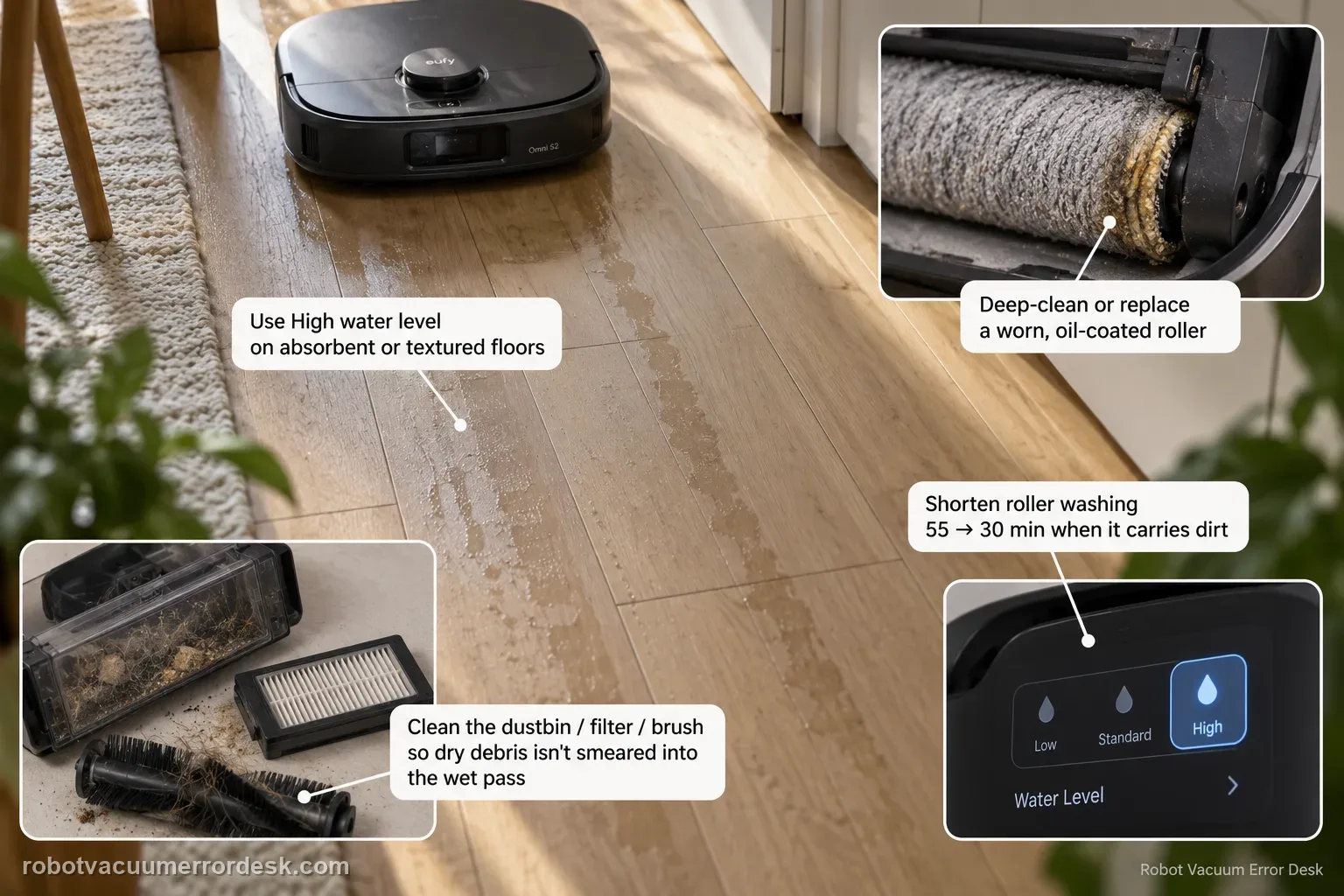
Visible streaks or water marks are a finish-quality problem, not the same intent as 'mop never activates' or 'missed areas.' eufy's S2 support starts with water delivery and roller cleanliness: use High water level when low/medium dries too quickly on absorbent or textured flooring, shorten roller washing when the roller carries dirt (eufy's example is 55 → 30 minutes), clean the dustbin/filter/brush path so dry debris is not smeared into the wet pass, and deep-clean or replace a worn, oil-coated or sticky roller mop.
What changes the streak pattern: water level, wash frequency, or roller condition?
Confirm the exact model and exact code, light pattern or symptom.
Run the lowest-risk physical or software check first.
Use each pass condition to decide what the result actually narrows down.
Does this match your problem?
- The S2 completes mopping but leaves visible lines, streaks or uneven water marks behind.
- The affected floor was actually covered by the robot, so this is not a missed-area/navigation complaint.
- The mop is active, unlike the separate Vacuum & Mop mode problem where mopping never starts.
Most likely causes
Low/medium water setting dries too quickly on the affected material
Roller wash interval is too long for the debris load
Dustbin/filter/main/side-brush maintenance is poor and dry debris reaches the wet roller
Roller mop is worn, smaller than normal, oil-coated or contaminated with sticky residue
Floor material absorbs/spreads water differently and needs a controlled setting comparison
What your test result means
| What you observe | What it narrows down | Next move |
|---|---|---|
| Mopping occurs but marks improve on High water level | The prior low/medium setting was not keeping the roller uniformly wet on that surface. | Use the improved water setting for the material and retune if excess moisture appears. |
| Marks build gradually late in a long run | Roller contamination between washes is a strong lead. | Shorten the roller-wash interval; eufy gives 55 → 30 minutes as an example. |
| Dry debris is visible before the wet pass | Weak dust collection is feeding dirt into the roller and smearing it. | Clean dustbin, HEPA filter, main brush and side brushes before adding more water. |
| Roller looks smaller, worn, oily or sticky | The consumable surface cannot absorb/distribute water evenly. | Deep-clean oily/sticky residue or replace a worn roller mop. |
| Same floor still streaks with clean dry path, clean roller and controlled settings | Simple water/maintenance causes are no longer explaining the finish. | Document floor material, water level, wash interval and photos for eufy rather than treating it as a leak without pooling. |
Do not factory-reset by default. Use the exact model’s reboot/network-reset procedure only when the manufacturer path calls for it.
Run these checks in order
Confirm this is streaking, not missed coverage or inactive mopping
Use one small hard-floor zone and confirm the roller mop is active and the robot actually traverses the marked area. If the robot never enters the area, move to the missed-areas path. If it remains vacuum-only, use the Vacuum & Mop activation path. Continue here only when mopping occurs but leaves an uneven finish.
Run one High-water-level comparison
eufy says low or medium water can be absorbed too quickly on rough, textured or more absorbent floors, leaving the roller without enough moisture for even distribution. Set water level to High for a small controlled test rather than changing multiple cleaning settings at once.
Shorten the roller-wash interval
A dirty roller can redistribute dust and residue. eufy's support gives a concrete example: shorten roller washing from every 55 minutes to every 30 minutes when buildup is producing uneven results. Use the shorter interval for a comparable test area so you can judge whether roller cleanliness is the discriminator.
Clean the dry collection path before blaming water delivery
Clean or service the dustbin, HEPA filter, main brush and side brushes according to the normal maintenance path. eufy explains that reduced dry pickup lets debris reach the roller mop, where it can create streaks. Re-test after the dry path is clean rather than increasing water repeatedly over a dirty roller.
Inspect, deep-clean or replace the roller mop
Remove the roller mop and inspect its size, surface and contamination. eufy identifies the roller as a consumable: replace it when worn/noticeably smaller, and deep-clean it when oil or sticky residue is coating the material. After reinstalling, compare the same small zone using the settings that gave the best prior result.
Use a small A/B floor test instead of changing every setting at once
Mark two similar sections of the same floor. Clean the first with the current water level and the second with High water while keeping route, roller and other settings constant. Then compare the dried finish under similar light. If High water reduces lines, you have a water-distribution clue. If both streak equally, move to roller wash frequency and contamination rather than adding still more variables.
Inspect what the roller is carrying, not just how wet the floor looks
After a streaking pass, look at the roller surface for embedded dust, oily film, sticky residue or obvious wear/shrinkage. eufy links roller contamination and service life directly to uneven finish. Also clean the dry collection path so new debris is not immediately transferred into a freshly cleaned roller. This explains why some streaks persist even when water delivery itself is adequate.
Escalate repeatable streaks after a High-water comparison, shorter roller-wash interval, clean dustbin/HEPA/main/side-brush path and a clean/serviceable roller mop fail to improve the same floor. Send floor material, water setting, wash interval, before/after photos, Device Information and steps tried. Switch fault paths if the roller never activates, the robot never reaches the area or water is leaking/pooling abnormally.
What to collect before contacting support
Give support a reproducible case instead of “it doesn’t work.” That reduces repeated basic troubleshooting and preserves the clues from your tests.
- Exact model name and the error code / voice prompt exactly as shown
- A photo or screenshot of the app error and the time it occurred
- A short list of the checks already completed and what happened after each one
- Device information / activity-log details from eufy Clean when the issue is mapping or routing related
Manufacturer evidence
eufy Omni S2 — Streaks or Water Marks During Mopping
eufy’s exact S2 streak/water-mark article recommends High water for uneven moisture, shortening roller-wash frequency (example 55 to 30 minutes), maintaining the dustbin/HEPA/main/side-brush path, and deep-cleaning or replacing a worn, smaller, oily or sticky roller mop. The S2 manual/model page provide companion maintenance context. This guide keeps finish-quality streaking separate from inactive mopping, missed coverage and true leaks.
Additional official source: eufy — Omni S2 User Guide (T2081) ↗Additional official source: eufy — Omni S2 model support desk ↗Additional official source: eufy — What support needs for S2 technical issues ↗Last editorial review: September 5, 2026Regional note: manufacturer help centers, model suffixes, mains-power requirements and warranty procedures can differ by country. If the source redirects to a local support site, confirm that the model/hardware scope still matches before following a region-sensitive step.
This guide is rated Official model support. See what each evidence label means →
FAQ
Why does my eufy Omni S2 leave streaks even though the mop is wet?
A wet roller can still distribute moisture unevenly. eufy recommends a High water-level comparison on absorbent or textured surfaces, then increasing roller-wash frequency if dirt accumulates. Also clean the dustbin/filter/brush path so dry debris is not smeared into the wet pass. Finally inspect the roller for wear, oil or sticky contamination rather than assuming every streak is a water-delivery failure.
Should I set the Omni S2 water level to High for streaks?
eufy specifically suggests High water when low or medium moisture is absorbed too quickly and leaves uneven distribution. Use it as a controlled A/B test on a small floor area. If High improves the finish, tune from there for your material. If streaks remain unchanged, move to roller-wash interval, dry-debris maintenance and roller condition instead of repeatedly increasing moisture.
How often should the Omni S2 wash the roller if it leaves marks?
eufy gives an example of shortening the roller wash interval from 55 minutes to 30 minutes when a dirty roller is causing uneven mopping. That is an example rather than a universal fixed schedule. Use the shorter interval as a comparison and inspect the roller after the run; heavy soil may require more frequent washing than a lightly used clean floor.
Can a dirty dustbin or HEPA filter cause Omni S2 mop streaks?
Indirectly, yes. eufy explains that poor dry collection can leave debris for the roller mop to pick up and smear, creating lines even when water delivery is normal. Clean the dustbin, HEPA filter, main brush and side brushes, then retest with a clean roller. This is why adding more water alone can fail to fix streaks caused by upstream debris.
When should I contact eufy about persistent Omni S2 water marks?
Escalate when the same floor still streaks after a High-water comparison, a shorter wash interval, clean dry-collection components and a clean/serviceable roller mop. Send before/after photos, floor type, water setting, wash interval and roller condition. Do not describe ordinary streaks as a leak unless water is actually escaping or pooling outside the normal mopping path.
Did this diagnostic narrow the fault?
Use this as an editorial signal, not a popularity counter. If a feedback address is configured you can email the note; otherwise you can copy it for your own support record.