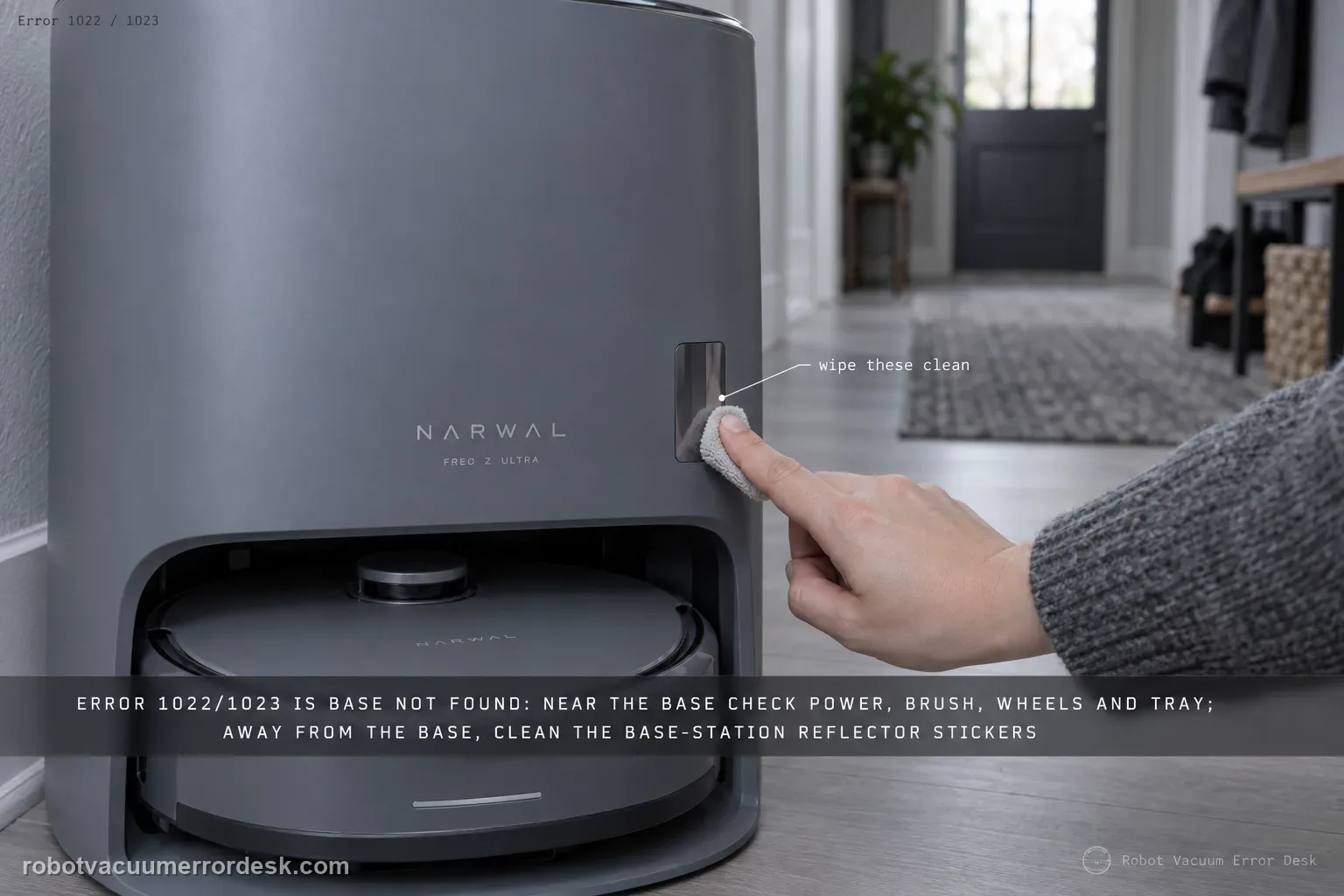
Errors 1022 and 1023 are Narwal’s Base Station Not Found path. The official branch changes depending on where the robot is when the error occurs. Near or on the base, Narwal says to verify base power, check installation/condition of the roller-brush assembly, rear drive wheels and caster, cleaning pad/tray or ramp components, and remap if the base was moved. When the error occurs away from the station, Narwal specifically points to cleaning the base-station reflector stickers. That location split is the key discriminator: do not immediately delete the map when the robot is physically at the dock with a power or seating problem, and do not replace a charging part when the robot simply cannot find the mapped station from a room. If the controlled checks fail, support wants the serial number, occurrence time and video.
Confirm the exact model and exact code, light pattern or symptom.
Run the lowest-risk physical or software check first.
Use each pass condition to decide what the result actually narrows down.
Does this match your problem?
- Freo Z Ultra reports Error 1022 or Error 1023 and cannot locate or complete return to the base station.
- The error happens while the robot is already near/on the base and you need to separate power/seating from mapping.
- The robot fails from another room and searches for the base even though the station has power.
- The base station was recently moved and docking/location errors began afterward.
- You need to know what evidence Narwal requests before support escalation for repeated Base Station Not Found errors.
Most likely causes
Base station is not powered reliably or the cable/outlet connection is incomplete.
Roller-brush cover, wheels, caster, cleaning tray/ramp or other docking-contact geometry prevents normal seating/return.
Dirt or oil on drive/caster wheels reduces traction during the final approach.
Base reflector stickers or relevant external guidance surfaces are dirty when the robot is trying to find the station from a distance.
The base was moved after mapping, so its physical location no longer agrees with the saved map.
A persistent robot/base localization or connection fault remains after power, physical fit, reflectors and map reference are verified.
What your test result means
| What you observe | What it narrows down | Next move |
|---|---|---|
| 1022/1023 appears while robot is near/on the base | Narwal prioritizes base power and physical installation/traction checks. | Verify power, brush cover, wheels/caster and cleaning tray/ramp before remapping. |
| 1022/1023 appears while robot is far from the base | The long-range find/reflector path is more relevant. | Clean the base-station reflector stickers and retry from a known mapped location. |
| Base was moved shortly before the error began | The map-to-base reference is likely stale. | Return the base to the old mapped location or remap from its final new position. |
| Robot reaches base but slips or cannot seat | This is final-approach geometry/traction, not just “cannot find dock.” | Clean wheels/contacts and verify tray, ramp and brush-cover installation. |
| Same error survives all location-specific checks | Owner-level causes are exhausted. | Send SN, occurrence time, screenshots/video and exact near/far failure state to Narwal. |
Do not factory-reset by default. Use the exact model’s reboot/network-reset procedure only when the manufacturer path calls for it.
Run these checks in order
Classify where the error occurs
Do not start by remapping. Note whether Error 1022/1023 appears while the Freo Z Ultra is already near/on the base, during the final approach, or while searching from another room. Narwal’s own resolution splits on this location. Capture the app message and a short video if possible. Also note whether the base was moved recently. This first classification prevents mixing long-range base finding with a final docking/physical-fit problem.
Verify the base station has stable power
For a near-base error, confirm the station is powered, the cable is fully inserted and the outlet works. If the display/indicator is dead, follow the base-station power path before touching the robot map. Narwal’s base troubleshooting also recommends a power restart when connection state is abnormal. A robot cannot find or reconnect to a station that is intermittently unpowered, even if the saved dock icon is perfectly located on the map.
Check the parts that affect final approach and seating
Narwal’s 1022/1023 guidance calls out the roller-brush assembly, rear drive wheels, caster, cleaning pad/tray and ramp-related components. Verify removable pieces are installed flush and there are no large gaps, loose covers or debris that changes ride height. Wipe oil/dirt from the wheel surfaces and make sure the caster can move freely. Do not disassemble the drive-wheel modules; the goal is to restore normal geometry and traction.
Clean the station reflectors when the failure starts away from base
If the robot is in another room when it reports Base Station Not Found, Narwal specifically says to clean the base-station reflector stickers. Use a soft cloth and avoid abrasive cleaners or covering films. Keep the front approach area open so the robot receives an unobstructed reference. This step is more targeted than wiping every sensor on the robot because the official away-from-base branch names the station reflectors directly.
Check whether the base moved after mapping
Compare the current physical base location with the saved map. Narwal says remapping is required after significant base-station movement; the general mapping guidance also warns not to move the base once a map is created. If the move was accidental, returning the station to its original mapped location is the least destructive test. If the move is permanent, create a new map with the station at its final location.
Run a controlled return from one mapped room
Place/start the robot from a normal mapped position and command a return to base. Watch the behavior from search to final seating. If it finds the station but slips at the ramp, revisit traction/geometry; if it circles far away, the map/reflector reference is more relevant. Do not carry the robot directly onto the contacts for this test because that bypasses the behavior you are trying to verify.
Prepare the support packet if 1022/1023 returns
Narwal asks for the robot serial number, error occurrence time and a video when the Base Station Not Found path persists. Add the app screenshot, whether the error occurred near or far from base, whether the base was moved, and which physical checks passed. If charging begins when the robot is manually seated but autonomous return still fails, say so; that distinction tells support the electrical contact path works while navigation/docking remains unresolved.
Escalate repeated Error 1022/1023 after stable base power, correct tray/brush/wheel geometry, clean station reflectors and a verified map/base location. Send Narwal the serial number, exact time, screenshot and a 20–30 second video showing whether the robot is far from the base, finds it but slips, or reaches it and cannot seat. Avoid repeated factory resets; they erase the mapped reference that helps distinguish navigation from physical docking.
What to collect before contacting support
Give support a reproducible case instead of “it doesn’t work.” That reduces repeated basic troubleshooting and preserves the clues from your tests.
- Exact model name and the error code / voice prompt exactly as shown
- A photo or screenshot of the app error and the time it occurred
- A short list of the checks already completed and what happened after each one
- Map screenshots and robot location when the problem involves localization, zones or docking
Manufacturer evidence
Narwal Error Code Index
Narwal’s 1022/1023 entry provides the essential near/on-base versus away-from-base decision branch and requested escalation evidence. The dedicated return-to-base and base-station guides reinforce contact, wheel, tray, reflector and remapping checks without inventing a hardware replacement path.
Additional official source: Narwal Return-to-Base Troubleshooting ↗Additional official source: Narwal Base Station Troubleshooting ↗Last editorial review: September 5, 2026Regional note: manufacturer help centers, model suffixes, mains-power requirements and warranty procedures can differ by country. If the source redirects to a local support site, confirm that the model/hardware scope still matches before following a region-sensitive step.
This guide is rated Official series support. See what each evidence label means →
FAQ
What is Narwal Error 1022 or 1023?
Narwal labels Errors 1022 and 1023 as Base Station Not Found. The recommended checks depend on where the robot is: near/on the base, verify station power and the parts that affect docking; away from the base, clean the station reflector stickers. If the base was moved after mapping, Narwal says remapping may be required.
Why does my Freo Z Ultra find the base but fail the last few centimeters?
That pattern is different from failing to locate the base from another room. Check wheel/caster cleanliness and traction, verify the roller-brush cover, cleaning tray and ramp are correctly seated, and keep the final approach open. If the robot reaches the station but slips, document that final-approach behavior rather than treating the whole problem as a bad map.
Should I remap for Error 1022/1023 if I never moved the base?
Not automatically. Narwal’s error path first separates base power, physical installation/traction and reflector conditions from map-reference problems. Remapping is specifically relevant when the station was relocated or the map no longer matches reality. If the base never moved and the robot is already near it when the error occurs, diagnose power and final docking geometry before deleting a good map.
What are the reflector stickers mentioned in the Narwal dock error guide?
Narwal’s 1022/1023 instructions refer to the base-station reflector stickers as an away-from-base check. Keep those external guidance surfaces clean and unobstructed with a soft cloth. Do not scrape, polish aggressively or cover them. If cleaning them changes nothing, preserve the robot’s search path on video so support can see how far it gets before the error appears.
What should I send Narwal if Error 1022/1023 keeps returning?
Narwal asks for the robot serial number, the time the error occurred and a video. Add the app screenshot, whether the failure began near or far from the base, whether the base was moved, and whether manual seating starts charging. Those details quickly separate station power/contact, final approach and map/localization branches and reduce the need to repeat destructive reset steps.
Did this diagnostic narrow the fault?
Use this as an editorial signal, not a popularity counter. If a feedback address is configured you can email the note; otherwise you can copy it for your own support record.