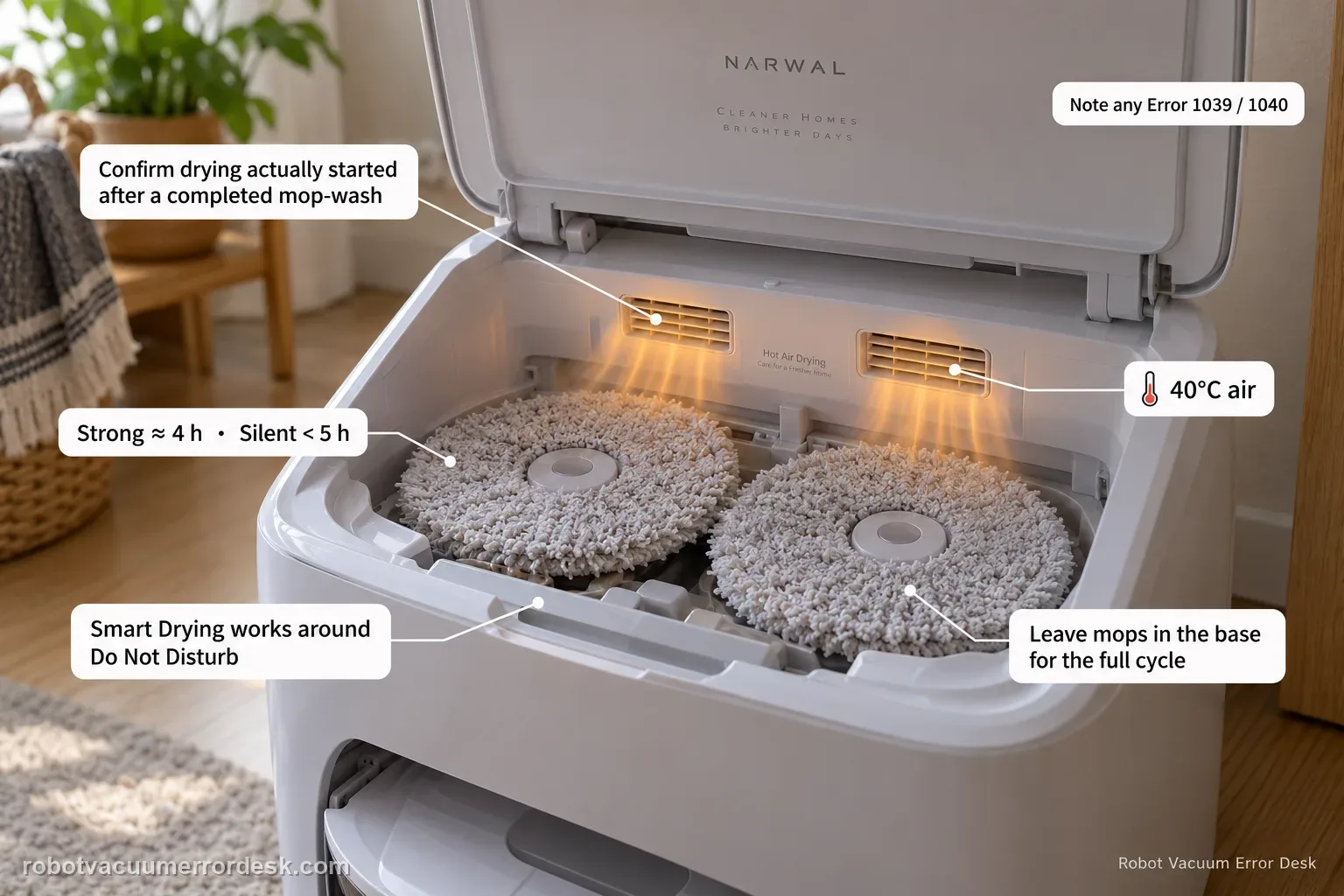
Freo Z Ultra normally dries its mop pads with 40°C air after mop washing, and Narwal documents Strong, Silent and Smart drying behavior. Strong Drying is designed around roughly four hours, while Silent Drying can take under five hours; Smart Drying can choose behavior around Do Not Disturb. Before diagnosing a failed heater or fan, confirm drying actually started after a completed mop-wash cycle or from the Washing & Drying control, then leave the robot/mops in the base for the full selected mode. Removing the robot or mopping module early can end the drying process. If the app reports Error 1039 or 1040, Narwal labels those as mopping-pad drying interrupted and directs owners to contact support with video. That exact error path should not be diluted into endless DIY cleaning when the normal start conditions are already met.
Confirm the exact model and exact code, light pattern or symptom.
Run the lowest-risk physical or software check first.
Use each pass condition to decide what the result actually narrows down.
Does this match your problem?
- Freo Z Ultra mop pads remain wet long after cleaning and you are unsure whether drying actually started.
- The base appears quiet during Smart/Silent drying or Do Not Disturb and you suspect the fan/heater stopped.
- Drying ends early after the robot or mopping module is removed from the base.
- The app reports Error 1039 or 1040 for mopping pad drying interrupted.
- You want to separate humidity/normal mode duration from a true base-station drying failure.
Most likely causes
Drying never started because mop washing did not finish or Washing & Drying was not actually activated.
Silent or Smart mode is being judged against the faster Strong Drying expectation, especially during Do Not Disturb hours.
The robot or mopping module was removed from the base before drying completed, ending the cycle early.
High room humidity leaves pads feeling damp even after a completed cycle.
An Error 1039/1040 interrupted state is present and Narwal wants video rather than internal owner repair.
A persistent base-station fan/heating/control fault remains after a full uninterrupted manual drying cycle.
What your test result means
| What you observe | What it narrows down | Next move |
|---|---|---|
| Strong mode runs and pads dry in the expected multi-hour window | Core drying function is operating. | Treat earlier wetness as timing/mode expectation, not hardware failure. |
| Smart/Silent mode is active during DND | Longer/quieter behavior can be intentional. | Compare with one manual Strong Drying cycle outside DND. |
| Drying stops when robot/mop module is removed | The cycle is being interrupted by handling. | Leave the robot and mops seated until the selected cycle completes. |
| Error 1039 or 1040 appears | Narwal classifies this as mopping-pad drying interrupted. | Record video and escalate instead of opening the base. |
| Full manual Strong cycle completes but pads stay very wet with no expected airflow/warmth | Normal duration and handling causes are less likely. | Capture start/end state, mode and room humidity and contact Narwal. |
Do not factory-reset by default. Use the exact model’s reboot/network-reset procedure only when the manufacturer path calls for it.
Run these checks in order
Confirm whether drying actually started
After the final mopping run, the Freo Z Ultra should return for mop washing and then drying. Narwal also says Washing & Drying can be started manually from the app/base control. Watch the app or base-station state long enough to confirm the cycle entered drying rather than merely finishing wash. If wash itself failed, solve that wet-system problem first; a dryer cannot dry pads that never reached the expected post-wash state.
Record Strong, Silent or Smart mode and DND state
Narwal documents two direct modes plus Smart Drying. Strong Drying is the faster option at about four hours; Silent can take under five hours, and Smart can use Strong for normal periods and Silent during Do Not Disturb. If the complaint is “it takes too long,” note the selected mode and DND schedule before touching the station. Quiet behavior during Silent mode is not itself proof that the fan failed.
Keep the robot and mopping module in place
Do not pull the robot out or remove the mopping module while testing. Narwal’s operating guidance ties drying to the robot’s post-wash docked state, and removing it can end the process early. Start a clean manual drying cycle and leave the hardware undisturbed. This is an important discriminator because an interrupted owner-handling cycle can leave the pads wet without any base-station fault.
Run one manual Strong Drying comparison
Outside Do Not Disturb, select or start the stronger/faster drying path and note the start time. Do not repeatedly stop and restart it. Check for normal station operation from a safe external position; you do not need to open the base or probe the heater. The point is to compare a known deliberate Strong cycle with the earlier Smart/Silent behavior. A successful Strong cycle shows the basic drying system can operate.
Judge the pads only after the full cycle and consider humidity
Assess both mop pads after the selected cycle finishes, not after 20–30 minutes. Room humidity can change how dry fabric feels at the end, so record whether the environment is unusually humid. A pad that is slightly damp after Silent mode in humid weather is a different case from pads that remain saturated after a full Strong cycle with no sign of drying. Use that distinction before escalating.
Treat Error 1039/1040 as its own branch
If the app reports 1039 or 1040, stop broad troubleshooting. Narwal’s error index labels these codes Mopping Pad Drying Interrupted and tells owners to contact support with a video. Preserve the exact code, what part of the cycle had completed, and whether the interruption happened without moving the robot. Do not open the heater/fan housing or bypass safety controls in an attempt to clear the code.
Verify one stable post-wash drying cycle
After corrections, run a short mopping task or a manual mop wash followed by drying and leave the system alone. A pass means drying starts automatically or manually, remains active for the selected mode and leaves the pads appropriately dry for that mode/environment. If the cycle stops by itself or stays ineffective despite a controlled Strong run, document start/end times and station indicators and escalate.
Contact Narwal if Error 1039/1040 appears, or if a full uninterrupted Strong Drying cycle fails after the robot/mops remain correctly seated and the mode/DND state is confirmed. Send video of the start and interruption, screenshots of the error or drying mode, start/end times, room humidity if unusually high and whether manual Washing & Drying can be started at all. Do not open the powered heater/fan section of the wet base station.
What to collect before contacting support
Give support a reproducible case instead of “it doesn’t work.” That reduces repeated basic troubleshooting and preserves the clues from your tests.
- Exact model name and the error code / voice prompt exactly as shown
- A photo or screenshot of the app error and the time it occurred
- A short list of the checks already completed and what happened after each one
- Robot serial number (SN) and a short video showing the wet-system behavior
Manufacturer evidence
Narwal Freo Z Ultra Product Help
Narwal’s exact-model page documents 40°C drying, Strong/Silent/Smart behavior and expected multi-hour durations. The error-code index separately defines 1039/1040 as Mopping Pad Drying Interrupted and directs owners to provide video to support.
Additional official source: Narwal Error Code Index ↗Additional official source: Narwal Base Station Operations Guide - Freo Z Ultra ↗Last editorial review: September 5, 2026Regional note: manufacturer help centers, model suffixes, mains-power requirements and warranty procedures can differ by country. If the source redirects to a local support site, confirm that the model/hardware scope still matches before following a region-sensitive step.
This guide is rated Official model support. See what each evidence label means →
FAQ
How long should Freo Z Ultra mop drying take?
Narwal says Strong Drying takes about four hours and Silent Drying takes under five hours, while Smart Drying can choose behavior around Do Not Disturb. Judge pad dryness after the selected cycle finishes, not after a short wait. If you need a diagnostic comparison, run one uninterrupted Strong cycle outside DND and record the start/end time before assuming the dryer failed.
Why are my Freo Z Ultra mops still wet in Smart Drying?
Smart Drying can change behavior based on normal versus Do Not Disturb periods, and Silent mode is designed to be quieter and can run longer. First confirm which mode actually ran and whether the robot/mopping module stayed seated for the full cycle. High room humidity can also affect final feel. Compare with a controlled Strong Drying cycle before escalating.
What do Narwal Errors 1039 and 1040 mean?
Narwal labels 1039 and 1040 as Mopping Pad Drying Interrupted. The official error index does not give an internal DIY repair; it tells owners to contact support and provide a video demonstrating the issue. Preserve the exact code, drying mode and whether the robot was moved before the interruption, then avoid opening the heater or fan housing.
Can removing the robot from the base stop mop drying?
Yes. The drying process is tied to the docked post-wash state, and removing the robot or mopping module can end the cycle early. For diagnosis, start a manual Washing & Drying/Strong Drying run and leave the robot and mops in place until completion. If the cycle then finishes normally, the earlier wet pads were caused by interruption rather than a failed dryer.
When should I contact Narwal about wet Freo Z Ultra mop pads?
Escalate when a full uninterrupted Strong Drying cycle fails, when drying will not start despite a completed wash/manual command, or immediately for Error 1039/1040 after preserving video. Include mode, DND status, start/end times and room humidity. A slightly damp pad after a quiet cycle in very humid conditions is less conclusive than saturated pads after a controlled Strong cycle.
Did this diagnostic narrow the fault?
Use this as an editorial signal, not a popularity counter. If a feedback address is configured you can email the note; otherwise you can copy it for your own support record.