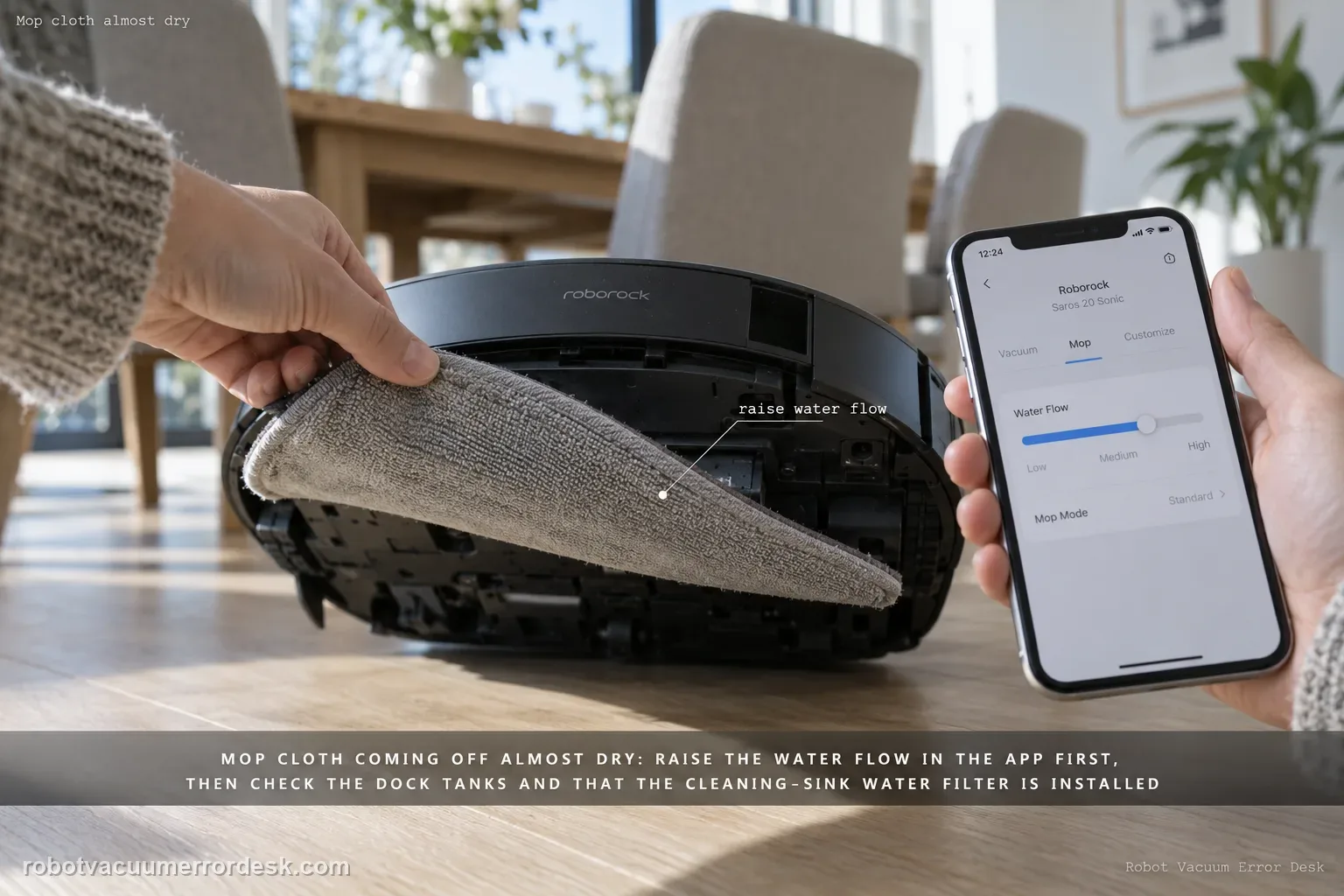
For a Saros 20 Sonic that leaves the mop cloth almost dry, use the current model manual as the owner-safe baseline: its Common Issues table says to increase water flow in the mobile app when there is no or little water during mopping. If that does not change the cloth, verify the dock can support a normal wash/refill cycle—clean-water tank seated and filled, dirty-water tank seated with capacity, and the cleaning-sink water filter installed correctly. Then run one dock-started mopping test without changing several settings at once. Do not open the robot’s internal water path, probe outlets with a needle, or remove an internal tank; those actions are not part of the current Sonic manual’s owner procedure.
Confirm the exact model and exact code, light pattern or symptom.
Run the lowest-risk physical or software check first.
Use each pass condition to decide what the result actually narrows down.
Confirm this is the right issue
- The Saros 20 Sonic mop cloth remains nearly dry during a real mopping run.
- The robot is moving and mopping, but the visible moisture level is much lower than expected.
- A higher app water-flow setting does not clearly change the cloth after a controlled retest.
- You want to separate an app setting from dock water-supply or internal water-path service without opening the robot.
What’s most likely causing this
The app water-flow setting is too low for the floor and current conditions
The dock clean-water tank is empty, poorly seated or unavailable for the normal refill/wash cycle
The dirty-water tank or cleaning-sink water filter is not in a normal service state
The robot did not begin from a valid mapped dock context for the refill/wash behavior being tested
A persistent internal water-delivery fault remains after the documented owner checks
Reading your test result
| What you observe | What it narrows down | Next move |
|---|---|---|
| Mop moisture increases after raising app water flow | The symptom was consistent with a low water-flow setting. | Keep the lowest setting that gives acceptable results for the floor and conditions. |
| Clean-water tank is empty or not seated | The dock cannot provide a normal wet-system context. | Fill with tap water, latch and reinstall the tank, then repeat the dock-started test. |
| Cleaning-sink water filter is dirty or loose | An owner-serviceable dock wet-system condition is unresolved. | Rinse and reinstall the filter until it locks, then retest. |
| Dock wash/refill works but floor mop remains almost dry | The problem is narrowing toward robot-side water delivery rather than dock supply. | Keep the robot closed and escalate with the controlled test result. |
| Almost-dry symptom repeats with higher flow and normal dock state | Documented owner checks no longer explain the failure. | Contact Roborock with the water-flow setting, dock checks and a short video. |
Do not factory-reset by default. Use the exact model’s reboot/network-reset procedure only when the manufacturer path calls for it.
Work through these checks in order
Confirm this is low water during mopping, not a mop-wash failure
Start with the symptom you can observe. This guide is for a mop cloth that stays unusually dry while the robot is actually mopping. If the robot will not wash the mop at the dock at all, use the separate mop-wash guide because the first checks are different. Likewise, a hot-water-wash complaint is about wash temperature, not floor water flow. Keeping those states separate prevents a dock wash setting from being mistaken for an onboard mopping fault.
Increase water flow in the app and change only that variable
The Saros 20 Sonic manual’s direct answer for “No or little water during mopping” is to increase the water flow in the mobile app. Raise the setting by a clear step, save it, and keep the same floor area and cleaning mode for the next comparison. Do not also change mop-wash frequency, route, detergent and suction at the same time; a one-variable test lets you tell whether the water-flow control actually affects the symptom.
Verify the dock clean-water tank is seated and available
If a higher water-flow setting makes no difference, check the dock’s owner-serviceable clean-water supply before suspecting an internal pump. The manual identifies the removable clean-water tank in the dock and instructs owners to fill it with tap water, close and latch the lid, then reinstall it. Use cold water as specified. A tank that is empty or not seated normally can compromise the wash/refill context used by the robot.
Check dirty-water capacity and the cleaning-sink water filter
The manual also treats the dirty-water tank and the cleaning-sink water filter as owner-serviceable dock components. Empty and reseat the dirty-water tank if needed. For the water filter, pull it by its latch, rinse it, wipe the cleaning sink as directed, reinstall the filter and press until it locks with a click. These checks are relevant because a normal wash/refill cycle depends on the dock’s wet-system state, not only the app slider.
Run one complete dock-started mopping proof
Start the robot from its mapped dock and run a short mopping task over a representative hard-floor area. Let it use the normal dock context rather than carrying it into the room. Compare the mop cloth and floor moisture with the earlier low-flow test. If the higher setting and normal dock wet-system state clearly increase moisture, the owner-side issue is resolved. If the cloth remains almost dry, the repeat is now controlled enough to justify support.
Stop before internal water-path work and prepare support evidence
If the mop remains almost dry after the app water-flow setting, dock clean-water tank, dirty-water tank and cleaning-sink filter are all confirmed, do not open the robot or internal water path. The current Sonic manual does not instruct owners to remove an internal robot tank or probe an outlet with a needle. Record the selected water-flow level, whether dock washing/refilling otherwise works, and a short before/after video or photo for Roborock.
Escalate when the Saros 20 Sonic mop remains almost dry after increasing water flow in the app and confirming a normal dock wet-system state: clean-water tank filled and seated, dirty-water tank usable, and cleaning-sink water filter clean and locked. Tell Roborock whether dock mop washing/refilling otherwise works and provide the selected water-flow level plus a short controlled-run video. Do not open the robot, remove an internal water tank, or probe the internal water path.
Before you contact support, gather this
A reproducible case moves a support call past the basic troubleshooting script faster than “it doesn’t work” does, and it keeps the clues from your own tests on record.
- Exact model name and the error code / voice prompt exactly as shown
- A photo or screenshot of the app error and the time it occurred
- A short list of the checks already completed and what happened after each one
- Firmware/app version if the issue began after a software change
Where this comes from
Roborock Saros 20 Sonic — very little water / mop cloth almost dry
The current Saros 20 Sonic manual gives the exact owner instruction for no/little water during mopping: increase water flow in the app. It also documents the dock clean-water tank, dirty-water tank and cleaning-sink water filter as owner-serviceable components. The model troubleshooting page contains older generic tank/outlet language, so this guide uses the current manual to keep the procedure aligned with Sonic hardware.
Additional official source: Roborock Saros 20 Sonic CE EN User Manual — water flow, dock tanks and water-filter maintenance ↗Additional official source: Roborock Saros 20 Sonic official product support hub ↗Last editorial review: September 5, 2026Regional note: manufacturer help centers, model suffixes, mains-power requirements and warranty procedures can differ by country. If the source redirects to a local support site, confirm that the model/hardware scope still matches before following a region-sensitive step.
This guide is rated Official model support. See what each evidence label means →
Questions people ask
What should I change first if my Saros 20 Sonic mop is almost dry?
Use the app water-flow control first. The current Saros 20 Sonic manual says to increase water flow when there is no or little water during mopping. Change only that setting for the first retest so you can see whether it affects mop moisture. If it does, you have solved a setting issue without disturbing the dock or map.
Should I use a needle to clear a Saros 20 Sonic water outlet?
Not as part of this current-model procedure. The present Saros 20 Sonic manual does not instruct owners to probe an internal robot water outlet or remove an internal tank. Use the documented app water-flow control and owner-serviceable dock checks first. If the controlled test still fails, keep the robot closed and send the result to Roborock support.
Which dock parts are relevant when the mop stays too dry?
Check the removable clean-water tank, dirty-water tank and the water filter in the cleaning sink. The manual shows all three as owner-serviceable dock components. Make sure clean water is available, the dirty-water tank has capacity, and the filter is rinsed and locked back into place. These checks support a normal mop-wash and refill cycle.
Why should the retest start from the mapped dock?
Starting from the mapped dock keeps the robot in its normal wash, refill and return context. Carrying it into a room changes the state you are trying to prove and can confuse a water-delivery complaint with a dock-localization issue. A short dock-started mopping run with one known water-flow setting gives cleaner evidence for both you and support.
When is an almost-dry mop likely to need Roborock support?
Contact Roborock when the mop remains almost dry after a higher water-flow setting and normal owner-serviceable dock checks, especially if dock washing/refilling otherwise works. Provide the selected water-flow level, whether clean and dirty tanks are seated, water-filter status, and a short video. Avoid opening the robot or internal water path to chase an unverified blockage.
Did this diagnostic narrow the fault?
Use this as an editorial signal, not a popularity counter. If a feedback address is configured you can email the note; otherwise you can copy it for your own support record.