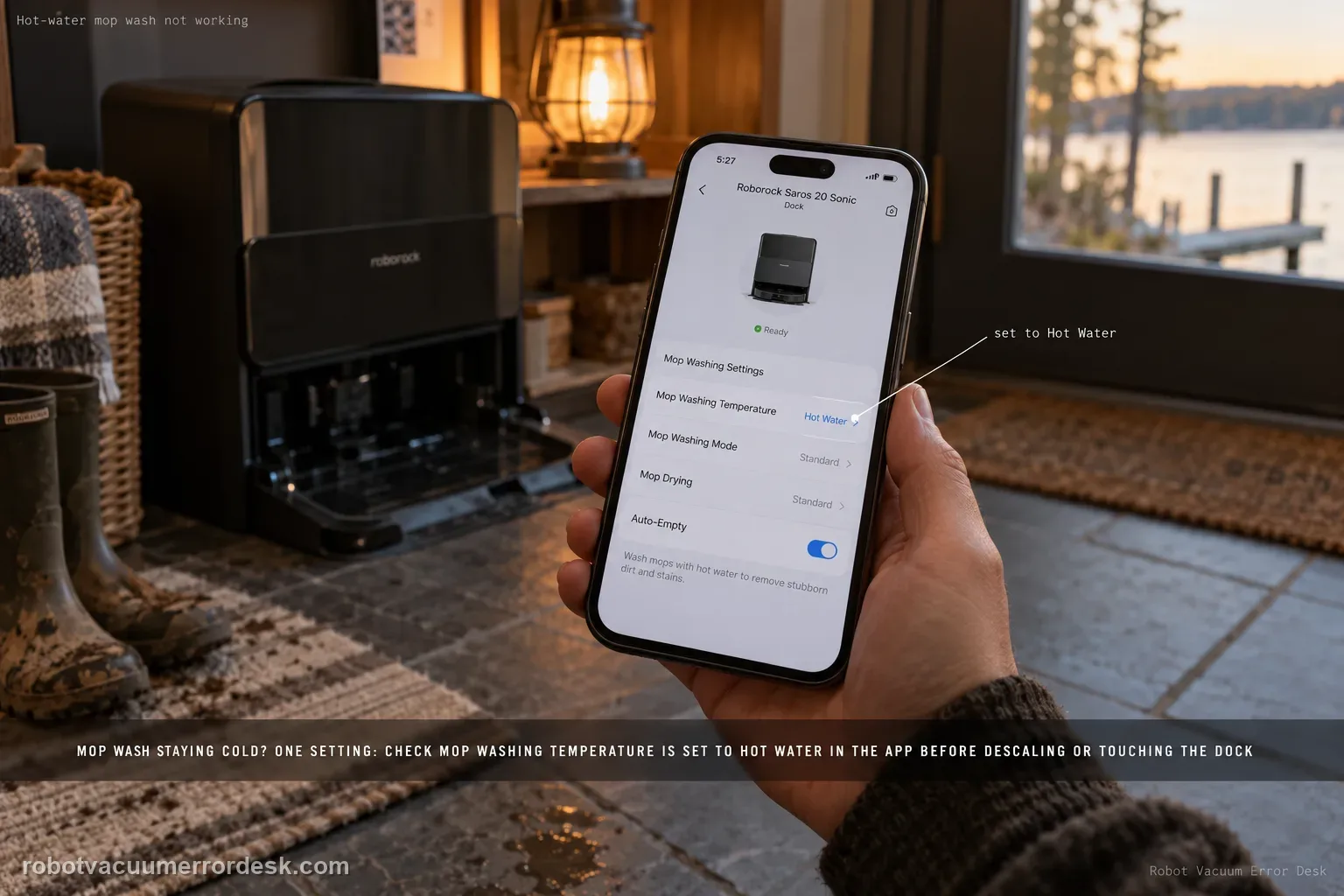
If the Saros 20 Sonic is washing the mop but the hot-water function seems absent, the model manual gives one owner-facing control: check that Mop Washing Temperature is set to Hot Water in the app. That makes this a setting-first diagnosis, not a reason to descale, dismantle the dock or add hotter water manually. Confirm the exact setting, trigger one normal mop-wash cycle, and distinguish 'wash does not run at all' from 'wash runs but hot-water mode appears not to engage.' The manual also marks dock water outlets and drying areas as hot surfaces, so avoid touch-based temperature tests.
Confirm the exact model and exact code, light pattern or symptom.
Run the lowest-risk physical or software check first.
Use each pass condition to decide what the result actually narrows down.
Does this match your problem?
- Mop washing occurs, but you do not see the expected hot-water behavior.
- The app may be set to a non-hot washing temperature.
- You need to separate a missing wash cycle from a temperature-mode complaint.
- The hot-water setting is already selected and the same result repeats on a normal cycle.
Most likely causes
Mop Washing Temperature is not set to Hot Water in the app.
The complaint is actually a broader mop-wash failure, not a temperature-selection issue.
The app setting changed but the next wash has not yet been tested under a controlled condition.
A persistent dock heating/control issue remains after the documented setting check.
What your test result means
| What you observe | What it narrows down | Next move |
|---|---|---|
| Mop washing does not run at all | The failure is broader than hot-water selection. | Use the Saros 20 Sonic mop-wash prerequisite checklist first. |
| Temperature setting is not Hot Water | Configuration explains the missing hot-water mode. | Select Hot Water, save it and run a fresh wash. |
| Hot Water is selected and next wash behaves normally | The issue was configuration-related. | Keep the setting and monitor future wash cycles. |
| Hot Water is selected but wash still seems non-hot | The documented owner control has already passed. | Capture the setting and cycle result for Roborock. |
| User would need to open/touch heated dock parts to continue | Owner-safe troubleshooting has reached its boundary. | Stop and escalate rather than performing internal heat tests. |
Do not factory-reset by default. Use the exact model’s reboot/network-reset procedure only when the manufacturer path calls for it.
Run these checks in order
Confirm the wash cycle itself is working
First verify that the dock can perform a normal mop wash. If the mop will not wash at all, use the separate Saros 20 Sonic mop-wash checklist because clean-water, dirty-water, dock-map and filter conditions are more relevant. A temperature diagnosis only makes sense after the underlying wash function is known to run.
Check Mop Washing Temperature in the app
Open the Saros 20 Sonic dock or mop-wash settings and find Mop Washing Temperature. Roborock’s manual says to set this control to Hot Water when hot-water mop washing is not occurring. Record the current value before changing it so you know whether the symptom was explained by configuration rather than hardware.
Run one fresh automatic wash after saving the setting
Trigger a normal mop-wash sequence under the same conditions, with the robot correctly docked and the water system otherwise operating. Avoid changing multiple dock options at once. The purpose of this run is to test only whether selecting Hot Water changes the behavior. Let the cycle proceed normally without moving the robot or interrupting the station.
Do not use touch as a temperature instrument
The manual carries a hot-surface warning for dock water dispensers and drying air outlets. Keep hands away from those areas during and immediately after operation. Do not pour externally heated water into the system, open the dock or use a hair dryer as a substitute test. The safe owner check is the app setting plus observed normal operation, not direct contact with heated components.
Keep a cold-wash complaint separate from no-wash symptoms
If the dock fails to dispense or wash, switch to the mop-wash troubleshooting path. If washing occurs normally but the Hot Water setting appears ineffective, preserve that exact distinction. This prevents clean-water or dirty-water troubleshooting from masking a possible temperature-control problem and avoids borrowing unsupported descaling procedures from other models or third-party guides.
Escalate a repeated setting-on failure without internal repair
When Hot Water is selected and a normal wash still appears to behave as non-hot, capture the app setting and cycle result for Roborock. The user manual does not provide an owner disassembly or heating-element service procedure for this complaint. Stop at the documented control rather than opening the dock, especially because the water/air outlets are identified as potentially hot surfaces.
Contact Roborock if Mop Washing Temperature is definitely set to Hot Water, normal mop washing otherwise works, and a fresh cycle still does not show the expected hot-water behavior. Send a screenshot of the setting and describe whether washing itself runs normally. Do not touch hot outlets, add externally heated water, descale internal heaters or open the dock unless Roborock provides a model-specific service procedure.
What to collect before contacting support
Give support a reproducible case instead of “it doesn’t work.” That reduces repeated basic troubleshooting and preserves the clues from your tests.
- Exact model name and the error code / voice prompt exactly as shown
- A photo or screenshot of the app error and the time it occurred
- A short list of the checks already completed and what happened after each one
- Firmware/app version if the issue began after a software change
Manufacturer evidence
Roborock Saros 20 Sonic CE EN User Manual — Common Issues
The Saros 20 Sonic manual’s Common Issues table gives a narrow, high-confidence check for hot-water wash: verify Mop Washing Temperature is set to Hot Water. This guide deliberately does not import third-party heating-element or descaling claims because the official owner path does not document them for this exact complaint.
Additional official source: Roborock Saros 20 Sonic official product support hub ↗Last editorial review: September 5, 2026Regional note: manufacturer help centers, model suffixes, mains-power requirements and warranty procedures can differ by country. If the source redirects to a local support site, confirm that the model/hardware scope still matches before following a region-sensitive step.
This guide is rated Official manual. See what each evidence label means →
FAQ
Where is the Saros 20 Sonic hot-water mop-wash setting?
Look in the Roborock app’s mop-wash or dock settings for Mop Washing Temperature. The manual identifies that control by name and says it should be set to Hot Water when the mop is not being washed with hot water. After changing it, run one fresh wash cycle. A saved setting plus a repeatable cycle result is more useful than guessing from the previous wash.
Should I descale the dock if hot-water washing seems cold?
Not from the owner guidance cited for this exact Saros 20 Sonic symptom. The manual’s documented check is the Mop Washing Temperature setting. Start there and prove that normal mop washing works. If Hot Water is selected and the behavior still appears wrong, contact Roborock rather than opening the station or applying a third-party descaling procedure that is not specified for this issue.
Can I touch the water outlet to see if Hot Water mode works?
Do not use direct touch as the test. The Saros 20 Sonic manual marks the clean-water dispensers and drying air outlets as hot surfaces. Keep clear during and shortly after operation. Instead, verify the app setting, run a normal wash and document the observed cycle. If the setting is correct but the expected hot-water function is absent, that is enough to take to support.
What if the mop does not wash at all, not just with hot water?
That is a broader wash problem. The manual gives separate checks for whether the mop was used, whether the robot started from a mapped dock, clean-water supply, dirty-water capacity and the cleaning-sink water filter. Use those first. A hot-water-setting page assumes washing already happens; otherwise you may spend time on temperature when the dock is not reaching the wash stage at all.
When should I contact Roborock about hot-water washing?
Escalate when a normal mop-wash cycle works, Mop Washing Temperature is visibly set to Hot Water, and a fresh controlled cycle still does not behave as expected. Send a screenshot of that setting and note that the underlying wash function works. That evidence keeps the case focused on temperature mode and avoids unsafe touching, internal heater work or unsupported chemical treatment of the dock.
Did this diagnostic narrow the fault?
Use this as an editorial signal, not a popularity counter. If a feedback address is configured you can email the note; otherwise you can copy it for your own support record.