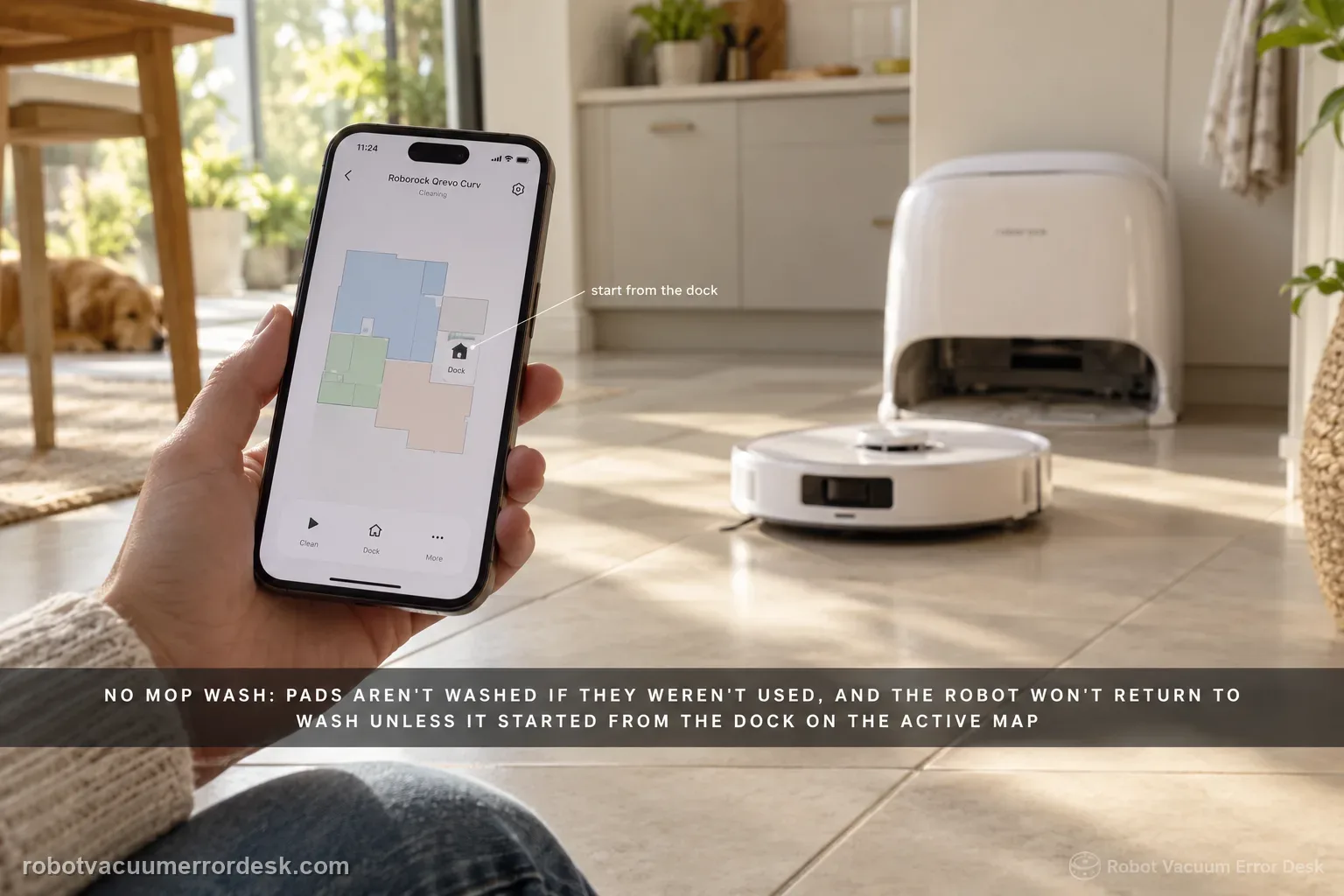
Treat 'no mop wash' as a trigger-and-water-path problem, not as the same issue as weak washing or cold wash water. Roborock's Qrevo Curv manual says mop cloths are not washed if they were not used, and the robot will not return for washing if it did not start from the dock or if the dock is not found on the active app map. For a valid wash trigger, run a small mopping task from the mapped dock and let the robot return naturally. Then check the clean-water tank is filled and seated, the dirty-water tank is emptied and seated, and the cleaning-tray module/filter is correctly installed. Finally start one manual mop-wash cycle. If manual washing works, the dock water system can operate and the remaining problem is the automatic trigger/map state. If manual washing also fails, preserve tank/tray status and any dock error for support instead of deleting the map immediately.
Does the Curv have a valid mop-wash trigger and complete external water/tray state?
Confirm the exact model and exact code, light pattern or symptom.
Run the lowest-risk physical or software check first.
Use each pass condition to decide what the result actually narrows down.
Confirm this is the right issue
- The Qrevo Curv reaches its dock but no mop-washing cycle starts.
- You need to distinguish no wash from reduced washing quality or hot-water temperature.
- The problem may depend on whether the mops were actually used and whether cleaning began from the mapped dock.
- Clean- and dirty-water tank state or cleaning-tray installation may be involved.
- You want one manual-wash test before assuming a pump or heater failure.
What’s most likely causing this
Mop cloths were not used during the preceding task, so no wash is required
Robot did not start the cleaning task from the dock
Dock is missing or displaced on the active app map
Clean-water tank empty, low or not seated correctly
Dirty-water tank full or not seated correctly
Cleaning-tray module or cleaning-tray filter missing/misinstalled
A dock wash-system fault after valid trigger, tank and tray checks
Reading your test result
| What you observe | What it narrows down | Next move |
|---|---|---|
| No wash after a vacuum-only task | The mops were not used, and Roborock says unused mop cloths will not be washed. | Run a small true mopping task before diagnosing the dock. |
| Wash works when task starts from dock but not when robot starts elsewhere | The automatic-return wash trigger depends on dock/map state rather than water hardware alone. | Keep the dock fixed on the active map and start the controlled test from it. |
| Clean-water tank is empty/mis-seated | The dock cannot supply wash water even if the trigger is valid. | Refill and reseat the clean-water tank, then retest once. |
| Dirty-water tank is full/mis-seated or tray/filter is not installed | The dock lacks a valid wastewater/tray state for washing. | Empty/reseat the dirty tank and correctly install the tray module/filter. |
| Manual wash works but automatic wash does not | The wash hardware can operate; trigger/map/task history is the stronger branch. | Recheck mop use, start-from-dock and dock-on-map conditions before escalation. |
Do not factory-reset by default. Use the exact model’s reboot/network-reset procedure only when the manufacturer path calls for it.
Work through these checks in order
Classify no wash separately from weak wash and no hot water
Watch one dock event and name the failure precisely. If the dock actually washes the mop cloths but they remain dirty, use the reduced-wash branch; Roborock points to mop attachment and Deep wash mode for that symptom. If the wash runs but water is not hot, use the separate hot-water setting path. Continue here only when the wash cycle itself does not start. This distinction matters because a pump/heater assumption is premature when the dock has already demonstrated that it can move wash water, and changing wash intensity cannot create a trigger that never existed.
Create a valid mop-use trigger instead of testing after vacuum-only
Roborock explicitly says mop cloths will not be washed if they were not used. Fit the mop cloths correctly and run a small mopping task rather than vacuum-only. Keep the task short enough that you can observe the entire trigger sequence. If no wash followed a vacuum-only run, that result is expected and should not be used as evidence of a failed dock. If washing begins after a genuine mopping task, the station has answered the question without a reset. This simple state check is more informative than repeatedly filling tanks when the dock never had a reason to wash the mops.
Start from the dock and verify the dock exists on the active map
Begin the controlled mopping task with the robot docked, and do not move the station during the run. The Curv manual says that if the robot does not start from the dock or if no dock is found on the app map, it will not return to the dock for mop washing. Check the current map before deleting anything: the dock icon should correspond to the real location. If the robot was carried to another room or the station was moved after mapping, preserve a screenshot, restore a stable dock position and retest. A missing map reference is a trigger problem, not evidence that the water pump has failed.
Check clean-water supply before investigating the wastewater side
Remove the clean-water tank, confirm there is enough clean water for a wash cycle and reseat the tank fully. Inspect only owner-accessible seals and seating surfaces for obvious debris. Do not add unapproved cleaners to make the test more visible. The manual specifically lists clean-water tank placement or refill as a no-wash check, so this is a direct branch rather than generic maintenance. If the tank was empty or not seated and washing resumes after correction, stop there; you have a supported cause. If supply is clearly available, continue to the dirty-water side rather than repeating the same tank step.
Empty and reseat the dirty-water tank
Check the dirty-water tank next. Empty it if full, make sure the lid and tank are correctly assembled, then seat it fully in the dock. Roborock includes dirty-water tank placement or emptying in the exact Curv no-wash table because the station needs a valid path to accept wastewater as well as a source of clean water. Note whether the dock reports a tank-related indication. Do not bypass float or lid mechanisms. If reseating the tank immediately restores washing, the result is useful and specific; if not, move on to the cleaning-tray module/filter instead of assuming an internal pump fault.
Install the cleaning-tray module/filter correctly, then run one manual wash
Remove accessible debris from the cleaning tray and filter, then reinstall the tray module and filter exactly as the manual shows. Roborock lists incorrect installation of these parts as another no-wash cause. With both tanks correct and the robot docked, start a single manual mop-wash cycle from the app. If manual washing starts, the dock can move water and the stronger remaining branch is automatic trigger/map history. If the manual cycle also refuses to start, record any red dock indication, app message and tank/tray state. Avoid repeated wet cycles when water is not moving normally.
Escalate with a trigger-and-water-state record, not a blind map reset
If a true mopping task started from the mapped dock, both tanks are correctly prepared, the cleaning tray/filter is installed and manual washing still will not start, capture the evidence for Roborock. Include whether the dock icon matches the real station, whether the robot returned naturally, tank levels before the test, a photo of the tray/filter installation and any app/dock error. Do not open the hot-water, pump or mains sections of the multifunctional dock. If manual wash works but automatic wash does not, say so clearly; that distinction points support toward trigger/map logic rather than the hydraulic hardware.
Contact Roborock when a real mopping task starts from the mapped, unmoved dock, both water tanks are correctly prepared, the cleaning-tray module/filter is installed, and one manual wash still fails. Send map/dock screenshots, tank state, tray/filter photos and any dock/app error. If manual washing works but automatic washing does not, report that explicitly because it separates trigger/map logic from wash hardware. Do not open the powered pump, heater or mains sections.
Before you contact support, gather this
A reproducible case moves a support call past the basic troubleshooting script faster than “it doesn’t work” does, and it keeps the clues from your own tests on record.
- Exact model name and the error code / voice prompt exactly as shown
- A photo or screenshot of the app error and the time it occurred
- A short list of the checks already completed and what happened after each one
- Firmware/app version if the issue began after a software change
Where this comes from
Roborock Qrevo Curv official manual — mop washing
The official Curv common-issues table states that unused mop cloths will not be washed; a robot that did not start from the dock or cannot find the dock on the map will not return for washing; and clean-water tank, dirty-water tank, cleaning-tray module and filter state must be checked. The manual also documents manual mop washing and a separate hot-water setting.
Additional official source: Roborock — Qrevo Curv Series User Manual (2026) ↗Additional official source: Roborock — Qrevo Curv CE multilingual user manual ↗Additional official source: Roborock — What can the Qrevo Curv Multifunctional dock do? ↗Last editorial review: September 5, 2026Regional note: manufacturer help centers, model suffixes, mains-power requirements and warranty procedures can differ by country. If the source redirects to a local support site, confirm that the model/hardware scope still matches before following a region-sensitive step.
This guide is rated Official manual. See what each evidence label means →
Questions people ask
Why does my Qrevo Curv return to the dock but not wash the mop pads?
First confirm the mops were actually used. Roborock says unused mop cloths will not be washed. The robot also needs the correct dock/map state for automatic return washing, and the clean-water tank, dirty-water tank and cleaning-tray module/filter must be properly prepared. A vacuum-only task or a task started away from the dock can produce a legitimate no-wash result.
Does the Qrevo Curv need to start from the dock for automatic mop washing?
For the automatic return-to-wash path, yes. The Curv manual says that if the robot does not start from the dock, or if no dock is found on the app map, it will not return for mop washing. That is why a controlled diagnostic run should begin at the mapped station and the dock should not be moved during the task.
Is “mop wash not working” the same as “hot water not working”?
No. The manual treats them as separate problems. A no-wash case means the cycle itself does not begin and should be checked through mop use, dock/map state, tanks and tray/filter. If a wash cycle clearly runs but the water is not hot, use the separate Mop Washing with Hot Water setting path instead of diagnosing the basic wash trigger.
What does it mean if manual mop washing works but automatic washing does not?
That is strong evidence that the dock can perform a wash cycle and move water. Focus next on the automatic trigger conditions: were the mops used, did the task start from the dock, is the dock correctly present on the active map, and did the robot return naturally? Preserve the working manual-wash result; it is more useful than immediately deleting the map.
When should I stop troubleshooting the Qrevo Curv mop-wash system myself?
Stop when a genuine mopping task starts from the mapped dock, the clean-water tank is filled and seated, the dirty-water tank is emptied and seated, the cleaning tray/filter is correctly installed, and one manual wash still fails. Send Roborock the map, tank/tray photos and error state. Do not open the dock’s pump, hot-water or mains-powered sections.
Did this diagnostic narrow the fault?
Use this as an editorial signal, not a popularity counter. If a feedback address is configured you can email the note; otherwise you can copy it for your own support record.