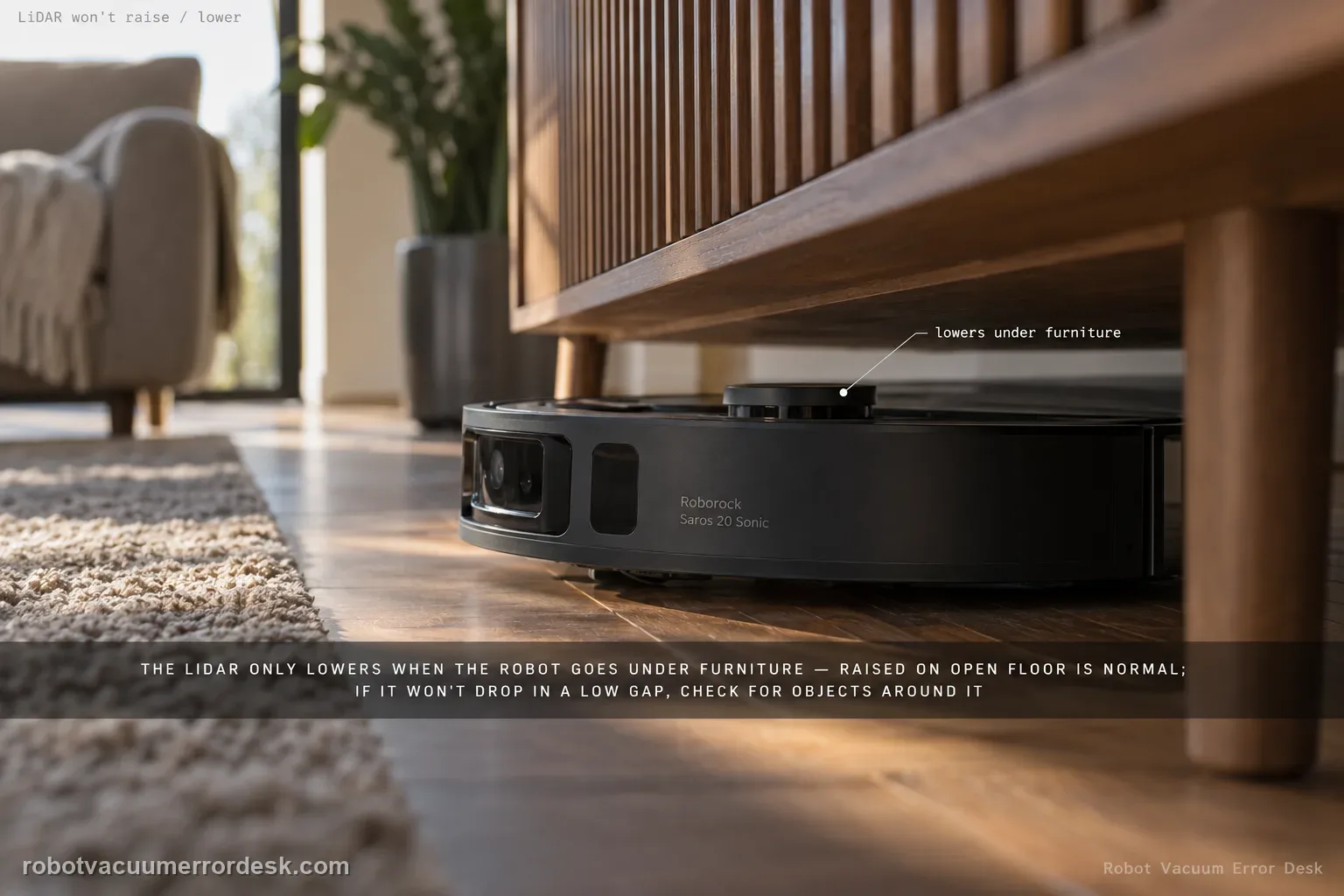
The Saros 20 Sonic’s moving LiDAR should not be judged by whether it raises or lowers continuously. Roborock’s manual says the LiDAR sensor lowers itself only when the robot cleans under furniture or appliances. That means a raised sensor in open floor is normal. If the sensor fails to move when the robot actually enters a low-clearance situation, the owner check is to inspect for objects stuck around the LiDAR sensor. Do not press, pry or force the tower; use a controlled open-floor versus under-furniture comparison to decide whether the behavior is normal context-aware movement or a repeatable mechanism fault.
Confirm the exact model and exact code, light pattern or symptom.
Run the lowest-risk physical or software check first.
Use each pass condition to decide what the result actually narrows down.
Confirm this is the right issue
- The LiDAR tower stays raised while the robot is cleaning open floor.
- The sensor does not lower when the robot attempts to clean under suitable furniture or an appliance.
- Debris may be caught around the moving LiDAR area.
- You need to distinguish normal context-dependent movement from a truly stuck sensor.
What’s most likely causing this
Normal operation is being misread: the LiDAR only lowers under furniture or appliances.
A foreign object is caught around the LiDAR sensor and blocking movement.
The test environment does not actually create a condition where lowering is expected.
A persistent raise/lower mechanism fault remains after the area is clear and a valid low-clearance test repeats.
Reading your test result
| What you observe | What it narrows down | Next move |
|---|---|---|
| LiDAR stays raised on open floor | The manual says lowering is context-dependent, so this can be normal. | Test under safe suitable furniture before diagnosing a fault. |
| Object is visible around the LiDAR perimeter | A physical obstruction may be preventing movement. | Power down, remove accessible debris gently and retest. |
| LiDAR lowers only under furniture | The mechanism is responding in the context described by the manual. | Treat the behavior as normal and avoid forcing it elsewhere. |
| LiDAR never moves in a valid low-clearance test | Normal context and visible obstruction no longer explain the result. | Record the natural movement failure for Roborock. |
| Testing would require pressing or prying the tower | The safe owner boundary has been reached. | Stop the force test and escalate with video evidence instead. |
Do not factory-reset by default. Use the exact model’s reboot/network-reset procedure only when the manufacturer path calls for it.
Work through these checks in order
Establish the open-floor baseline first
Run the robot briefly on open hard floor and observe the LiDAR position without touching it. A raised sensor here is not a failure because the manual says lowering occurs when cleaning under furniture or appliances. This baseline prevents normal high-position operation from being misclassified before you even test the moving function.
Choose a safe, appropriate low-clearance test area
Use furniture or an appliance the robot can normally approach safely and where there is enough room to enter without wedging the chassis. Remove cords and loose objects. The goal is to create the context the manual associates with LiDAR lowering, not to force the robot under something too low. Stay nearby during the test so you can stop it if clearance is unsafe.
Check around the LiDAR sensor for stuck objects
Power the robot down and inspect the perimeter of the LiDAR assembly for hair, crumbs or foreign material that could physically obstruct movement. Remove only accessible debris using a gentle dry method. Do not insert tools into the mechanism, press the sensor down or pull it upward. The manual’s physical owner check is obstruction around the sensor, not internal disassembly.
Compare open-floor and under-furniture behavior
Restart the robot and observe the same sensor first in open space and then as it attempts the prepared low-clearance route. If it stays raised in open floor but lowers appropriately under furniture, the behavior matches the manual. If it remains fixed and cannot negotiate a space it should handle, record that difference rather than repeatedly cycling the robot.
Do not turn a movement test into a force test
If the LiDAR looks stuck, resist pressing on the assembly to 'help' it lower. The moving sensor and surrounding mechanism can be damaged by force, and a manually moved tower no longer proves how the robot behaves under its own control. Capture the natural movement from the side instead, including the furniture approach and any app or voice error.
Escalate a valid low-clearance repeat
If the sensor area is clean yet the LiDAR repeatedly fails to raise/lower in a context where the robot is trying to use that movement, send Roborock the open-floor versus low-clearance video. Include the furniture clearance and any error message. That evidence is more specific than saying the LiDAR 'doesn't move' while the robot is simply on open floor.
Contact Roborock if the accessible LiDAR area is clear and the sensor repeatedly fails to raise/lower during a safe low-clearance cleaning attempt. Send a video that includes both open-floor and under-furniture behavior. Do not press the LiDAR down, pull it up or open the sensor assembly. A stationary raised tower on open floor alone is not enough evidence of failure because the manual says lowering is context-dependent.
Before you contact support, gather this
A reproducible case moves a support call past the basic troubleshooting script faster than “it doesn’t work” does, and it keeps the clues from your own tests on record.
- Exact model name and the error code / voice prompt exactly as shown
- A photo or screenshot of the app error and the time it occurred
- A short list of the checks already completed and what happened after each one
- Firmware/app version if the issue began after a software change
Where this comes from
Roborock Saros 20 Sonic CE EN User Manual — Common Issues
The core discriminator comes directly from the Saros 20 Sonic manual: LiDAR lowering is expected specifically when cleaning under furniture or appliances. The manual then tells owners to check for objects stuck around the sensor. This page uses those two facts to prevent normal open-floor behavior from becoming a false-positive repair diagnosis.
Additional official source: Roborock Saros 20 Sonic official product support hub ↗Last editorial review: September 5, 2026Regional note: manufacturer help centers, model suffixes, mains-power requirements and warranty procedures can differ by country. If the source redirects to a local support site, confirm that the model/hardware scope still matches before following a region-sensitive step.
This guide is rated Official manual. See what each evidence label means →
Questions people ask
Is it normal for the Saros 20 Sonic LiDAR to stay raised on open floors?
Yes. Roborock says the LiDAR sensor lowers itself only when the robot cleans under furniture or appliances. A raised tower on open floor is therefore not sufficient evidence of a fault. Judge movement during a safe low-clearance route instead. Compare that with the open-floor baseline and avoid pressing on the sensor, because forced movement does not show how the mechanism operates under robot control.
What should I clean if the LiDAR will not lower?
The manual says to check whether objects are stuck around the LiDAR sensor. Power the robot down and remove only visible accessible debris such as hair or crumbs around the sensor perimeter. Do not insert tools into the mechanism, pry the tower up or push it down. After cleaning, repeat a safe under-furniture test and observe whether the sensor moves when that context actually requires it.
Can I press the Saros 20 Sonic LiDAR down by hand to test it?
That is not the owner test documented in the manual. A forced movement can damage the mechanism or create a misleading result because you no longer know whether the robot can actuate the sensor itself. Use visual observation instead: record the tower in open floor and again as the robot approaches suitable low furniture. If it never moves with the area clear, preserve the video for support.
What if the robot cannot fit under the furniture even with moving LiDAR?
Do not use furniture that is so low it traps the chassis. The goal is a safe condition where the robot can approach and the LiDAR movement can be observed, not to prove a height specification by force. If the furniture clearance is marginal, choose another test location. A jammed robot under an unsuitable object does not cleanly distinguish a LiDAR mechanism problem from insufficient physical clearance.
When is a LiDAR raise/lower issue ready for Roborock support?
Escalate when the sensor perimeter is clear and a repeatable low-clearance test shows that the LiDAR fails to move when the robot attempts to clean under suitable furniture or an appliance. Send video of both open-floor and low-clearance behavior plus any error message. That directly addresses the manual’s context and obstruction checks without risking damage through manual force or disassembly.
Did this diagnostic narrow the fault?
Use this as an editorial signal, not a popularity counter. If a feedback address is configured you can email the note; otherwise you can copy it for your own support record.