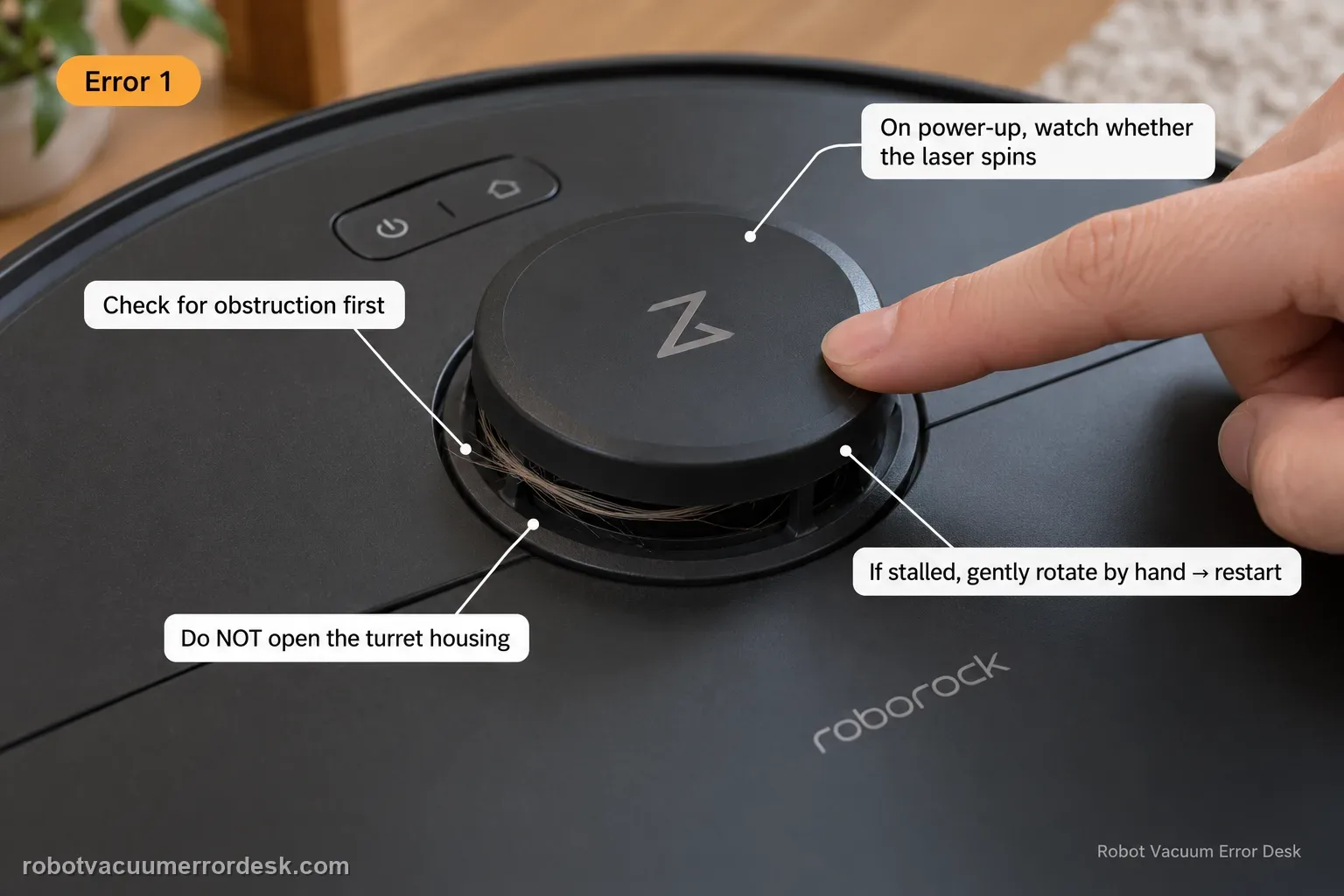
Q7 Max Error 1 means the LiDAR turret or laser is blocked. Check for physical obstruction first, then power the robot and watch whether the laser unit spins. If it is stalled, Roborock’s Q7 support says to gently rotate it manually and restart. Do not open the turret housing.
Confirm the exact model and exact code, light pattern or symptom.
Run the lowest-risk physical or software check first.
Use each pass condition to decide what the result actually narrows down.
Does this match your problem?
- The Q7 Max announces or displays Error 1.
- The robot stops before normal navigation begins.
- The top LiDAR turret may be obstructed or not rotating normally.
Most likely causes
Object or debris is blocking the LiDAR turret/laser opening
The laser unit is not rotating freely
A sensor error remains after obstruction removal and restart
What your test result means
| What you observe | What it narrows down | Next move |
|---|---|---|
| LiDAR turret does not rotate at startup | A physical bind or sensor-drive fault is stronger than an optics-only issue. | Remove external obstruction, gently verify free rotation as Roborock instructs, restart once and observe again. |
| Turret rotates normally after debris removal | The external obstruction was likely the trigger. | Run a short open-floor navigation test before returning the robot under low furniture/clutter. |
| Turret rotates but Error 1 returns immediately | The simple stalled-turret branch no longer explains the error. | Keep the turret unobstructed, capture video of normal rotation plus the code and escalate. |
| Error appears only under one low piece of furniture | Environmental contact may be pressing or blocking the turret. | Test in open space and create a keep-out/route change rather than opening the LiDAR housing. |
| Turret has a hard mechanical bind even with no visible debris | The fault is beyond routine external cleaning. | Stop forcing the turret and contact Roborock; do not pry the housing upward. |
Do not factory-reset by default. Use the exact model’s reboot/network-reset procedure only when the manufacturer path calls for it.
Run these checks in order
Inspect the LiDAR turret for external obstruction
Power the Q7 Max off and remove anything touching or covering the top LiDAR turret. Check the surrounding gap for hair, dust or a loose object. The Q7 Max manual defines Error 1 as a blocked LiDAR turret or laser.
Power on and observe whether the laser unit spins
Restart the robot in an open area and watch the turret during startup. Roborock’s Q7 support specifically tells owners to verify that the laser unit is spinning; do not infer rotation just because the robot powers on.
If the turret is stalled, gently verify free rotation
Only if the laser unit is not spinning, Roborock allows gentle manual rotation before another restart. Do not pry the turret upward, lubricate it or open the housing. A hard bind that does not free with the published owner check is already useful escalation evidence.
Run a short open-floor navigation proof
Move curtains, furniture edges and loose objects away from the turret and run the Q7 Max briefly on level open flooring. If Error 1 clears there but returns under one low object, the environment is the discriminator. If it repeats in open space, the failure is no longer explained by external contact.
Record the exact rotation behavior if Error 1 returns
From above, capture whether the turret never moves, starts then stops, or appears to spin normally while Error 1 is announced. This is more useful for support than repeatedly rotating the unit by hand, and it preserves the distinction between a physical bind and a sensor/control fault. If the turret visibly spins yet Error 1 still returns, record that contradiction rather than forcing the turret repeatedly. The official text defines the error around the LiDAR/laser path, but a normally spinning turret means a simple mechanical stall is less convincing. That does not prove which internal component failed; it only gives Roborock a cleaner handoff than “LiDAR broken” without an observed rotation state.
Escalate without opening the LiDAR assembly
Contact Roborock if Error 1 repeats on open level flooring after external obstruction is removed, especially if the turret remains hard-bound or the code returns while it visibly rotates. Send the startup video and exact error; owner troubleshooting stops before housing disassembly.
Escalate if the LiDAR remains stalled/hard-bound after external obstruction removal, or if Error 1 returns on open flooring while the turret visibly rotates. Send a video of startup/rotation and the exact error. Do not pry open, lubricate or disassemble the LiDAR housing; those steps are outside Roborock’s published Q7 owner procedure.
What to collect before contacting support
Give support a reproducible case instead of “it doesn’t work.” That reduces repeated basic troubleshooting and preserves the clues from your tests.
- Exact model name and the error code / voice prompt exactly as shown
- A photo or screenshot of the app error and the time it occurred
- A short list of the checks already completed and what happened after each one
- Firmware/app version if the issue began after a software change
Manufacturer evidence
Roborock Q7 Max User Manual — Error 1
The Q7 Max manual defines Error 1 as a blocked LiDAR turret/laser. Current Roborock support tells owners to power the robot on and observe whether the laser unit spins; if it does not, gently check that it can rotate and restart, then contact support if the error persists.
Additional official source: Roborock — current Error 1 support ↗Additional official source: Roborock — Q7 current troubleshooting hub ↗Last editorial review: September 5, 2026Regional note: manufacturer help centers, model suffixes, mains-power requirements and warranty procedures can differ by country. If the source redirects to a local support site, confirm that the model/hardware scope still matches before following a region-sensitive step.
This guide is rated Official manual. See what each evidence label means →
FAQ
What does Error 1 mean on the Roborock Q7 Max?
On the Q7 Max, Error 1 is the LiDAR-turret or laser-blocked fault. Roborock’s Q7 support adds a useful check: power the robot on and watch whether the laser unit spins. Clear anything touching the turret, then gently verify rotation only if it is stalled. Restart on open level flooring and escalate if Error 1 returns with an unobstructed rotating turret.
How can I tell if the Q7 Max LiDAR motor is stuck?
Watch the top turret during startup instead of assuming it spins because the robot has power. Roborock specifically instructs owners to verify laser-unit rotation. If it is not moving, remove external debris and gently rotate it manually to check for a bind, then restart. Do not pry the turret upward. A hard bind or repeated no-rotation state should be documented for support.
Can low furniture trigger Q7 Max Error 1?
Yes, if the furniture or hanging material physically contacts or blocks the LiDAR turret. Run the robot in an open area after cleaning the turret gap. If Error 1 clears there and returns only under one low object, the environment is the discriminator. Use a keep-out strategy rather than opening or disabling the LiDAR sensor to make the robot fit.
Should I lubricate the Roborock Q7 Max LiDAR turret if it does not spin?
No. Roborock’s owner guidance is to remove obstruction, gently rotate a stalled laser unit and restart. It does not instruct owners to lubricate or open the LiDAR housing. Lubricant can contaminate optics or internal parts and makes the fault harder to diagnose. If the turret remains hard to turn or does not spin under power, stop and contact support.
When should I contact Roborock for Q7 Max Error 1?
Contact Roborock when the turret remains unable to rotate after external obstruction removal, or when it rotates normally in open space but Error 1 still returns. Send a short video showing the turret state and exact error. Avoid repeated forcing or housing disassembly; the manual/support procedure ends with obstruction checks, gentle rotation, restart and a controlled navigation retest.
Did this diagnostic narrow the fault?
Use this as an editorial signal, not a popularity counter. If a feedback address is configured you can email the note; otherwise you can copy it for your own support record.