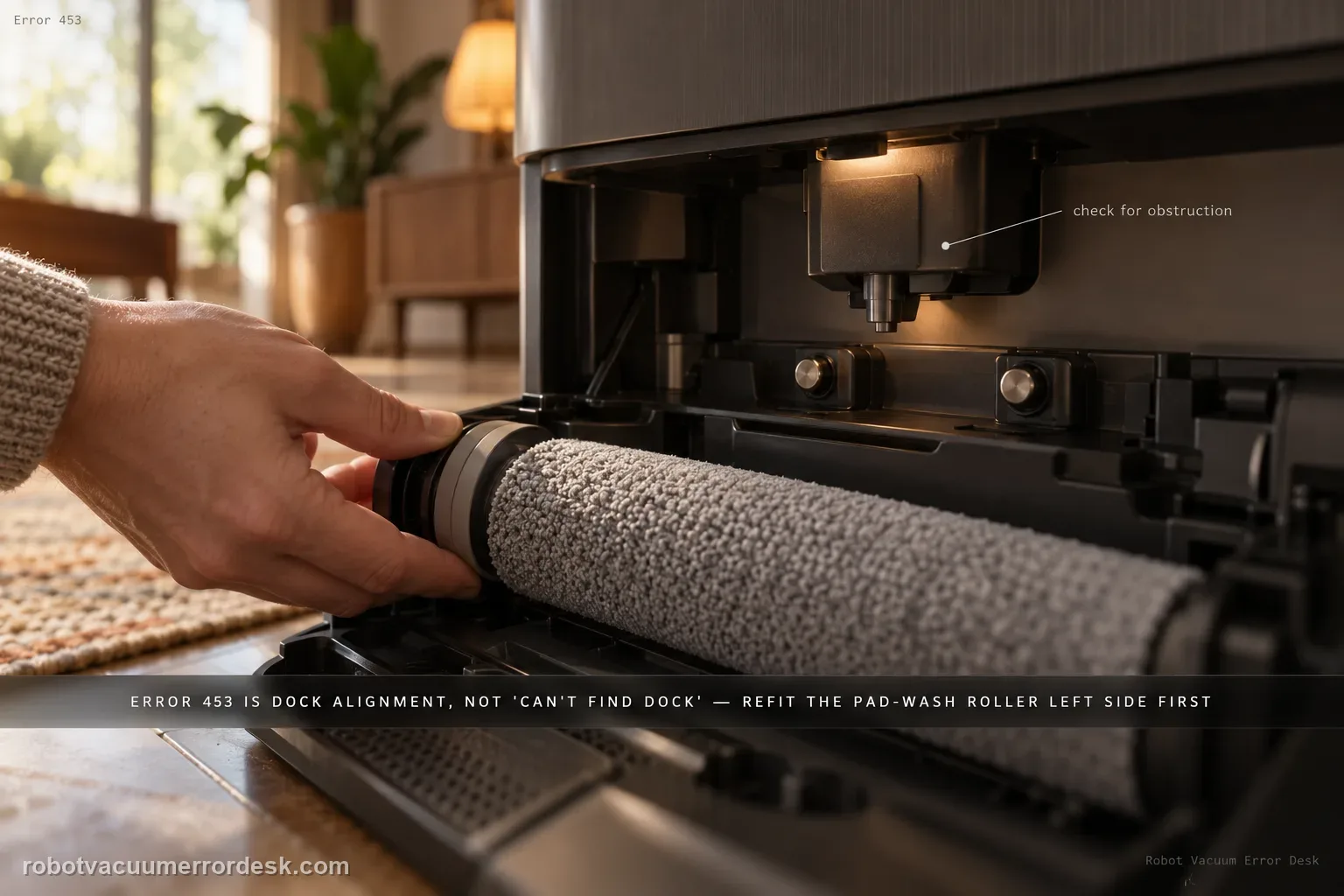
Error 453 is an AutoWash dock alignment failure after multiple attempts to position the Max 705 closely enough for the refill nozzle to extend. It is not the same as ‘cannot find the dock.’ iRobot’s code-specific procedure focuses on the mechanical interface around the wash/refill position: reinstall the Pad Wash Roller left side first, verify the robot bin is correctly installed, press the movable port on the bin to make sure it can move, inspect the dock nozzle housing for obstruction, and test the two dock buttons that lift the charging contacts. Each button should move freely and the corresponding contact should spring upward; it should not remain stuck in the pressed position. Only after those external checks should you reboot the robot and briefly power-cycle the dock, then run one return/refill retest. Do not pull or force the nozzle or contacts into position by hand.
Which external AutoWash alignment part fails the Error 453 check?
Confirm the exact model and exact code, light pattern or symptom.
Run the lowest-risk physical or software check first.
Use each pass condition to decide what the result actually narrows down.
Does this match your problem?
- The Max 705 Combo reports AutoWash Error 453 after repeated dock alignment attempts.
- The robot can locate/reach the dock, but the refill/nozzle alignment sequence fails.
- The Pad Wash Roller, robot bin/port, dock nozzle housing or contact-lift buttons may have been disturbed during maintenance.
- You need to separate a mechanical alignment/interface problem from navigation or ordinary charging errors.
Most likely causes
The Pad Wash Roller is not seated correctly; iRobot specifies reinstalling it left side first.
The robot bin is not installed properly or its movable refill port is not moving freely.
An obstruction is present in or around the dock nozzle housing.
One of the two dock buttons that raises the charging contacts is sticking instead of moving freely.
The robot/dock state needs the documented reboot after the mechanical interface has been corrected.
A persistent dock alignment/nozzle mechanism fault remains beyond owner-serviceable checks.
What your test result means
| What you observe | What it narrows down | Next move |
|---|---|---|
| Robot reaches the dock but 453 occurs during refill alignment | Navigation succeeded; the failure is at the AutoWash interface, not 'can't find dock.' | Inspect the Pad Wash Roller, robot bin/port and nozzle/contact-lift interface before changing maps or dock location. |
| Pad Wash Roller is loose or was recently removed | Incorrect roller seating can disturb the dock alignment geometry iRobot checks for 453. | Remove it and reinstall it left side first as documented, then retest. |
| Robot bin is not fully seated or its port does not move freely | The nozzle cannot complete a normal mating sequence against a blocked/misaligned robot-side port. | Reinstall the bin and verify the port movement without forcing it. |
| Nozzle housing is clear but a dock contact-lift button sticks down | The dock is not presenting its contact/alignment mechanism normally. | Stop forcing the button/contact; document which side sticks and contact iRobot if it does not return freely. |
| All interface parts move/seat normally but 453 returns after reboot | Owner-accessible alignment checks are exhausted. | Save a video of the alignment attempts and escalate rather than manipulating the nozzle internally. |
Do not factory-reset by default. Use the exact model’s reboot/network-reset procedure only when the manufacturer path calls for it.
Run these checks in order
Keep Error 453 on the AutoWash alignment branch
Confirm the exact code and observe when it appears. iRobot defines 453 as a failure to align enough for nozzle extension after multiple attempts. If the Max 705 never finds the dock at all, use a return-to-dock/navigation guide instead. If it reaches the dock and then repeats positioning before the error, stay on this page. This distinction prevents unnecessary map resets and dock relocation when the robot has already demonstrated that navigation to the station works.
Reinstall the Pad Wash Roller left side first
Uninstall the Pad Wash Roller from the dock and reinstall it using iRobot’s specified orientation: left side first. Do not merely push on a partly seated roller. Check that it settles in its normal position without debris underneath. Because 453 is an alignment problem, seemingly small seating errors at the wash assembly can matter. Avoid modifying the roller or latch; the test is whether the original component can be installed exactly as intended.
Verify the robot bin and its movable port
Remove/reinstall the Max 705 bin so it is properly seated. Then press the port on the bin to confirm it can move as iRobot instructs. Do not pry, lubricate or enlarge the port. The nozzle has to meet a correctly positioned, movable robot-side interface; if the bin is loose or the port is jammed, repeated docking attempts cannot fix that geometry. If the port will not move normally, preserve that evidence rather than forcing it.
Inspect the dock nozzle housing and contact-lift buttons
Look for visible obstruction around the dock nozzle housing. Then locate the two dock buttons that lift the charging contacts. iRobot explains that the robot’s wheel normally presses these buttons when docked correctly. Press each button gently with a finger: it should move up and down freely, and the contact should spring up rather than staying stuck in the depressed position. Do not pull the charging contact or nozzle upward by hand.
Reboot robot and dock only after the interface checks
Once the roller, bin/port, nozzle housing and lift buttons have been classified, reboot the robot and briefly unplug/replug the dock as iRobot directs. A reboot before the mechanical checks can temporarily clear a message without correcting the alignment cause. After power returns, leave the dock on a level unobstructed surface and run one return/refill test while watching how many alignment attempts occur before either success or Error 453.
Escalate a repeatable alignment failure without forcing the nozzle
If the Max 705 still reaches the dock but cannot align for nozzle extension, save a short video showing the approach/repositioning sequence and photos of the correctly installed wash roller/bin. Mention whether both lift buttons spring back. Do not manually extend the nozzle, wedge the robot or disassemble the dock. The remaining problem is in a precision alignment/mechanism path that the manufacturer does not direct owners to repair internally.
Contact iRobot when the Max 705 can reach the dock, the Pad Wash Roller is correctly installed left side first, the robot bin and port move normally, the nozzle housing is clear, both contact-lift buttons spring freely, and Error 453 still returns after the documented reboot. Escalate earlier if a lift button/port is stuck. Do not force the nozzle or charging contacts; a video of the repeated alignment attempts is more useful than additional physical manipulation.
What to collect before contacting support
Give support a reproducible case instead of “it doesn’t work.” That reduces repeated basic troubleshooting and preserves the clues from your tests.
- Exact model name and the error code / voice prompt exactly as shown
- A photo or screenshot of the app error and the time it occurred
- A short list of the checks already completed and what happened after each one
- Robot serial number and proof of purchase if warranty may apply
Manufacturer evidence
iRobot AutoWash Dock Error Codes — Error 453
Primary evidence is iRobot’s AutoWash Dock Error Codes page, which defines Error 453 and lists the exact roller, bin/port, nozzle-housing and two-button checks. The Max 705 Combo packout is a stable companion confirming the AutoWash dock configuration. This guide deliberately excludes generic navigation/map advice because 453 occurs after multiple physical alignment attempts at the dock interface.
Additional official source: iRobot — Roomba Max 705 Combo packout / AutoWash dock confirmation ↗Last editorial review: September 5, 2026Regional note: manufacturer help centers, model suffixes, mains-power requirements and warranty procedures can differ by country. If the source redirects to a local support site, confirm that the model/hardware scope still matches before following a region-sensitive step.
This guide is rated Official series support. See what each evidence label means →
FAQ
What does Error 453 mean on the Roomba Max 705 Combo?
Error 453 means the AutoWash dock could not align closely enough with the robot for nozzle extension after multiple attempts. It is an interface/alignment code, not simply ‘cannot find dock.’ iRobot directs owners to reseat the Pad Wash Roller left side first, verify the robot bin and movable port, inspect the nozzle housing, and test the two contact-lift buttons before rebooting and trying again.
Why does the Pad Wash Roller matter for Error 453?
iRobot specifically includes it in the 453 procedure and says to reinstall the roller left side first. Because the error occurs during a precise dock alignment/nozzle sequence, a wash roller that is not correctly seated can disturb the dock geometry even if the robot navigates to the station normally. Remove and reinstall it properly rather than pressing on a crooked roller or moving the entire dock as the first response.
What should the two dock buttons do during an Error 453 check?
They are the buttons that the robot’s wheel normally presses to lift the charging contacts. iRobot says each button should move up and down freely and the charging contact should spring up; the button should not remain stuck in a pressed position. Test gently with a finger. If a button sticks, document that side and stop forcing it, because the dock mechanism may require service.
Does Error 453 mean my Max 705 cannot find the dock?
Not necessarily. The code is reported after multiple alignment attempts when the robot is already working at the AutoWash docking interface. If the robot never reaches the dock, that is a navigation/return problem and should be diagnosed separately. For 453, focus on the wash roller, robot bin/port, nozzle housing and contact-lift buttons because those are the components iRobot names in the exact error procedure.
When should I stop troubleshooting Roomba Max 705 Error 453?
Stop when the robot reaches the dock, the wash roller is correctly installed, the bin/port moves normally, the nozzle housing is unobstructed, and both lift buttons spring freely, yet 453 returns after one robot/dock reboot. Also stop if any port or button is mechanically stuck. Do not pull the nozzle into position. Save a video of the alignment attempts and contact iRobot for the remaining mechanism fault.
Did this diagnostic narrow the fault?
Use this as an editorial signal, not a popularity counter. If a feedback address is configured you can email the note; otherwise you can copy it for your own support record.