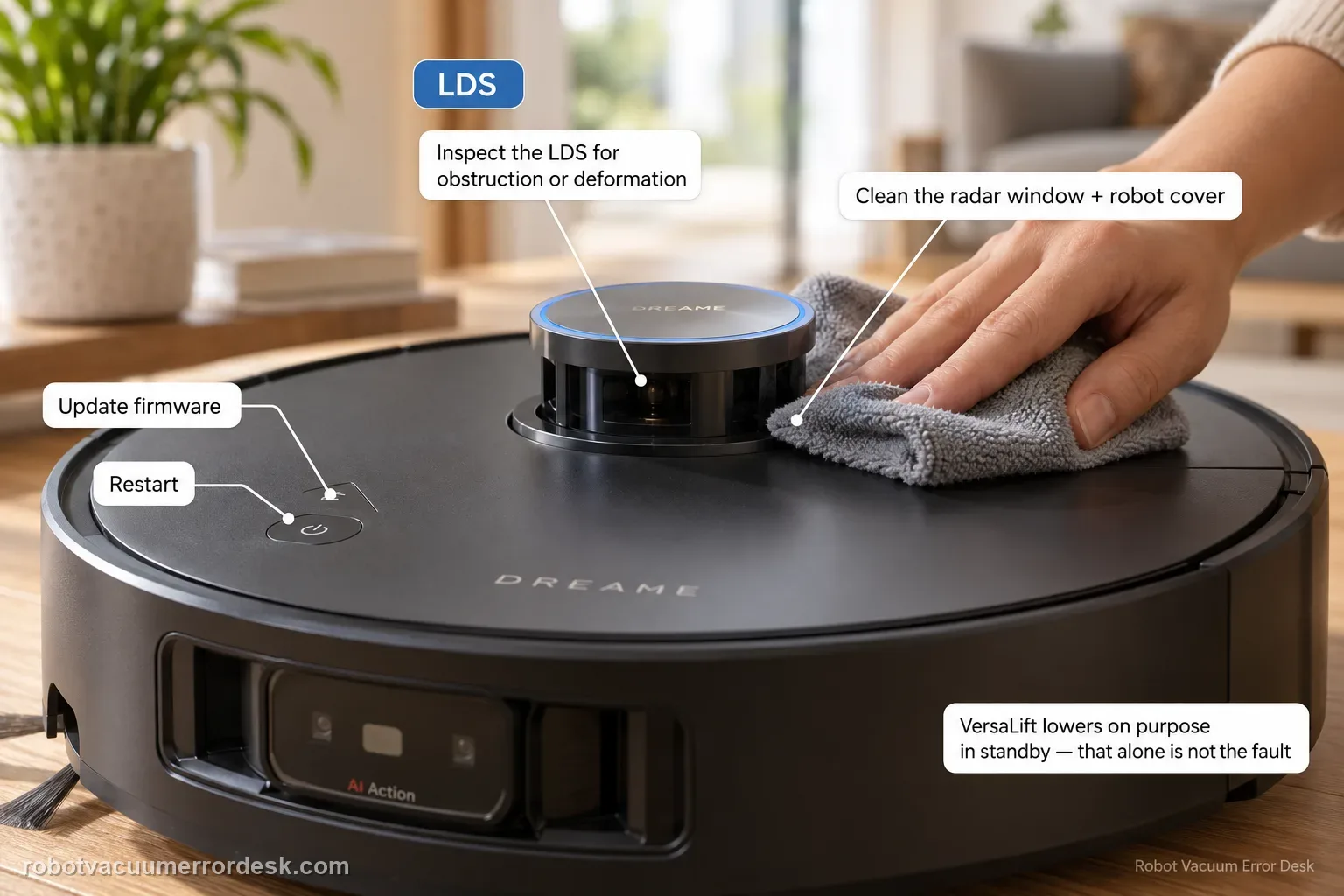
Use this page when the X50 reports an LDS sensor malfunction or the localization sensor itself appears obstructed/deformed—not merely because the retractable LDS will not raise or lower. Dreame’s exact model article gives four owner checks: update firmware, inspect the LDS for anything obstructing it or for deformation, clean the radar and robot cover, and restart. The manual identifies the retractable top unit as the VersaLift sensor and says it is intentionally lowered while the robot is in standby, charging, or cleaning low-clearance areas, so a lowered tower by itself is not proof of malfunction. If the problem is specifically that the LDS cannot raise/lower on command, switch to the separate lifting-function guide, which includes the app’s radar-lifting setting and remote-control test. For a true malfunction that persists after a clear/clean sensor and restart, do not dismantle the turret; send Dreame the exact message and a video.
Confirm the exact model and exact code, light pattern or symptom.
Run the lowest-risk physical or software check first.
Use each pass condition to decide what the result actually narrows down.
Confirm this is the right issue
- The X50 app/voice message specifically reports an LDS sensor malfunction.
- The top localization sensor is visibly obstructed or appears deformed and navigation stops.
- Cleaning/restarting is needed to distinguish a temporary blocked radar state from service hardware.
- The tower is merely lowered while charging/standby; that is documented normal behavior and is not enough for this guide.
- The issue is inability to raise/lower the LDS on command; that belongs to the separate LDS lifting guide.
What’s most likely causing this
Firmware is not current for the documented exact-model support path
Foreign material is physically obstructing the LDS sensor area
Visible deformation or external interference prevents normal sensor operation
Dust/debris on the radar or robot cover interferes with the sensor state
Temporary system state clears after normal restart
Persistent LDS hardware fault requires service after owner-level cleaning/inspection
Reading your test result
| What you observe | What it narrows down | Next move |
|---|---|---|
| Tower is lowered only while charging/standby | The X50 manual describes that as normal VersaLift behavior. | Do not diagnose an LDS malfunction from height alone; reproduce the actual message/task failure. |
| Visible loose debris blocks the LDS and cleaning clears error | External obstruction was a supported, owner-correctable cause. | Retest navigation and keep the sensor perimeter clear without further reset. |
| LDS appears visibly deformed | The exact support article treats deformation as a relevant abnormal state. | Photograph it and escalate; do not bend or force the tower. |
| No malfunction message, but tower will not raise/lower on command | The lift mechanism/configuration is the more exact intent. | Use the dedicated LDS raise/lower guide with app lifting/remote-control checks. |
| Clean unobstructed sensor + current firmware + restart still errors | Documented owner-level causes are exhausted. | Send Dreame the message, firmware and video and stop before turret disassembly. |
Reset can erase maps/settings on this path. Use lower-risk checks first and document the current state before resetting.
Work through these checks in order
Confirm the message says LDS sensor malfunction
Read the Dreamehome message or repeat the robot voice prompt before touching the tower. This article is for the exact ‘LDS sensor malfunction’ state. It is intentionally separate from ‘LDS cannot be raised or lowered,’ because Dreame publishes different troubleshooting for the lifting mechanism. Also remember the X50 manual says the VersaLift sensor is normally lowered in standby, while charging and in low-clearance cleaning. A lowered tower during those states is expected behavior, not enough evidence to call the sensor defective.
Check and record the firmware version
Dreame’s first exact-model LDS malfunction step is to check whether firmware is current. Open Dreamehome, record the installed version and apply an available update if the robot can do so normally. Do not use firmware updating as a substitute for inspecting a visibly blocked sensor. The purpose is to remove a manufacturer-defined software prerequisite and preserve useful version information for support. After updating, let the robot restart normally before deciding whether the malfunction message is still present.
Inspect the LDS for external obstruction
Dreame next says to inspect whether anything is obstructing the LDS sensor. Look around the exposed sensor perimeter and top area for packing material, hair, debris or another object resting against it. Remove only loose, visible material without inserting tools into the turret or forcing it to rotate/extend. If the robot was recently cleaning beneath low furniture, check for an external object or shifted material on the top surface. Then retest the same message rather than immediately changing maps or factory settings.
Check for visible deformation without trying to reshape it
The exact support article also asks whether the LDS sensor is deformed. Compare the top sensor and surrounding cover for an obviously tilted, dented or mechanically displaced appearance. This is an observation step, not permission to bend the tower back into shape. If deformation is visible, stop mechanical experiments and photograph it for support. If it appears normal, continue to the documented cleaning step. A normal appearance does not prove the internal sensor is healthy, but it removes one clear external cause.
Clean the radar and robot cover with the manual-safe method
Dreame says to clean the radar and robot cover. The X50 manual’s maintenance section says robot sensors should be wiped with a soft, dry cloth and warns that a wet cloth may damage sensitive elements inside the robot/base. Use that dry method on accessible optical/sensor surfaces and the surrounding cover; do not spray cleaner into the LDS gap. Remove fingerprints/dust without pressing hard on the retractable mechanism. Retest only after the area is dry and clear.
Restart the robot once after inspection and cleaning
Dreame’s final documented owner step for LDS sensor malfunction is to restart the robot. Perform a normal restart after firmware, obstruction, deformation and cleaning have been checked. Return the X50 to an open area and see whether the same LDS malfunction message appears before or during a short task. Avoid factory reset or map deletion unless Dreame support specifically ties those actions to your case; they are not required in this exact article and would erase useful state without proving the sensor.
Stop at the sensor-service boundary if the malfunction persists
A persistent exact LDS malfunction after the four documented checks is not a reason to open the turret. Capture the message, a photo/video of the sensor during startup and the firmware version. If you can safely show whether the LDS rotates or moves without touching it, include that observation. If the dominant symptom is instead ‘cannot raise/lower,’ note that clearly because Dreame’s other article includes an app radar-lifting setting and remote-control test. Accurate state labeling gives support a better chance to distinguish sensor failure from lift-mechanism failure.
Contact Dreame when the X50 still reports LDS sensor malfunction with current firmware, no external obstruction, no owner-correctable top interference, clean/dry radar/cover and a normal restart. Send the exact message, firmware, photo/video and whether there is visible deformation. Do not force or dismantle the retractable LDS. If the complaint is specifically that the tower cannot raise/lower, use that separate path and report the app lifting-test result.
Before you contact support, gather this
A reproducible case moves a support call past the basic troubleshooting script faster than “it doesn’t work” does, and it keeps the clues from your own tests on record.
- Exact model name and the error code / voice prompt exactly as shown
- A photo or screenshot of the app error and the time it occurred
- A short list of the checks already completed and what happened after each one
- Short video showing the failed docking, mapping or base-station behavior
- Firmware version shown in Dreamehome
Where this comes from
Dreame X50 Ultra Complete — Robot LDS Sensor Malfunction
Dreame’s exact X50 LDS-malfunction article requires current firmware, inspection for obstruction or deformation, cleaning the radar and robot cover, and restart. The X50 manual identifies the retractable top sensor as VersaLift and documents that it is intentionally lowered during standby, charging and low-clearance cleaning, which prevents normal lowered states from being misclassified as malfunction.
Additional official source: Dreame X50 Ultra User Manual ↗Last editorial review: September 5, 2026Regional note: manufacturer help centers, model suffixes, mains-power requirements and warranty procedures can differ by country. If the source redirects to a local support site, confirm that the model/hardware scope still matches before following a region-sensitive step.
This guide is rated Official model support. See what each evidence label means →
Questions people ask
Is a lowered X50 LDS tower always a malfunction?
No. The official X50 manual says the VersaLift sensor is lowered while the robot is in standby, charging on the base, or cleaning low-clearance areas. Diagnose a malfunction from the actual app/voice error or failed sensor behavior, not from tower height by itself. If it cannot raise/lower when it should, use the lifting-function guide rather than this malfunction page.
What does Dreame say to check for an X50 LDS malfunction?
Dreame’s exact X50 article gives four owner steps: confirm/update firmware, inspect whether anything obstructs the LDS or whether it is deformed, clean the radar and the robot cover, then restart. That is deliberately narrower than internet teardown advice. If the exact malfunction survives those checks, preserve the error and escalate instead of opening the retractable sensor assembly.
Can I push or pull the X50 LDS tower to free it?
This exact malfunction article does not instruct owners to force the tower. Inspect and remove only visible external obstruction, note deformation, clean accessible surfaces and restart. The X50 has a retractable VersaLift mechanism, and a separate Dreame article exists for raise/lower failure. Forcing the mechanism can damage it and also makes the original service evidence harder to interpret.
How should I clean the X50 LDS area?
Dreame says to clean the radar and robot cover, while the X50 manual specifies a soft, dry cloth for robot sensors and warns that wet cloths can damage sensitive elements. Wipe accessible surfaces gently without spraying liquid into the turret gap or inserting tools. Then reproduce the same task/message so you know whether cleanliness actually changed the malfunction state.
What should I send support for a persistent LDS malfunction?
Send the exact Dreamehome/voice message, firmware version and a short photo/video showing the LDS during startup or the failed task. Note whether there is visible obstruction or deformation and whether a normal restart was already tested. If the tower’s problem is specifically that it cannot raise or lower, include that wording so support does not confuse sensor malfunction with lift-mechanism failure.
Did this diagnostic narrow the fault?
Use this as an editorial signal, not a popularity counter. If a feedback address is configured you can email the note; otherwise you can copy it for your own support record.