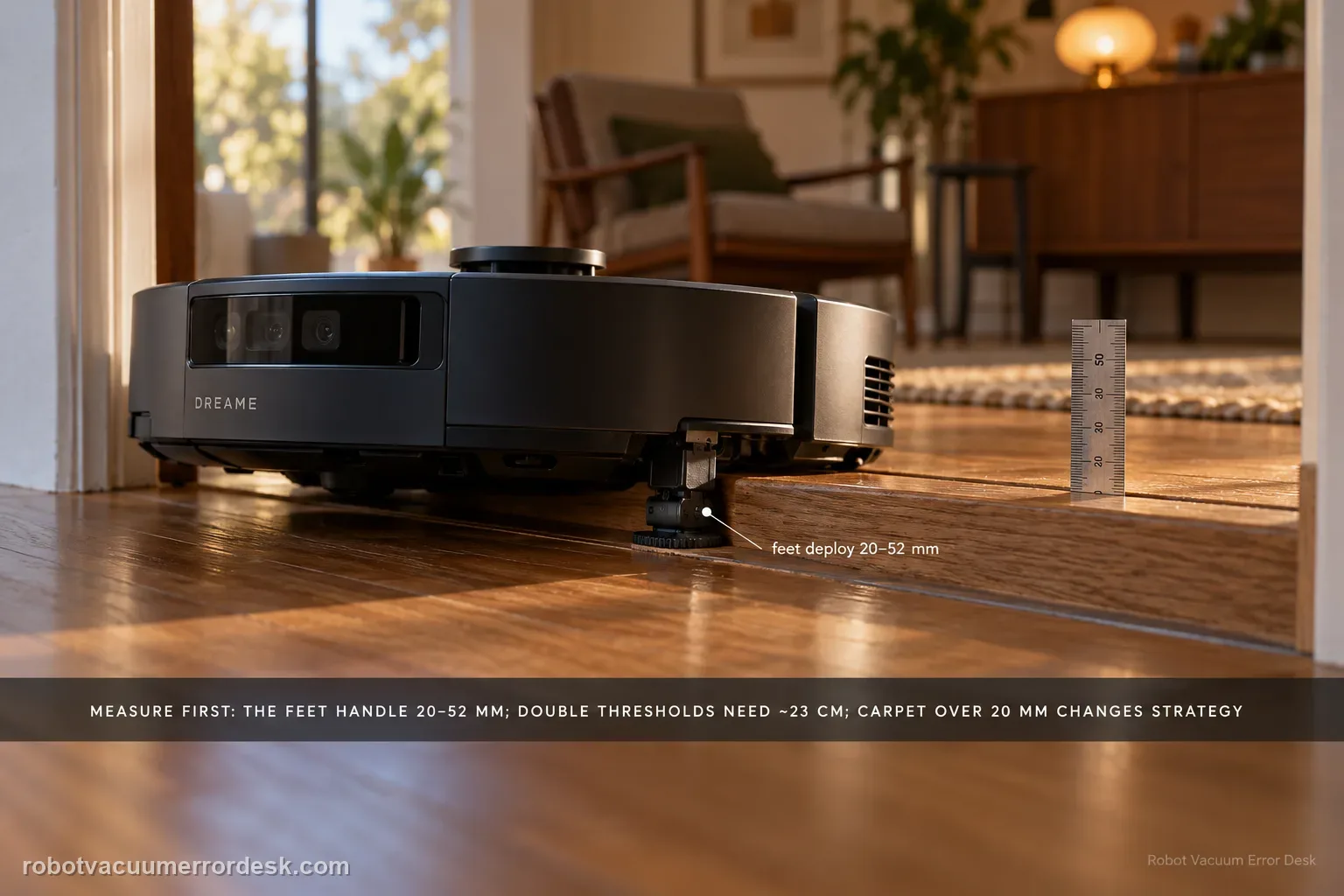
Measure the obstacle before calling the X60’s behavior a navigation fault. Dreame’s current X60 support page distinguishes obstacle height, double-layer width/geometry, dark surfaces, mechanical-foot behavior, chassis lifting and carpet strategy. The robot’s mechanical feet are used when a threshold is greater than 20 mm but less than 52 mm; if those feet do not reset in time, a tangling warning can appear. Double-layer obstacles add a width constraint of about 23 cm, and carpets thicker than 20 mm use a different chassis-lift strategy. Treat 52 mm as a conditional capability boundary, not a promise that every 52 mm doorway will be crossed regardless of shape, approach or surface.
Is the threshold within the documented geometry?
Confirm the exact model and exact code, light pattern or symptom.
Run the lowest-risk physical or software check first.
Use each pass condition to decide what the result actually narrows down.
Confirm this is the right issue
- The X60 Pro Ultra backs away from, stalls at or repeatedly retries a threshold/step.
- The obstacle is around or above 20 mm and you need to know whether mechanical-foot behavior is relevant.
- The threshold is dark/black, double-layered or shaped in a way that height alone does not explain.
- A tangling warning or abnormal chassis lift appears after the robot attempts to cross.
- The complaint is obstacle crossing rather than a general missed-area problem with no physical threshold.
What’s most likely causing this
Obstacle geometry exceeds the robot’s supported crossing envelope
Dark/black surface changes detection behavior at the step
Double-layer threshold width/shape is outside the documented scenario
Mechanical foot entangled with debris or not resetting after a >20 mm crossing attempt
Foreign objects around the chassis interfering with lift movement
Carpet thickness requires a different chassis-lift setting rather than threshold logic
Reading your test result
| What you observe | What it narrows down | Next move |
|---|---|---|
| Single physical step is below 20 mm | The documented mechanical-foot trigger range is not the main discriminator. | Check approach geometry, surface condition and whether the complaint is actually navigation/obstacle avoidance. |
| Threshold is >20 mm but <52 mm | Dreame says the mechanical feet can raise to assist obstacle crossing in this range. | Watch for normal foot deployment/reset and clear any foreign objects if a tangling warning appears. |
| Double-layer obstacle has about 23 cm or less supported step width | Width is part of the documented double-layer crossing envelope, not height alone. | Measure both layers/width and avoid promising success from a single height number. |
| Carpet is >20 mm thick | Dreame treats this with chassis-lift/carpet settings rather than the same hard-threshold branch. | Use the documented carpet strategy and appropriate chassis lift level for the pile type. |
| Chassis/mechanical foot remains abnormal after debris check and restart | The documented owner-level crossing mechanism check has failed. | Stop repeated climbing attempts and send Dreame the measured threshold plus a side-view video. |
Do not factory-reset by default. Use the exact model’s reboot/network-reset procedure only when the manufacturer path calls for it.
Work through these checks in order
Measure the obstacle instead of estimating by eye
Measure the vertical height and note whether the obstacle is a single step or a double-layer transition. Dreame’s article discusses single-layer capability below 52 mm but also makes clear that geometry matters. Record the numbers and take a side photo. If the obstacle is outside the documented envelope, do not keep forcing repeated climbs; a climbing mat or route change is more appropriate than treating the robot as faulty.
Check dark surfaces and the approach condition
Dreame specifically includes black/dark steps in its threshold troubleshooting. Note the color/finish and clear loose objects at the approach so the crossing test is about the threshold itself. A dark edge can change what the robot perceives, while slippers, wires or a crooked approach can create a different obstacle-avoidance outcome. Use one clean approach before changing maps or resetting the robot.
Observe the mechanical feet in the 20–52 mm range
For thresholds greater than 20 mm but less than 52 mm, Dreame says the X60 can raise mechanical feet on the drive-wheel side to help clear the obstacle. Watch whether the feet deploy and then reset. If a tangling warning appears or the feet remain abnormal, power off, inspect for visible foreign objects, restart the main unit, place it back in the base station, restart again and observe as Dreame directs.
Measure double-layer width and inspect chassis lift
If the obstacle is double-layered, record the width as well as height; Dreame gives an approximately 23 cm maximum supported step width for the documented double-layer scenario. Also inspect the chassis for foreign objects if lifting is abnormal. Clean visible tangles, move the robot to an open area and restart. This separates obstacle geometry from a lift mechanism that is being physically restricted.
Use the carpet branch only when the obstacle is actually carpet
Dreame separately describes carpets thicker than 20 mm. The X60 can use chassis lift levels, with a middle level suggested for thick short pile (up to about 5 mm in the cited usable scenario) and the highest level for thick long pile around 5–11 mm. Do not apply carpet settings to a hard doorway threshold. After choosing the correct branch, make one controlled pass and record whether the failure is geometry, foot reset or persistent lift behavior.
Escalate when a measured obstacle appears to fit the documented scenario but the X60 repeatedly produces a mechanical-foot tangling warning, abnormal chassis lift or another reproducible fault after visible debris is cleared and the robot has been restarted. Send Dreame the measured height, double-layer width if relevant, surface color, a side-view video of the approach and whether the feet deploy/reset. Do not treat 'under 52 mm' as a warranty that every shape must be crossed.
Before you contact support, gather this
A reproducible case moves a support call past the basic troubleshooting script faster than “it doesn’t work” does, and it keeps the clues from your own tests on record.
- Exact model name and the error code / voice prompt exactly as shown
- A photo or screenshot of the app error and the time it occurred
- A short list of the checks already completed and what happened after each one
- Short video showing the failed docking, mapping or base-station behavior
- Firmware version shown in Dreamehome
Where this comes from
Dreame X60 Pro Ultra — Threshold-Crossing Issues
Dreame’s exact X60 threshold article provides the 20–52 mm mechanical-foot range, the conditional single/double-layer crossing guidance, approximate 23 cm double-layer width, dark-surface check, chassis-reset path and separate carpet strategy. The X60 cleaning-function article independently lists an over-capability threshold as a cause of missed areas.
Additional official source: Dreame X60 Pro Ultra Complete — Cleaning Function Issues ↗Last editorial review: September 5, 2026Regional note: manufacturer help centers, model suffixes, mains-power requirements and warranty procedures can differ by country. If the source redirects to a local support site, confirm that the model/hardware scope still matches before following a region-sensitive step.
This guide is rated Official model support. See what each evidence label means →
Questions people ask
Can the Dreame X60 cross every threshold under 52 mm?
No. Dreame’s exact X60 support page discusses dark surfaces, approach geometry, mechanical-foot behavior and double-layer dimensions in addition to height. Treat 52 mm as part of the documented single-layer crossing envelope, not a promise for every doorway shape. Measure the obstacle and use one controlled approach before deciding the robot has a navigation fault.
When do the X60 mechanical feet activate for a threshold?
Dreame says the built-in mechanical feet on the drive-wheel side can raise when the robot detects a threshold greater than 20 mm but less than 52 mm. If a foot does not reset in time, a tangling warning can appear. Clear visible debris, restart as documented and avoid manually forcing the foot mechanism.
What does the 23 cm X60 threshold number refer to?
Dreame gives approximately 23 cm as the supported step width for its documented double-layer crossing scenario. That width is not a room-entrance clearance and should not be confused with the narrow-space figure in the missed-area guide. Record height, layer shape and width together before judging whether a double-layer doorway is inside the intended crossing geometry.
Why can a black or dark threshold stop the X60 even when it is not very tall?
Dreame specifically tells owners to check whether a step the X60 will not cross is black or dark-colored. That means surface appearance is part of the manufacturer’s troubleshooting path, not height alone. Keep the approach clear, note the threshold color and compare the same measured transition before changing unrelated obstacle-avoidance or map settings.
Are thick carpets diagnosed the same way as a hard X60 threshold?
No. Dreame gives a separate carpet strategy that uses chassis-lift levels for carpets thicker than 20 mm. Use the carpet branch when pile height is the obstacle and the hard-threshold branch for door tracks or steps. Mixing the two can make a normal carpet-lift setting look like a failed ProLeap/mechanical-foot crossing mechanism.
Did this diagnostic narrow the fault?
Use this as an editorial signal, not a popularity counter. If a feedback address is configured you can email the note; otherwise you can copy it for your own support record.