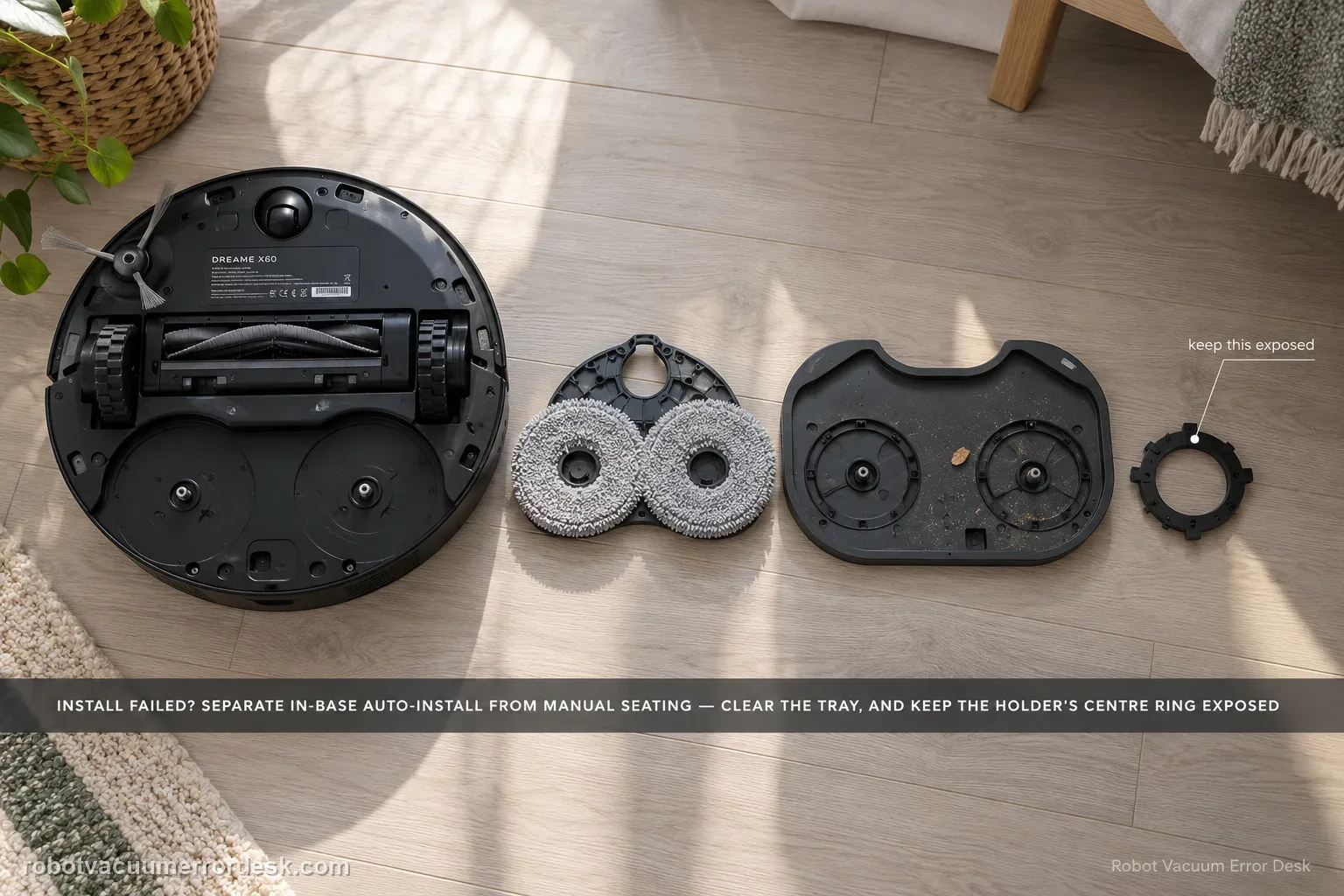
First classify where the error occurs. Dreame’s exact X60 article separates an in-base automatic installation failure from an outside-base case where the mop pad holder must be installed manually. A second X60 support article adds two high-value checks: foreign objects on the cleaning tray and whether the mop is fitted so the holder’s central ring remains fully exposed. If a clean, correctly fitted holder still fails after one restart/reinstall, document whether the same side fails and escalate instead of repeatedly cycling the installation mechanism.
Confirm the exact model and exact code, light pattern or symptom.
Run the lowest-risk physical or software check first.
Use each pass condition to decide what the result actually narrows down.
Does this match your problem?
- The X60 reports ‘Mop installation failed, please install manually.’
- The alert occurs while the robot is inside the base and automatic mop-holder installation does not complete.
- The robot is outside the base and one or both mop pad holders are missing, loose or incorrectly seated.
- The holder appears installed but the alert returns when a new task begins.
Most likely causes
Automatic mop-holder installation in the base did not complete
Mop pad holder not fully seated when the robot is outside the base
Foreign object on the cleaning tray interfering with installation
Mop cloth fitted over the holder incorrectly so the central ring is obstructed
Holder seating or the automatic installation mechanism remains abnormal after the documented fit checks and one restart
What your test result means
| What you observe | What it narrows down | Next move |
|---|---|---|
| Alert appears only while robot is inside the base | Dreame classifies this as failed automatic holder installation. | Stop repeated cycling, inspect the tray/holder and manually install the holder for one controlled retry. |
| Alert appears outside the base and a holder is loose/missing | The problem is currently a seating/installation state, not proof of a base failure. | Install the holder manually, verify the mop does not cover the central ring and retry once. |
| Cleaning tray has debris or the mop bunches over the center of the holder | The installation mechanism may be meeting a physical obstruction or malformed assembly. | Clean the tray, refit the mop correctly and perform one controlled reinstall. |
| Correct clean assembly still fails after restart | User-level fit checks no longer explain the error. | Record both holder sides and the exact failure state for Dreame support. |
| Both holders seat evenly, tray is clear and central rings are exposed, but the same side still fails | Simple debris/cloth fit no longer explains the repeatable side-specific result. | Photograph both holders and record the in-base/outside-base failure for Dreame support. |
Reset can erase maps/settings on this path. Use lower-risk checks first and document the current state before resetting.
Run these checks in order
Identify whether the failure is inside or outside the base
When the message appears, note the robot’s exact position before moving anything. Dreame documents two different scenarios. If the robot is inside the base, the automatic installation of the mop pad holder has failed and the next owner action is manual installation. If the robot is already outside the base, the holder itself needs to be installed and confirmed correctly before the task is restarted. This location split is the first discriminator because it prevents you from blaming the dock for an outside-base seating problem or repeatedly commanding the automatic mechanism when it has already failed once.
Inspect the cleaning tray and the holder before reinstalling
With the mechanism idle, look for hair, grit or a foreign object on the cleaning tray where the mop holder installation occurs. Dreame’s X60 cleaning-function support specifically tells users to check the tray for foreign objects when the mop pad holder installation fails. Remove loose debris using normal maintenance methods. Then inspect both holders for obvious damage, contamination or a pad that has shifted. Do not force a holder into place against debris or a mispositioned cloth. The goal is to return the installation interface to a known clean state before you judge the base mechanism or holder recognition.
Refit the mop so the holder's central ring stays exposed
Dreame also instructs X60 owners to confirm that the mop is installed correctly and that the central ring of the mop holder is fully exposed rather than blocked by the cloth. Remove and refit the mop pad carefully so it sits where intended instead of bunching across the center. Then seat the holder manually. If one side repeatedly feels different from the other, compare the cloth fit, holder face and seating depth without prying, bending or modifying the holder. Correct visual fit plus even seating is more meaningful than simply pressing harder until the alert disappears.
Run one controlled reinstall/restart test, not repeated cycles
After cleaning and correct assembly, reinstall the holder manually and re-initiate one task, matching Dreame’s exact article. If the error returns, remove the robot from the base, detach the holders, restart the robot and reinstall them after startup. Dreame’s own after-sales guidance on related holder problems uses restart and reinstallation as a late mechanical-state check. Avoid jumping to a factory reset: a factory reset changes settings and maps while the evidence still points at a physical holder/tray installation path. One clean retry and one restart-based retry are enough to establish whether the state clears.
Escalate with side-by-side holder evidence if the fit is proven
If the error persists, photograph both mop holders, the mop fit around the central ring and the clean tray. Record a short video showing whether the failure occurs inside the base or outside it. If one holder side behaves differently, note that instead of forcing repeated installation cycles. Dreame’s exact article says to contact after-sales service when manual installation does not resolve the issue. This evidence lets support distinguish a holder-seating problem from an automatic installation mechanism that still fails after the documented owner checks.
Escalate when the tray is clean, the mop does not block the holder’s central ring, the holders are manually seated correctly and the alert still returns after one restart/reinstallation cycle. Do not repeatedly force the automatic mechanism or factory-reset the robot before the physical installation path is proven.
What to collect before contacting support
Give support a reproducible case instead of “it doesn’t work.” That reduces repeated basic troubleshooting and preserves the clues from your tests.
- Exact model name and the error code / voice prompt exactly as shown
- A photo or screenshot of the app error and the time it occurred
- A short list of the checks already completed and what happened after each one
- Short video showing the failed docking, mapping or base-station behavior
- Firmware version shown in Dreamehome
Manufacturer evidence
Dreame X60 Pro Ultra Complete — Mop Installation Failure
Dreame’s exact X60 article defines the inside-base versus outside-base scenarios. The X60 Cleaning Function Issues article adds the tray-debris and exposed-central-ring mop-fit checks. The guide keeps those manufacturer facts separate from the owner-observable pass/fail sequence and does not infer an electrical or recognition failure from the holder’s magnetic construction alone.
Additional official source: Dreame X60 Pro Ultra Complete — Cleaning Function Issues ↗Last editorial review: September 5, 2026Regional note: manufacturer help centers, model suffixes, mains-power requirements and warranty procedures can differ by country. If the source redirects to a local support site, confirm that the model/hardware scope still matches before following a region-sensitive step.
This guide is rated Official model support. See what each evidence label means →
FAQ
Does ‘mop installation failed’ mean the X60 base station is broken?
No. Dreame explicitly separates two scenarios. If the robot is inside the base, automatic holder installation failed; if it is outside, the holder may simply need correct manual installation. Confirm the robot’s location, clean the tray and make sure both holders and mops are seated correctly before concluding that the automatic base mechanism itself has failed.
Why does the center ring of the X60 mop holder need to stay exposed?
Dreame’s X60 cleaning-function support says the mop should be fitted so the holder’s central ring is fully exposed and not blocked by the cloth. A bunched pad changes the physical assembly being installed. Refit the cloth, seat the holder manually and use one controlled task restart before treating the message as a persistent holder-seating or automatic-installation fault.
Should I factory-reset the X60 for a mop installation failure?
Not as an early step. The manufacturer path is mechanical: identify whether the robot is inside or outside the base, install the holder manually, clear the cleaning tray and verify the mop fit. A restart after removing/reinstalling the holders can be a late check, but a factory reset changes maps and settings without proving a holder/tray installation problem.
What should I inspect if only one X60 mop holder keeps failing?
Compare the two holder faces, mop fit and seating feel after the tray is cleaned. Make sure the affected holder’s central ring remains exposed and that no cloth edge or debris changes its position. Do not pry, bend or reshape the holder. If the same side fails after correct manual seating and restart, document that side-specific behavior for Dreame support.
What evidence should I send Dreame for a repeating X60 mop install error?
Show whether the alert occurs inside or outside the base, both holder faces, the mop cloth fitted with the central ring exposed and the cleaned tray. Add one short video of the failed installation/restart and note whether one holder behaves differently. That compact evidence lets support evaluate the holder seating or automatic installation mechanism without asking you to force repeated cycles.
Did this diagnostic narrow the fault?
Use this as an editorial signal, not a popularity counter. If a feedback address is configured you can email the note; otherwise you can copy it for your own support record.