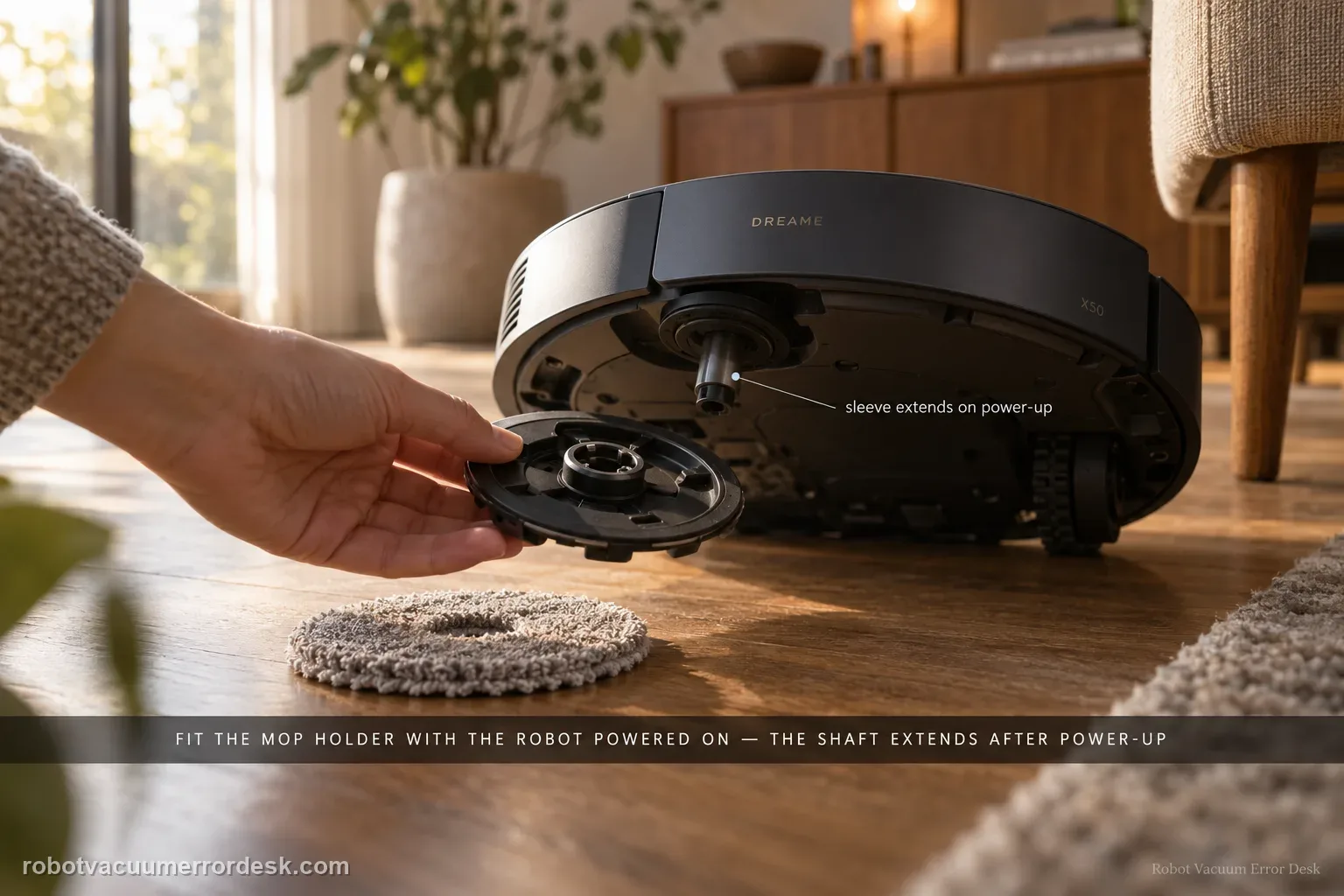
Dreame’s exact X50 support says a mop tray/holder that falls off can be caused by installation state, the pad itself, floor obstacles or cleaning mode. A model-specific detail matters first: Dreame says the mop pad holder cannot be installed while the robot is turned off; after power-on, the holder shaft sleeve automatically extends, so install the holder with the robot powered on. Make sure the mop pad is attached evenly to the holder and replace a worn pad that will not hold securely. Then check the route: carpets, thresholds, small steps and loose cables can snag the tray. Dreame recommends a designated mopping area for problematic zones and Mop after Vac in Cleaning Settings, and notes that this model supports automatic mop installation/removal. If the holder physically detaches despite correct powered-on installation and a clear route, restart once and capture the detachment for support. Do not create a separate near-duplicate page for ‘mop pad holder falls off’ unless the diagnostic intent materially differs.
Confirm the exact model and exact code, light pattern or symptom.
Run the lowest-risk physical or software check first.
Use each pass condition to decide what the result actually narrows down.
Is this the problem you’re seeing?
- One or both X50 mop pad holders/trays detach during operation.
- The holder will not attach securely when you try to install it with the robot powered off.
- The mop falls off after crossing carpet, a threshold, a small step or loose floor cable.
- The mop pad itself is uneven, worn or no longer attaches evenly to the holder.
- The issue is physical detachment, not simply a mop that will not extend or lift.
Likely root causes, ranked
Holder was installed while the robot was off, before the shaft sleeve was in the expected powered-on state
Mop pad is unevenly attached or worn and no longer holds securely to the holder
Carpet, threshold or small step catches the mop tray during travel
Power cable or another loose floor obstacle snags the mop assembly
Cleaning-mode/automatic mop installation-removal state needs the documented Mop after Vac/restart branch
Persistent holder/mounting hardware fault remains after correct fit and clear-route testing
What the result narrows down
| What you observe | What it narrows down | Next move |
|---|---|---|
| Holder will not attach while robot is off but does when powered on | The model-specific powered-on shaft-sleeve state explains the installation failure. | Install only in the expected powered state; do not force the mechanism. |
| Fabric pad peels but holder stays on robot | Pad-to-holder attachment/wear is the closer problem than holder mounting. | Reattach evenly or replace a worn pad before testing the robot mount. |
| Holder falls only at carpet/threshold/cable | Environmental snagging is strongly implicated by Dreame’s documented obstacle branch. | Tidy the route or use a designated mopping area that avoids the snag point. |
| Holder stays on during clear hard-floor test | Mounting can work; reproduce only the specific route/mode that causes detachment. | Focus on obstacle geometry or automatic mop-handling state rather than replacing hardware. |
| Holder detaches on clear floor after correct fit/restart | Documented owner-level causes are exhausted. | Film the clean-route release and contact Dreame; do not modify holder/mount. |
Do not factory-reset by default. Use the exact model’s reboot/network-reset procedure only when the manufacturer path calls for it.
Checks to run, in sequence
Confirm the physical symptom and which piece detaches
Identify whether the entire mop pad holder/tray comes off the robot or only the fabric mop pad separates from the holder. Dreame’s exact article discusses the mop tray/holder falling off and also tells owners to check pad attachment. Photograph the correctly assembled side before testing so you can compare after the failure. If the complaint is instead that the mop stays attached but will not extend, lift or wash, use those exact system guides. Keeping ‘physical detachment’ separate prevents mode/water troubleshooting from burying a simple fit/snag problem.
Power the X50 on before installing the mop holder
This is the key model-specific discriminator. Dreame says the mop pad holder cannot be installed when the robot is turned off. After the robot is powered on, the shaft sleeve of the mop pad holder automatically extends; Dreame then tells owners to try installing the holder again. Do not force the holder into a powered-off mechanism or use tape/magnets to fake attachment. Turn the robot on normally, wait for the expected powered state, and install each holder according to the normal fit.
Attach each mop pad evenly and inspect wear
Dreame says the mop pad should be properly and evenly attached to the mop pad holder before operation. Remove bunching, folded edges or an off-center attachment that can drag and peel. If the pad repeatedly will not secure evenly after multiple uses, Dreame recommends replacing it with a new mop pad. This step distinguishes fabric attachment from the holder-to-robot connection. After correcting the pad, tug only as the normal attachment design permits; do not bend the holder or modify its mounting points.
Run a short obstacle-free hard-floor test
Before blaming the holder mechanism, test the X50 on open hard flooring with carpets, thresholds and small steps excluded. Keep cables and loose objects out of the route. A holder that stays attached on this simple route but falls off only at one transition points toward environmental snagging rather than an always-failed mount. Use a short route so you can observe when the tray contacts the floor/obstacle; do not repeatedly send a loose holder across a surface where it can scratch the floor or damage itself.
Inspect carpets, thresholds, steps and floor cables for snagging
Dreame explicitly says the mop tray may become stuck and fall off when the robot climbs over carpets, thresholds or small steps, and it warns that power cables/obstacles can entangle the tray. Walk the actual route and identify where detachment occurred. Tidy cables and remove loose objects. For a problematic zone, Dreame recommends setting a designated mopping area so the robot does not enter restricted areas with the mop attached. Do not repeatedly test a known snag point merely to collect more failures.
Check Mop after Vac and automatic mop behavior
Dreame tells X50 owners to go to Cleaning Settings and select Mop after Vac mode for this troubleshooting path, noting that the model supports automatic mop installation and removal. Check the current app state and run one controlled task. App wording may change, so follow the current equivalent setting rather than an old screenshot. The purpose is to rule out an unexpected automatic mop-handling state, not to claim that every physical fall-off is software. Preserve a screenshot of the mode if detachment repeats.
Restart once and escalate repeat detachment
If powered-on installation, even pad fit, a clear route and the documented mode still produce physical detachment, restart the robot once as Dreame recommends for abnormal behavior. Then film a short safe test showing the holder installed and the moment it releases, ideally without a snag hazard. Do not add adhesive, aftermarket magnets or bend the holder/mount to make it stay. A repeat release under clean conditions is useful evidence for holder/mount service and should not be hidden by improvised modification.
Contact Dreame if an X50 mop holder/tray still detaches after it is installed with the robot powered on, the pad is evenly secured and serviceable, the route is clear of carpets/thresholds/steps/cables that snag it, Mop after Vac/automatic mop behavior is checked, and the robot has been restarted. Send photos of the holder/pad and a short video of a clean-route detachment. Do not glue, bend or add magnets to the mounting system.
Information to have ready for support
Support can skip the basic troubleshooting script when you provide a reproducible case. That keeps the results of your checks from getting lost.
- Exact model name and the error code / voice prompt exactly as shown
- A photo or screenshot of the app error and the time it occurred
- A short list of the checks already completed and what happened after each one
- Short video showing the failed docking, mapping or base-station behavior
- Firmware version shown in Dreamehome
Source and evidence level
Dreame X50 Ultra Complete — Mop Falls Off
Dreame’s exact X50 Mop Falls Off article says the holder cannot be installed while the robot is off and that its shaft sleeve extends after power-on; it also requires even pad attachment, checks carpets/thresholds/small steps and floor cables for snagging, recommends a designated mopping area where needed, points to Mop after Vac, notes automatic mop installation/removal, and says to restart if abnormal behavior persists.
Additional official source: Dreame X50 Ultra User Manual ↗Last editorial review: September 5, 2026Regional note: manufacturer help centers, model suffixes, mains-power requirements and warranty procedures can differ by country. If the source redirects to a local support site, confirm that the model/hardware scope still matches before following a region-sensitive step.
This guide is rated Official model support. See what each evidence label means →
Common questions
Why won’t my Dreame X50 mop holder attach when the robot is off?
Dreame’s exact X50 support says the mop pad holder cannot be installed while the robot is turned off. After power-on, the shaft sleeve of the holder automatically extends, and Dreame tells owners to install it then. Power the robot normally and use the intended fit instead of forcing the holder into a powered-off mechanism or adding adhesive/magnets.
Can thresholds or carpets make the X50 mop fall off?
Yes. Dreame says carpets, thresholds and small steps can catch the mop tray and cause it to fall off. Loose power cables can also entangle it. Test first on open hard flooring, then inspect the exact route where detachment occurs. Tidy obstacles and use a designated mopping area for a problem zone rather than repeatedly dragging a loose tray across the snag point.
What if only the mop pad fabric falls off the holder?
That is different from the holder detaching from the robot. Dreame says the mop pad should be attached properly and evenly to the holder and recommends replacing it if repeated use leaves it unable to attach securely. Center and flatten the pad first; if the holder itself stays mounted, do not diagnose the robot-side mounting mechanism until the pad-to-holder attachment is known good.
Why does Dreame suggest Mop after Vac for this problem?
The exact X50 article tells owners to select Mop after Vac in Cleaning Settings and notes that the model supports automatic mop installation/removal. That check helps control the mop-handling state while troubleshooting. It does not mean software explains every physical detachment; if the holder falls off on a clear hard floor after correct powered-on installation, preserve that mechanical evidence and escalate.
Should I glue or add magnets to an X50 mop holder that keeps falling off?
No. The official owner path is powered-on installation, even pad fit, obstacle/cable avoidance, checking the documented cleaning mode and restart. Glue, stronger magnets or bending the holder can damage the automatic mounting system and obscure a warranty/service issue. If it still detaches in a clean controlled route, film the release and send Dreame photos/video instead of modifying the hardware.
Did this diagnostic narrow the fault?
Use this as an editorial signal, not a popularity counter. If a feedback address is configured you can email the note; otherwise you can copy it for your own support record.