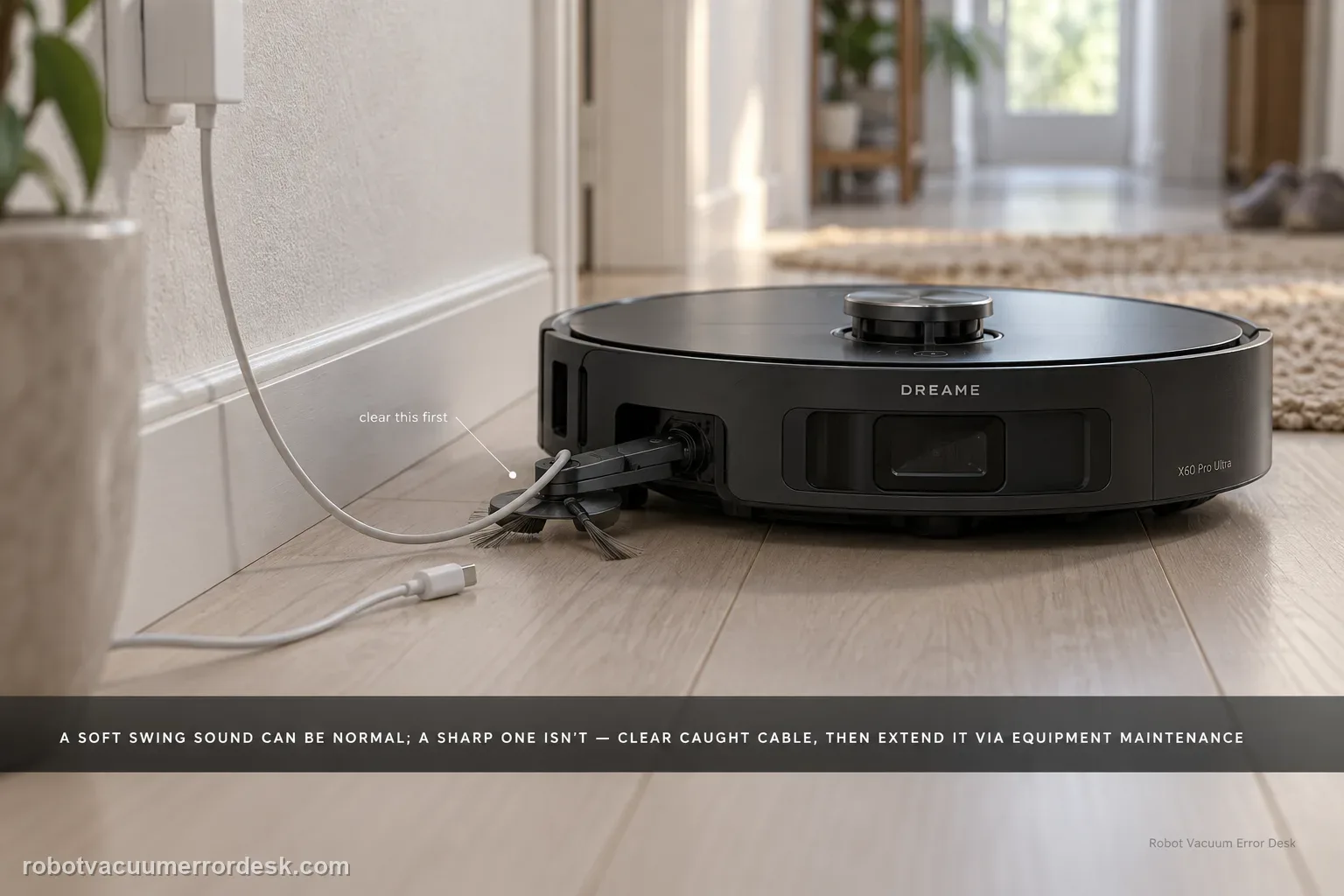
First decide whether the X60 arm is actually stuck. Dreame says a slight outward-swinging sound from the dual motors/gearboxes can be normal; a sharp abnormal sound is not. If a wire or rag is caught, stop the robot, clear loose floor hazards, then use Settings → Auxiliary Functions → Equipment Maintenance to extend the module far enough to remove the obstruction safely. If the arm remains extended after the obstruction is gone, Dreame provides App Settings → More Functions → Device Maintenance → Reset Mop → Retract. Do not force the linkage by hand when the app can command the mechanism.
Confirm the exact model and exact code, light pattern or symptom.
Run the lowest-risk physical or software check first.
Use each pass condition to decide what the result actually narrows down.
Is this the problem you’re seeing?
- The X60 side brush or mop extension catches a wire, rag, toy or other loose object and does not move normally afterward.
- The extension remains out after cleaning or after an obstruction has already been removed.
- You hear gear/mechanism noise and need to distinguish the light normal swing sound Dreame describes from a sharp abnormal sound.
- On a highly polished glazed floor, you see the mop stop rotating briefly before outward extension and are unsure whether that pause is a fault.
Likely root causes, ranked
A cable, rag or small object is physically tangled around the extending mechanism.
The module needs to be moved to maximum extension in Device Maintenance so the trapped material can be removed without pulling against the linkage.
The mop/extension state needs the documented Reset Mop → Retract command after the obstruction is cleared.
A light gearbox sound is normal mechanical movement and is being mistaken for a failure.
A sharp abnormal sound or persistent binding after the documented controls can indicate a motor/gearbox or linkage fault that is not an owner-force repair.
What the result narrows down
| What you observe | What it narrows down | Next move |
|---|---|---|
| Only a slight gear/swing sound; movement is smooth. | Dreame describes light dual motor/gearbox movement noise as normal. | Keep using it and watch for binding; do not disassemble a healthy mechanism. |
| A wire/rag is visibly caught while the arm can still be commanded. | This is an obstruction problem, not yet proof of a failed motor. | Stop cleaning, use Equipment Maintenance to expose the mechanism, and remove the obstruction without yanking the arm. |
| Obstruction is gone but the arm remains extended. | The mechanism may be out of its expected retract state. | Use Device Maintenance → Reset Mop → Retract and then retest on open floor. |
| Sharp noise, no movement or repeated binding after the reset. | The owner-level obstruction/reset path is exhausted. | Stop repeated cycling and send Dreame a video plus the maintenance-command results. |
| Arm works in open-floor retest but repeatedly catches the same loose cable/textile | The extension mechanism is functioning; the environment is recreating the obstruction. | Remove/route the loose item or exclude the hazardous spot instead of forcing the arm. |
Do not factory-reset by default. Use the exact model’s reboot/network-reset procedure only when the manufacturer path calls for it.
Checks to run, in sequence
Classify the symptom before touching the mechanism
Run only long enough to observe the problem safely. Dreame explains that the X60’s dual robotic arms use dual motors and gearboxes, so a slight outward-swinging sound can be normal mechanical gear movement. That is different from a sharp, abnormal sound, a visible snag, or an arm that refuses to retract. Also note a separate normal behavior on highly polished glazed floors: the software may stop mop rotation before outward extension and restart rotation afterward to reduce the chance of catching. Misclassifying those normal behaviors leads to unnecessary forcing or resets.
Stop cleaning and remove loose hazards around the arm
Before moving the extension module, clear the floor of loose wires, charging cables, rags, children’s toys, hard objects and sharp debris. These are the exact kinds of items Dreame warns can become tangled, scratched or knocked over. If a cable is already caught, do not pull the robot or extension arm against it; tension can turn a removable obstruction into a mechanical problem. Power/stop the cleaning task first so you are working on a stationary mechanism.
Use Equipment Maintenance to expose a trapped wire or object
For an obstruction that is difficult to reach, Dreame documents a maintenance path: Settings → Auxiliary Functions → Equipment Maintenance. From there you can manually operate the expansion module to its maximum extent, then remove the obstruction. Use the app command to position the mechanism rather than levering or twisting the arm by hand. Once the wire or rag is free, inspect the visible path for remaining strands or fragments before asking the arm to move again.
If it stays extended, use the documented retract command
When the extended arm itself will not retract after the path is clear, use Dreame’s specific reset path: App Settings → More Functions → Device Maintenance → Reset Mop → Retract. Run that command once and watch the arm rather than repeatedly cycling it. A successful commanded retract tells you the mechanism and control path can still complete the home position. If the app command produces no movement or a sharp noise, stop there; repeated attempts are not adding diagnostic information.
Retest on an open floor and compare extension/retraction behavior
After the obstruction or stuck state is cleared, run a short edge-cleaning task in an open area with no wires or loose textiles. Watch one extension and one retraction cycle. If you are testing on a high-polish glazed floor, remember Dreame’s documented pause-before-extension behavior can be normal. The proof you want is smooth commanded movement, not silence. If the arm binds again in an empty test area, record a close video showing the movement and sound and stop repeated cycling.
Contact Dreame if the X60 arm will not respond to Reset Mop → Retract after the obstruction path is clear, if it repeatedly binds in an empty test area, or if movement produces a sharp abnormal sound. Do not force the extension linkage, pry the arm inward, or open the dual motor/gearbox assembly. Send the video plus the exact maintenance command that failed.
Information to have ready for support
Support can skip the basic troubleshooting script when you provide a reproducible case. That keeps the results of your checks from getting lost.
- Exact model name and the error code / voice prompt exactly as shown
- A photo or screenshot of the app error and the time it occurred
- A short list of the checks already completed and what happened after each one
- Short video showing the failed docking, mapping or base-station behavior
- Firmware version shown in Dreamehome
Source and evidence level
Dreame X60 Pro Ultra — Extension Function Issues
Dreame’s exact extension-function article distinguishes normal light gearbox sound, a trapped wire/object and a stuck-extended state; it provides Equipment Maintenance and Reset Mop → Retract paths. The exact corner/baseboard article confirms the X60’s extended mop/side-brush functions and their intended cleaning role.
Additional official source: Dreame X60 Pro Ultra Complete — Corner and Baseboard Cleaning Functions ↗Last editorial review: September 5, 2026Regional note: manufacturer help centers, model suffixes, mains-power requirements and warranty procedures can differ by country. If the source redirects to a local support site, confirm that the model/hardware scope still matches before following a region-sensitive step.
This guide is rated Official model support. See what each evidence label means →
Common questions
Is a slight sound when the Dreame X60 extension arm swings outward a defect?
Not necessarily. Dreame says the X60’s dual robotic arms use motors and gearboxes, so a light outward-swinging gear sound can be normal. The stronger warning signs are a sharp abnormal sound, visible binding or loss of motion. Judge movement as well as noise and do not open the gearbox just to make a healthy mechanism quieter.
How do I remove a wire trapped around the X60 extension arm?
Stop the cleaning task and remove tension from the wire first. Dreame says Settings → Auxiliary Functions → Equipment Maintenance can move the expansion module to its maximum extent, giving access to the obstruction. Use the app control to position the mechanism instead of pulling the arm sideways, then clear the surrounding floor before commanding another extension/retraction cycle.
What app command retracts an X60 arm that stays extended?
Dreame documents App Settings → More Functions → Device Maintenance → Reset Mop → Retract for an extended arm that will not return after the obstruction path is clear. Run the command once and watch the movement. If the arm produces a sharp sound, does not move or binds again on open floor, stop repeated cycling and record the result for support.
Why can the X60 mop pause before extending on a polished floor?
Dreame says the software can stop mop rotation before outward extension on highly polished glazed flooring and restart rotation after the extension finishes. That pause is designed to reduce catching and is considered normal. It should not be confused with an arm that remains extended, cannot retract or repeatedly binds after a wire or other obstruction has been removed.
When is an X60 extension-arm problem ready for Dreame support?
Escalate when the visible path is clear, Equipment Maintenance can no longer resolve the obstruction state, Reset Mop → Retract fails, or the arm repeatedly binds or makes a sharp sound in an empty test area. Send a close video plus the exact maintenance command that failed. Do not pry the arm inward or open the dual motor/gearbox assembly.
Did this diagnostic narrow the fault?
Use this as an editorial signal, not a popularity counter. If a feedback address is configured you can email the note; otherwise you can copy it for your own support record.