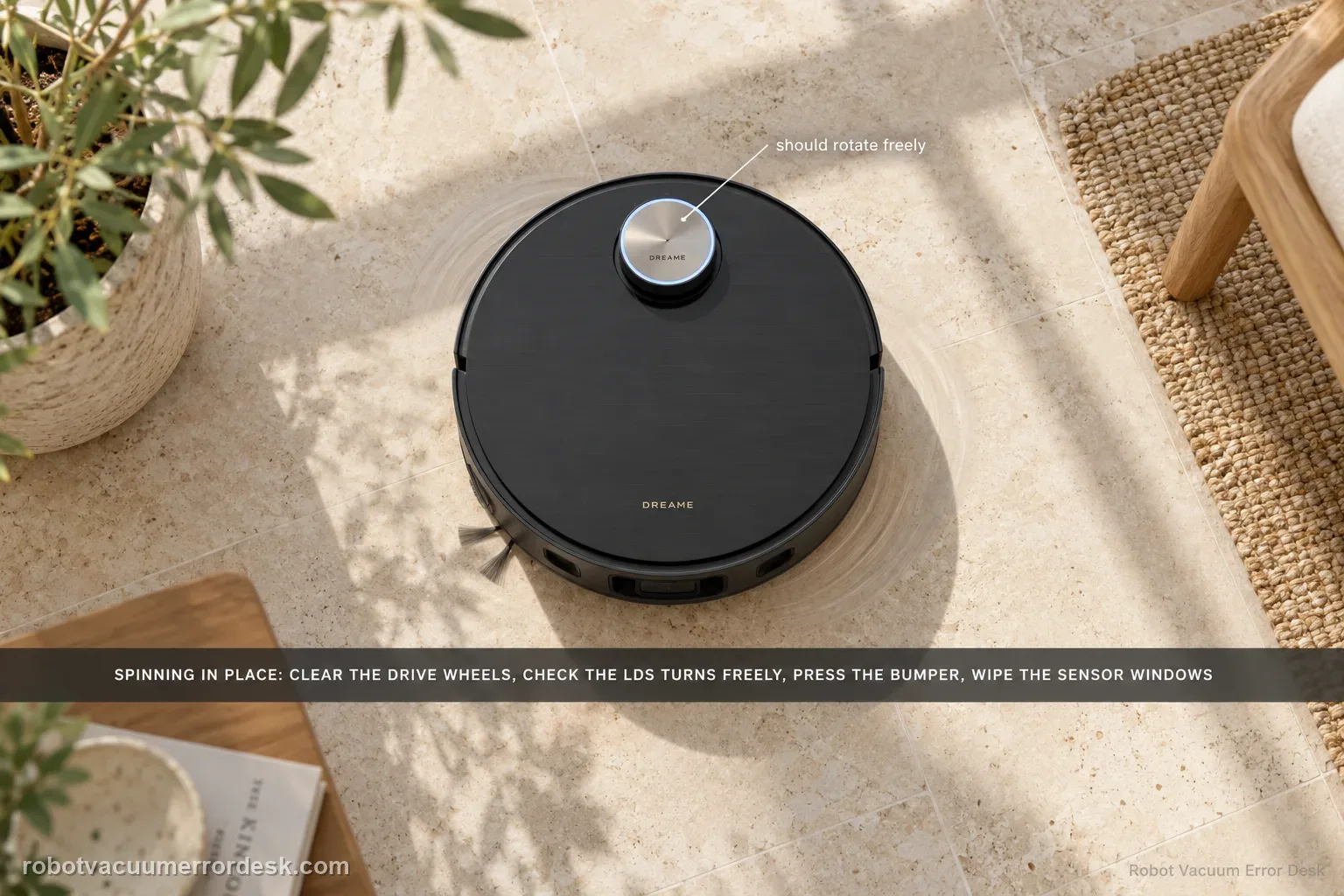
Dreame’s exact X50 article gives a seven-check path for a robot that spins or keeps turning in the same place. Start with foreign material around the drive wheel, then confirm the LDS is rotating and that its upper cover rebounds normally. Check for hair/debris in the LDS rotating area and for a lifted/cocked sticker or larger object on the robot’s top surface. Then press the impact plate/bumper to confirm it rebounds and wipe the line-laser and AI-identification sensor windows clean. Restart only after those physical states are known. This is not the same intent as ‘map will not save’: a circling robot has a live movement/localization problem, while a map-save problem can occur after otherwise normal driving. Do not force the retractable LDS tower or dismantle a drive wheel. If the X50 still spins after the documented checks, preserve a short video and escalate.
Confirm the exact model and exact code, light pattern or symptom.
Run the lowest-risk physical or software check first.
Use each pass condition to decide what the result actually narrows down.
Does this match your problem?
- The X50 spins or cleans in circles instead of progressing through the room.
- The robot repeatedly turns in place and may pause automatically during operation.
- You can reproduce the circling on a clear, dry test area rather than only beside one obstacle.
- The symptom appears to involve drive-wheel freedom, LDS behavior, bumper rebound or front sensor contamination.
- The robot moves abnormally now; this is distinct from a map that fails to save after a normal route.
Most likely causes
Foreign object or hair is wound around a drive wheel and changes left/right travel
LDS is not rotating normally or the upper cover does not rebound as expected
Hair/debris is interfering with the rotating part of the LDS
A lifted/cocked sticker or larger object on the robot surface interferes with the LDS/top area
Impact plate/bumper is not rebounding freely
Dust or fingerprints on line-laser or AI-identification sensors degrade navigation input
What your test result means
| What you observe | What it narrows down | Next move |
|---|---|---|
| Circle disappears after clearing one drive wheel | Asymmetric wheel obstruction was materially changing robot motion. | Monitor that wheel and avoid unrelated map/LDS changes. |
| LDS does not rotate/rebound normally | Localization hardware/mechanics is now the stronger branch. | Use the exact LDS malfunction or raise/lower path; do not force the tower. |
| Bumper remains pressed or fails to rebound | Robot may be receiving a persistent collision input. | Clear visible seam debris and escalate if rebound cannot be restored without disassembly. |
| Circling stops after dry sensor-window cleaning | Contaminated navigation optics were likely contributing. | Keep line-laser/AI windows clean with the manual’s soft dry-cloth method. |
| Same circle repeats after all seven checks and restart | Documented owner-level causes are exhausted. | Send Dreame a clear movement video and stop before wheel/LDS disassembly. |
Do not factory-reset by default. Use the exact model’s reboot/network-reset procedure only when the manufacturer path calls for it.
Run these checks in order
Reproduce the circling on a clear dry area
Move the X50 to an open, dry section of hard flooring and start a short controlled task. Remove loose cords, slippers and obvious obstacles so a single trapped object does not masquerade as a robot-wide navigation fault. The manual separately notes that slippery wet surfaces can make the main wheel slip and produce abnormal movement, so dry the test area before judging wheel/LDS behavior. Record whether the robot truly turns around the same point or simply avoids one obstacle. A repeatable open-area circle justifies the exact Dreame checks that follow.
Check both drive wheels for winding or foreign material
Dreame’s first exact-model check is whether a drive wheel is wound with a foreign object. With the robot stopped, inspect the accessible wheel edges/tread for hair, thread or debris that could make one side travel differently from the other. Remove only visible owner-accessible material; do not open the wheel module. Gently compare normal spring travel where the design allows without forcing anything. Retest in the same open area so you can tell whether clearing one wheel restores straight movement instead of mixing the result with a new floor or map state.
Confirm the LDS is rotating and the upper cover rebounds
Dreame next asks owners to confirm whether the LDS rotates normally and to lightly touch the upper cover of the LDS sensor to check whether the rebound is normal. Observe from outside; do not grab or force the mechanism. The X50 uses a retractable VersaLift sensor, so an abnormal physical raise/lower state may belong in the dedicated LDS-raise/lower guide. Here, the question is whether the localization sensor is operating and its cover is mechanically free enough during the circling event.
Clear visible hair or debris around the LDS rotating area
Dreame specifically says foreign objects or hair in the rotating part of the LDS can cause poor rotation or stopping. Inspect the exposed perimeter and clean only what is reachable without removing covers. Do not insert tools into the mechanism or manually spin/raise the tower against resistance. If you find material, remove it gently and retest the same open-area route. A change from circling to normal forward travel after that cleaning is meaningful; continuing to manipulate a stuck mechanism after the visible debris is gone is not.
Remove lifted stickers or large objects from the top surface
Dreame’s exact circling article includes an unusual but model-specific check: confirm there is no uneven/cocked sticker or larger object on the machine surface. Inspect anything added after purchase, protective film that has lifted, or debris sitting near the top sensor area. Remove only nonessential external material that could interfere with motion or sensing. Do not peel required labels or disassemble the cover. Retest after restoring a clean external surface, because this is a separate discriminator from dirty optical sensor windows.
Confirm bumper/impact plate rebound
Dreame tells owners to tap the impact plate and confirm it is in a rebound state. Press the bumper/impact plate gently at several accessible points and make sure it returns rather than staying mechanically held in. A bumper stuck as if it is continuously contacting an obstacle can make navigation logic behave abnormally. Remove only visible debris around the seam. Do not pry the bumper off. Repeat the open-area test after it rebounds freely so you can distinguish a stuck collision input from an LDS or wheel issue.
Wipe the line-laser and AI-identification sensor windows
Dreame’s sixth check is to wipe the line-laser sensor and AI-identification sensor so fingerprints or dust are not blocking them. The X50 manual’s routine maintenance likewise says to wipe robot sensors with a soft, dry cloth and warns that a wet cloth can damage sensitive elements. Use that dry method on the visible sensor windows, not spray cleaner. Then run the same short test. If the route normalizes only after sensor cleaning, keep those windows on the maintenance list rather than changing map settings at random.
Restart once, then escalate a persistent circle
After the wheel, LDS, top-surface, bumper and sensor checks, Dreame’s final owner step is to restart the robot. Perform one normal restart and repeat the same open-area test. If it still turns in place, capture a video that includes the LDS, both drive sides and bumper behavior if possible, plus the app/voice message. Do not force the retractable tower, remove wheel modules or factory-reset solely because the robot circles. A repeat after all seven documented checks is a stronger service case than a pile of unrelated resets.
Escalate if the X50 still spins in place on a clear dry surface after accessible wheel debris is removed, LDS rotation/rebound is checked, visible LDS debris/top interference is cleared, bumper rebound is normal, line-laser/AI sensor windows are clean and the robot has been restarted. Send a short video plus any error message. If the LDS specifically cannot raise/lower or reports an LDS malfunction, switch to that exact support branch rather than forcing the tower.
What to collect before contacting support
Give support a reproducible case instead of “it doesn’t work.” That reduces repeated basic troubleshooting and preserves the clues from your tests.
- Exact model name and the error code / voice prompt exactly as shown
- A photo or screenshot of the app error and the time it occurred
- A short list of the checks already completed and what happened after each one
- Short video showing the failed docking, mapping or base-station behavior
- Firmware version shown in Dreamehome
Manufacturer evidence
Dreame X50 Ultra Complete — Robot Keeps Turning in the Same Place
Dreame’s exact X50 article prescribes seven checks: drive-wheel foreign objects, LDS rotation and upper-cover rebound, hair/debris in the rotating LDS area, lifted/cocked stickers or larger top-surface objects, impact-plate rebound, clean line-laser/AI-identification sensors, then restart. The manual supports dry sensor cleaning and notes wet/slippery floors can cause abnormal wheel movement.
Additional official source: Dreame X50 Ultra User Manual ↗Last editorial review: September 5, 2026Regional note: manufacturer help centers, model suffixes, mains-power requirements and warranty procedures can differ by country. If the source redirects to a local support site, confirm that the model/hardware scope still matches before following a region-sensitive step.
This guide is rated Official model support. See what each evidence label means →
FAQ
Why does my Dreame X50 keep spinning in circles?
Dreame’s exact X50 article does not reduce circling to one cause. It checks drive-wheel winding first, then LDS rotation/rebound and debris, top-surface interference, bumper/impact-plate rebound, and line-laser/AI sensor cleanliness before a restart. That sequence is useful because unequal wheel movement, bad localization input and a stuck collision input can all produce similar-looking turns.
Can a dirty sensor make the X50 turn in place?
Yes, sensor contamination is one of Dreame’s documented checks. The exact article says to wipe the line-laser and AI-identification sensors to remove fingerprints or dust. The manual says robot sensors should be cleaned with a soft, dry cloth and warns that a wet cloth can damage sensitive elements. Retest on the same clear floor after cleaning to prove the effect.
Should I manually raise or spin the X50 LDS tower?
No. For the circling path, Dreame only asks you to observe normal LDS rotation, lightly check upper-cover rebound and remove visible hair or debris around the rotating area. If the retractable LDS specifically cannot raise/lower or reports a malfunction, use the dedicated exact-model guide. Forcing the tower can turn a diagnostic state into physical damage and is not an owner step here.
Could a wet floor cause strange X50 movement?
The X50 manual says slippery wet surfaces can make the main wheel slip, and its troubleshooting recommends drying wet areas before use. That is why the circling test should be repeated on a clear, dry hard-floor area. If the behavior disappears there, the environment is a stronger explanation than a robot-wide LDS fault, and you should not rush into resets or service.
When is X50 circling different from a map-not-saving problem?
Circling is a live movement/localization symptom: the robot repeatedly turns instead of progressing. A map-not-saving problem can happen even after a mostly normal route when the task, base position or return/save cycle is interrupted. If the X50 drives normally but the map disappears afterward, use the map-save path. If it cannot navigate straight now, diagnose wheels/LDS/bumper/sensors first.
Did this diagnostic narrow the fault?
Use this as an editorial signal, not a popularity counter. If a feedback address is configured you can email the note; otherwise you can copy it for your own support record.