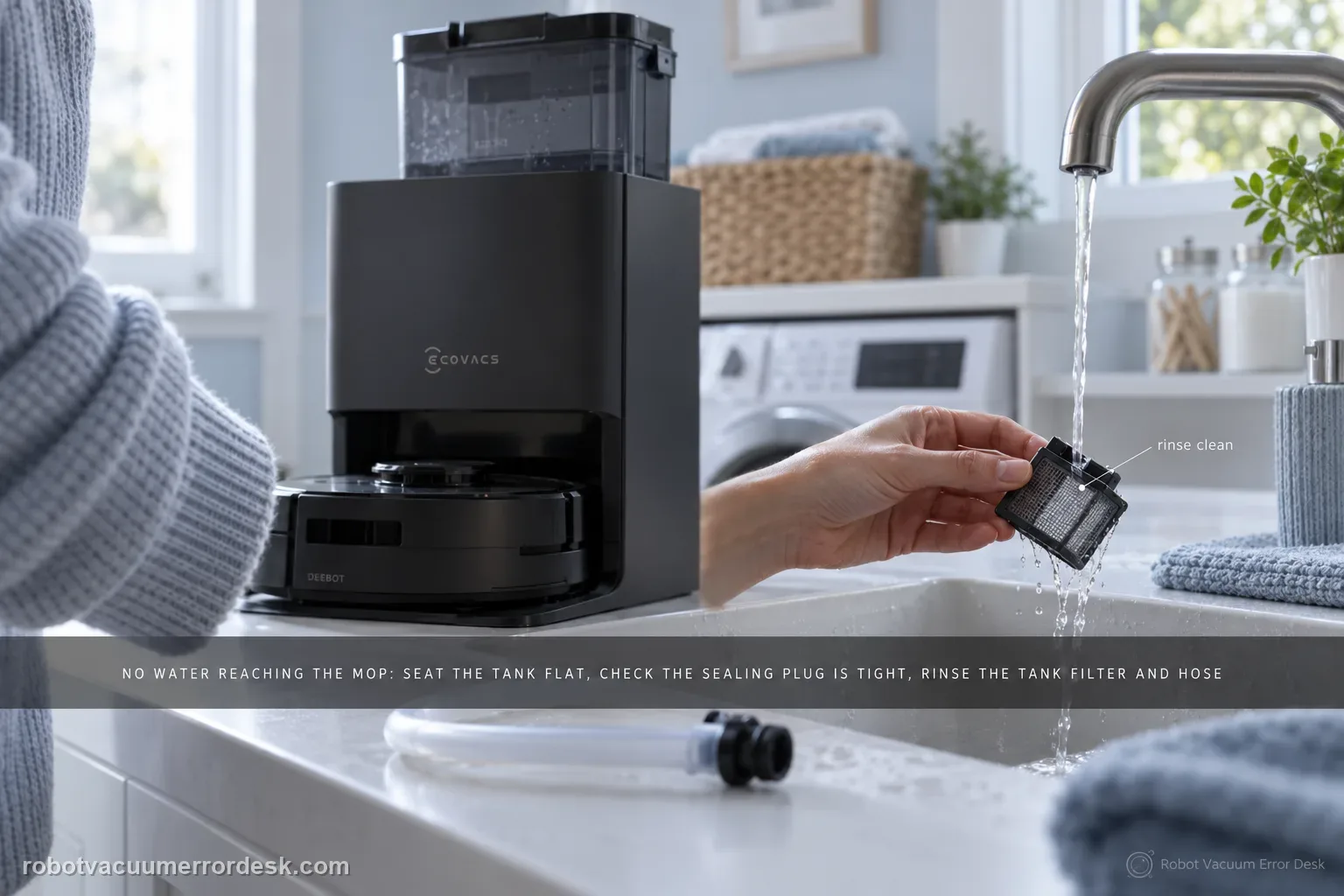
When the T80 OMNI has a recognized clean-water tank but no fresh water reaches mopping or station self-cleaning, troubleshoot the removable water path before assuming a pump failure. ECOVACS tells owners to seat the tank flat with no object trapped between tank and station, confirm the station sealing plug is fitted tightly, then remove the tank filter, disconnect the hose and rinse the filter with clean water. A separate Clean Water Tank Anomaly alert is a different branch that adds water level, float and lid checks.
Is the clean-water tank recognized and seated flat?
Confirm the exact model and exact code, light pattern or symptom.
Run the lowest-risk physical or software check first.
Use each pass condition to decide what the result actually narrows down.
Does this match your problem?
- The robot can start a mopping or station self-cleaning cycle but the wash path remains dry.
- The clean-water tank is installed and not obviously empty, yet no fresh water is delivered from the station.
- You recently removed the tank filter or hose for maintenance and dispensing stopped afterward.
- The symptom is missing water flow, not primarily a Clean Water Tank Anomaly voice/app alert.
- Water flow changes when the tank is re-seated, suggesting the problem may be seating, sealing or the removable inlet path rather than an internal pump.
Most likely causes
Debris under or behind the clean-water tank prevents it from sitting flat in the station
The station-side sealing plug is missing, loose or not fitted squarely against the tank interface
The removable clean-water filter is loaded with residue and restricts flow
The small hose/filter connection was left loose, kinked or incompletely reconnected after cleaning
The tank is actually triggering a level/float/lid anomaly that should be diagnosed with the separate tank-anomaly procedure
An internal station valve or pump fault remains after the entire owner-serviceable water path passes
What your test result means
| What you observe | What it narrows down | Next move |
|---|---|---|
| Tank will not sit flat | Physical seating is not proven, so flow testing is premature. | Remove the tank, clear the mating area and reinstall without forcing it. |
| Tank sits flat but sealing plug is loose | The station may not form the intended water connection. | Re-fit the sealing plug firmly and repeat a self-cleaning water-flow test. |
| Flow failed after filter/hose maintenance | A dirty filter or poor reconnection is more likely than a sudden pump failure. | Rinse the filter, reconnect the hose fully and secure the tank before retesting. |
| App/voice says Clean Water Tank Anomaly | This is a recognition/level/float branch, not just a no-flow branch. | Use the T80 clean-water-tank anomaly guide and verify water, float, lid and seating. |
| No water after seating, plug and filter/hose checks | The owner-serviceable path is exhausted. | Record a station self-cleaning test and contact ECOVACS rather than opening the base. |
Do not factory-reset by default. Use the exact model’s reboot/network-reset procedure only when the manufacturer path calls for it.
Run these checks in order
Confirm you are diagnosing no flow, not a tank-recognition alert
Start a mopping or station self-cleaning action and note the exact app or voice message. This path applies when ECOVACS HOME or the robot shows no fresh-water delivery during mopping/self-cleaning. If the robot instead says the clean-water tank is missing, low or abnormal, the T80 support library has a separate path involving refill level, float movement and lid seating. Keeping those two symptoms separate matters because a pump-path test cannot tell you whether the station is even recognizing the tank correctly.
Remove the tank and inspect the station mating surface
Lift out the clean-water tank and check the entire area where it sits. A small cap, cleaning-tool fragment, grit or warped placement can keep the tank from settling flat even when it looks installed from above. ECOVACS specifically tells owners to check for foreign objects between the water tank and station. Clean the mating surface, inspect the tank for obvious damage and lower it back into place without forcing one side down. The goal is a level, repeatable seat before you test any downstream water component.
Inspect the station sealing plug before opening the tank
Locate the clean-water tank sealing plug at the station interface and verify that it is present, correctly oriented and tightly fitted. This part is easy to overlook because the tank can appear fully installed while the water connection is not sealed as intended. Do not use improvised tape or sealant; if the plug is damaged or cannot be seated normally, preserve that observation for support. After correcting the fit, run a short self-cleaning attempt so you know whether this single variable restored flow.
Clean the removable filter and reconnect the hose carefully
Open the clean-water tank, remove the filter and disconnect the water hose as ECOVACS instructs. Rinse the filter with clean water until loose residue is gone; avoid poking the filter media with sharp tools. Reconnect the hose fully, reinstall the filter and secure the tank lid. Pay attention to hose routing so it is not pinched when the tank is closed. A dispensing failure that began after routine tank cleaning often comes from a reconnection or restriction that can be corrected here without any station disassembly.
Reinstall and run a controlled station self-cleaning test
Put the tank back on a clean mating surface and use the station's normal self-cleaning/wash action. Watch for actual fresh-water delivery rather than inferring success from pump noise alone. If flow returns, repeat once more after removing and reinstalling the tank to make sure the fix is not dependent on one lucky position. If the station remains dry, note whether you hear normal pump activity, whether any water appears and then stops, and whether the app raises a new tank-related message; each observation points to a different service branch.
Stop at the station boundary if the removable path passes
Once the tank sits flat, the sealing plug is correct, the filter is clean and the hose is fully connected, there is little owner-level value in opening the OMNI station to chase the internal pump. Instead, record a short video of the self-cleaning attempt and photograph the tank interface and filter/hose reconnection. Tell ECOVACS whether the station makes pump noise, whether any water moves at all and whether the clean-water-tank anomaly appears. That evidence is much safer and more useful than speculative internal disassembly.
Escalate when the tank is recognized and filled, the mating surface is clear, the tank sits flat, the station sealing plug is correctly fitted, and the removable filter/hose path is clean and reconnected, yet a controlled self-cleaning cycle still produces no fresh water. Do not open the station to probe a pump or valve. Send ECOVACS a video showing the dry self-cleaning attempt and state whether pump noise is present and whether any separate tank-anomaly message appears; those details separate an internal flow fault from a recognition problem.
What to collect before contacting support
Give support a reproducible case instead of “it doesn’t work.” That reduces repeated basic troubleshooting and preserves the clues from your tests.
- Exact model name and the error code / voice prompt exactly as shown
- A photo or screenshot of the app error and the time it occurred
- A short list of the checks already completed and what happened after each one
- Map/station screenshot when the problem involves return-to-station or mapping
Manufacturer evidence
ECOVACS T80 OMNI — Clean Water Not Dispensing
ECOVACS defines this exact T80 symptom as no fresh water during mopping/self-cleaning and directs owners through tank seating, station sealing plug, removable filter and hose. The separate Clean Water Tank Anomaly article adds the level/float/lid branch, which keeps a no-flow fault distinct from a tank-recognition alert.
Additional official source: ECOVACS T80 OMNI — Clean Water Tank Anomaly ↗Additional official source: ECOVACS T80 OMNI product support hub ↗Last editorial review: September 5, 2026Regional note: manufacturer help centers, model suffixes, mains-power requirements and warranty procedures can differ by country. If the source redirects to a local support site, confirm that the model/hardware scope still matches before following a region-sensitive step.
This guide is rated Official model support. See what each evidence label means →
FAQ
Why is my DEEBOT T80 OMNI not dispensing clean water even with a full tank?
A full tank does not prove the station has a usable water path. ECOVACS tells T80 owners to check that the tank sits flat, the station sealing plug is fitted tightly, and the removable filter/hose path is clean and reconnected. If those all pass and self-cleaning remains dry, the remaining fault belongs with ECOVACS service rather than more tank filling.
Is Clean Water Not Dispensing the same as the T80 Clean Water Tank Anomaly alert?
No. They overlap, but ECOVACS publishes separate procedures. The anomaly article checks water level, the float mechanism, lid latches and tank reinstallation. The no-dispensing article focuses on tank seating, the sealing plug, filter and hose. Use the exact app/voice symptom first so you do not spend time cleaning a filter when the station is actually failing to recognize the tank.
Can I rinse the DEEBOT T80 clean-water filter?
Yes. The official T80 no-dispensing procedure tells owners to remove the filter, disconnect the water hose and rinse the filter carefully with clean water before reinstalling it. Make sure the hose is fully reconnected and not kinked when the tank is closed. A clean filter with a poor hose connection can leave you with the same no-flow symptom.
What should I check if water stopped after I cleaned the tank?
Revisit the parts you touched: filter orientation, hose connection, tank lid, tank seating and the station sealing plug. A symptom that appears immediately after maintenance is more informative than a random failure because it points toward an incomplete reconnection or a tank that is no longer sitting flat. Retest one variable at a time instead of opening the station.
When should I stop DIY troubleshooting the T80 water path?
Stop after the owner-serviceable path is proven: correct symptom, filled/recognized tank, flat seating, correct sealing plug, clean filter and fully connected hose. If a controlled self-cleaning cycle still produces no fresh water, record the attempt and contact ECOVACS. Internal pump or valve work inside a mains-powered station is not an appropriate next step for a routine owner diagnostic.
Did this diagnostic narrow the fault?
Use this as an editorial signal, not a popularity counter. If a feedback address is configured you can email the note; otherwise you can copy it for your own support record.