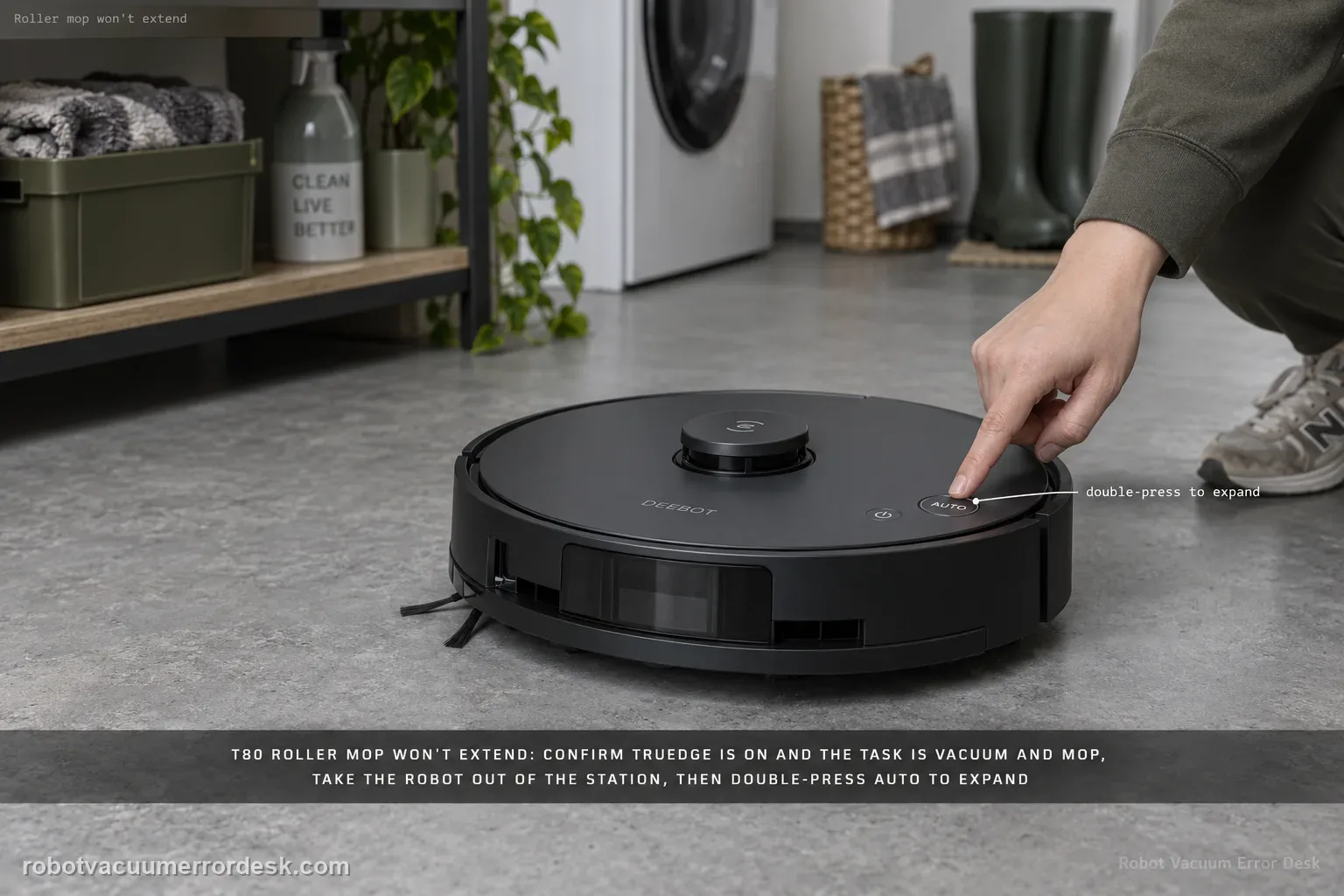
A T80 roller that will not extend should be treated as a conditions-and-mechanism problem, not immediately as a failed motor. ECOVACS says to confirm TruEdge Adaptive Edge Mopping is enabled and the task is in Vacuum and Mop mode, then check the roller for a debris jam. The companion roller guide adds two important installation facts: expansion mode is required for removal/installation, the robot should be outside the station when you double-press AUTO, and the roller must align to the motor until it clicks. Prove the settings, clean/reseat the roller, then run one repeatable edge pass.
Confirm the exact model and exact code, light pattern or symptom.
Run the lowest-risk physical or software check first.
Use each pass condition to decide what the result actually narrows down.
Does this match your problem?
- The T80 mops but the OZMO roller never extends outward near an edge.
- TruEdge behavior disappeared after an app setting change or a different cleaning mode was selected.
- The extension problem began after the roller was removed, cleaned or reinstalled.
- Hair/debris is present around the roller and may be preventing extension even without a specific Roller Mop Tangled alert.
- You need to distinguish expected non-extension in the wrong mode from a mechanism that fails under the correct settings.
Most likely causes
TruEdge Adaptive Edge Mopping is disabled in the robot advanced settings
The current task is not Vacuum and Mop, so the robot has no reason to deploy the mopping edge behavior
Hair or debris jams the roller/extension path
The roller was reinstalled without fully aligning and clicking into the motor-side connection
The extension was tested while the robot was inside the station, contrary to the service-position instructions
An extension-drive fault remains after settings, cleaning and seating are proven
What your test result means
| What you observe | What it narrows down | Next move |
|---|---|---|
| TruEdge is off | Non-extension may be expected configuration, not hardware failure. | Enable TruEdge Adaptive Edge Mopping and start a new controlled edge test. |
| Task is Vacuum-only or another non-mop mode | The roller extension condition is not being requested. | Switch to Vacuum and Mop for the diagnostic. |
| Roller is jammed or hard to remove | Mechanical debris can block extension. | Use the documented extension/removal path, clean the roller and inspect the cavity. |
| Problem began after roller maintenance | Incorrect motor-side seating is plausible. | Reinstall in expansion mode until the roller clicks into place. |
| Correct settings + clean clicked roller still never extends | The owner-serviceable causes are exhausted. | Film one edge pass with settings visible and contact ECOVACS. |
Do not factory-reset by default. Use the exact model’s reboot/network-reset procedure only when the manufacturer path calls for it.
Run these checks in order
Verify TruEdge Adaptive Edge Mopping is actually enabled
Open the T80's advanced settings in ECOVACS HOME and locate TruEdge Adaptive Edge Mopping. ECOVACS lists this as the first exact-model check for a roller that will not expand. If it is off, turn it on and start a fresh task; do not judge the old run because its behavior was produced under a different configuration. Save a screenshot of the setting before the test. That screenshot also becomes useful evidence later if the roller still never deploys despite the feature being enabled.
Use Vacuum and Mop mode for the diagnostic
Confirm the cleaning mode is Vacuum and Mop. A vacuum-only task cannot prove that edge-mopping extension is broken, because the system is not being asked to mop. Keep the first test simple: one accessible hard-floor edge, no carpet transition and no dense clutter. This removes other mode decisions from the result and lets you observe whether the roller attempts to move outward when the conditions clearly call for mopping near an edge.
Check for a jam using the documented expansion position
Move the robot out of the station. If you need to remove the roller, double-press AUTO so the roller component extends, then use the release latch. ECOVACS' removal guide warns that expansion mode is required for removal/installation and not to double-press AUTO inside the station. Clean hair and debris from the roller and accessible cavity. If the robot shows the specific Roller Mop Tangled alert, follow the fuller tangle procedure because it includes the cavity and bearing check.
Reinstall the roller until the motor-side connection clicks
Reattach the roller end cover, align the roller with the motor and push inward until the click confirms correct installation. A roller that sits loosely in the cavity can look clean but still fail to couple properly to the drive/extension behavior. Do not force a roller that will not align; remove it and inspect the ends again. After the click, use AUTO to return the component to its normal position and reinstall the dirty-water box if it was removed for cleaning.
Run one edge pass and watch the exact condition for extension
Start a short Vacuum and Mop run with TruEdge enabled beside a clean, accessible wall edge. Watch the roller rather than assuming extension from the path line in the app. If it extends during some edges but not others, note the surface and obstacle context; that is different from a mechanism that never attempts to deploy. Do not change three settings between passes. One repeatable edge route gives you a clean before/after result after the roller was cleaned and seated.
Escalate a settings-proven mechanism failure
If TruEdge is on, Vacuum and Mop is selected, the roller/cavity is clean and the roller clicks into the motor connection, yet the component never extends on a simple hard-floor edge, save the settings screenshot and a short video of the run. Do not open the extension motor or pry the assembly outward. Tell ECOVACS whether the roller rotates normally while mopping and whether it can be extended/retracted for service with the double-AUTO sequence; that distinction helps separate edge-deployment logic from a broader roller mechanism fault.
Contact ECOVACS when TruEdge Adaptive Edge Mopping is enabled, the test is Vacuum and Mop, the roller/cavity is clean, the roller is correctly seated with a click, and a simple hard-floor edge pass still never produces extension. Escalate sooner if the service-position extension itself cannot move normally without force. Send a screenshot of the two required settings and a video of the edge pass; do not pry the roller outward or open the extension drive.
What to collect before contacting support
Give support a reproducible case instead of “it doesn’t work.” That reduces repeated basic troubleshooting and preserves the clues from your tests.
- Exact model name and the error code / voice prompt exactly as shown
- A photo or screenshot of the app error and the time it occurred
- A short list of the checks already completed and what happened after each one
- Photo or short video of the roller/tray/sensor state plus the exact app alert
Manufacturer evidence
ECOVACS T80 OMNI — Roller Mop Will Not Expand
ECOVACS' exact T80 non-extension article lists TruEdge Adaptive Edge Mopping, Vacuum and Mop mode and roller debris as the first checks. The T80 removal guide adds the required expansion-mode service position and motor-side click; the tangle article covers the deeper cavity/bearing branch if a jam is present.
Additional official source: ECOVACS T80 OMNI — roller mop removal and installation ↗Additional official source: ECOVACS T80 OMNI — Roller Mop Tangled ↗Additional official source: ECOVACS T80 OMNI product support hub ↗Last editorial review: September 5, 2026Regional note: manufacturer help centers, model suffixes, mains-power requirements and warranty procedures can differ by country. If the source redirects to a local support site, confirm that the model/hardware scope still matches before following a region-sensitive step.
This guide is rated Official model support. See what each evidence label means →
FAQ
Why won't the DEEBOT T80 roller mop extend near the wall?
Check the two conditions ECOVACS names first: TruEdge Adaptive Edge Mopping must be enabled and the task must be Vacuum and Mop. Then inspect the roller for debris. If the problem began after maintenance, remove/install the roller in expansion mode and make sure it clicks into the motor-side connection before testing a simple hard-floor edge again.
Does the T80 roller extend in Vacuum-only mode?
That is not the correct mode for diagnosing edge-mop extension. ECOVACS specifically tells owners to check that cleaning mode is Vacuum and Mop when the roller will not expand. Use that mode with TruEdge enabled so the robot is actually being asked to mop the edge. Otherwise non-extension may be expected behavior rather than a failure.
How do I reinstall the T80 roller mop correctly after cleaning?
Move the robot out of the station and use the double-AUTO expansion position for service. Reattach the end cover, align the roller with the motor and push inward until the click confirms installation. ECOVACS says expansion mode is required for removal and installation. If the roller will not align without force, remove it and inspect the ends/cavity again instead of pushing harder.
Is 'roller will not expand' the same as Roller Mop Tangled?
No. Debris can contribute to both, but ECOVACS publishes a specific tangle procedure that goes deeper into removing the roller, cleaning the cavity and checking bearing movement. A non-extension case first checks TruEdge and Vacuum and Mop mode. If the app reports the explicit tangle alert, use that dedicated sequence so you do not skip the cavity/drive checks.
When should I send a T80 non-extension problem to ECOVACS?
After you can show TruEdge enabled, Vacuum and Mop selected, a clean correctly seated roller and a controlled hard-floor edge pass in which the roller still never deploys. Send the settings screenshot and video. Also tell support whether the roller can extend/retract for service with double-AUTO and whether it rotates normally during mopping; those details narrow the extension mechanism branch.
Did this diagnostic narrow the fault?
Use this as an editorial signal, not a popularity counter. If a feedback address is configured you can email the note; otherwise you can copy it for your own support record.