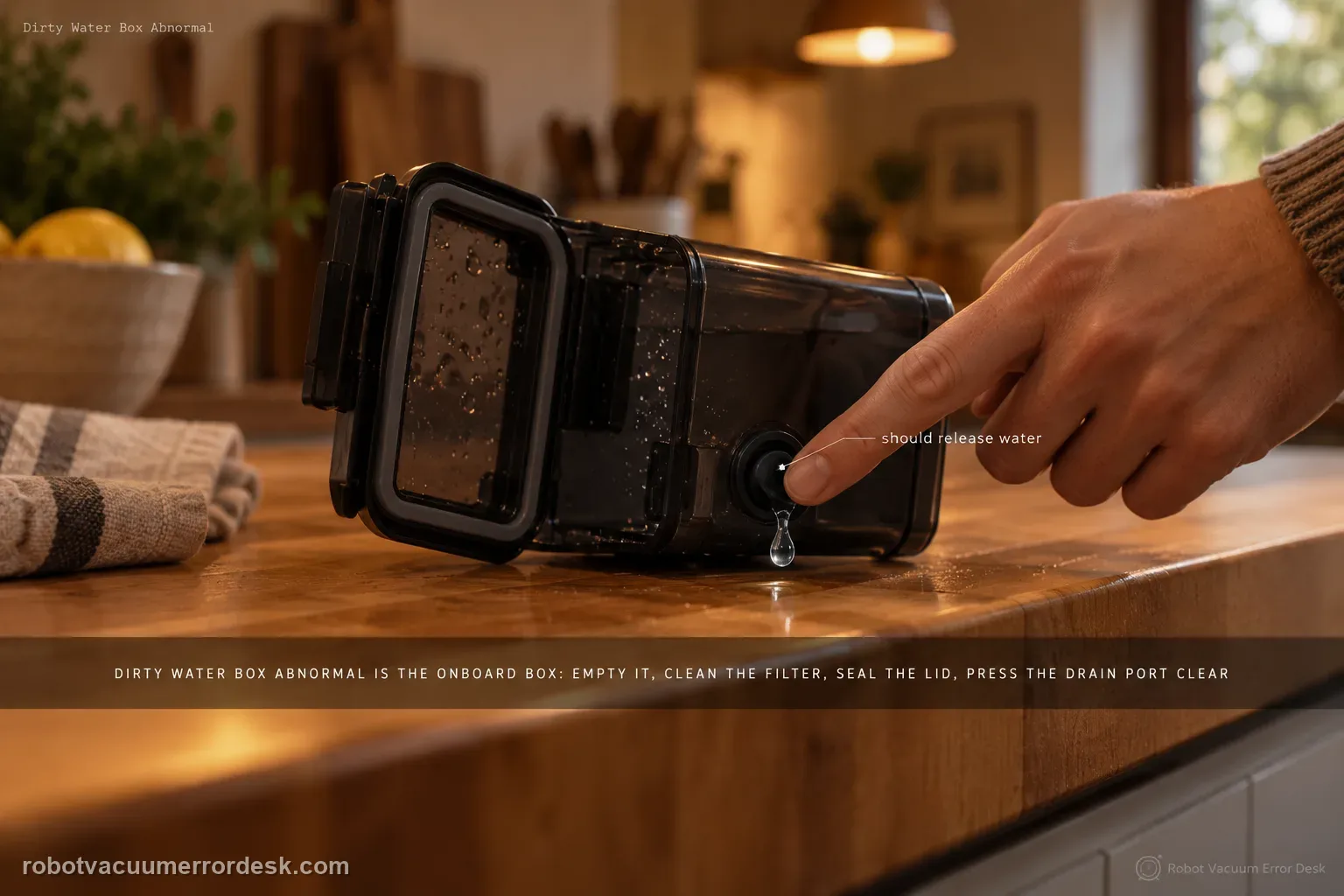
ECOVACS’ T80 Dirty Water Box Abnormal alert refers to the robot’s onboard Dirty Water Box, not the station’s larger Dirty Water Tank. Remove the onboard box, empty it, clean its filter and close the lid firmly for a tight seal. Then press the drain port: if the box contains water, pressing the port should release water; clean that port with a brush if it is blocked. The manufacturer adds a mechanical station test: press the charging contacts on the base’s right side for 1–2 seconds, release them and check whether the drain rod moves up/down smoothly. The same T80 support set also shows how to clean/reseat the dirty-water box and water tray, including the positive “click” on reinstallation.
Confirm the exact model and exact code, light pattern or symptom.
Run the lowest-risk physical or software check first.
Use each pass condition to decide what the result actually narrows down.
Confirm this is the right issue
- The T80 OMNI reports “Dirty Water Box Abnormal.”
- The dirty-water box is full/dirty, the filter is contaminated, or the lid may not be sealing firmly.
- Wastewater does not leave the box normally when the drain port is pressed.
- You need to check whether the station drain rod moves freely rather than guessing at a pump failure.
- The alert returns after emptying the box and you want a repeatable reseat/cleaning test.
What’s most likely causing this
Dirty-water box/filter needs cleaning or box remains full
Lid is not firmly closed enough to maintain the expected seal
Drain port is blocked and does not release water when pressed
Drain rod in the base does not move smoothly through its expected travel
Dirty-water box or water tray is not correctly reinstalled after cleaning
Persistent station drainage/sensing fault after owner-accessible checks pass
Reading your test result
| What you observe | What it narrows down | Next move |
|---|---|---|
| Box/filter is dirty or lid is loose | The manufacturer starts with cleanliness and a tight lid seal. | Empty/clean the box and filter, then close the lid firmly before any mechanical station test. |
| Pressing the drain port does not release water from a water-containing box | The port itself may be obstructed. | Clean the drain port with a brush and retest its release action. |
| Right-side station contact test does not produce smooth drain-rod movement | The mechanical drain actuation is not behaving as ECOVACS describes. | Document the rod behavior and escalate rather than forcing or opening the station. |
| Port/rod work but alert returns after a clicked-in reseat | Owner-accessible cleaning/actuation checks are passing. | Record the alert plus box/tray installation and contact ECOVACS for station drainage/sensor diagnosis. |
| Box is clean but the drain port does not release water when checked | The owner-accessible drain path may still be obstructed even though the container itself looks clean. | Clean the drain port carefully, reinstall the box, and repeat one controlled station cycle before escalating. |
Do not factory-reset by default. Use the exact model’s reboot/network-reset procedure only when the manufacturer path calls for it.
Work through these checks in order
Empty the dirty-water box and clean its filter
Press the blue release button, remove the dirty-water box and open its top cover. ECOVACS’ T80 cleaning guide says to dump the wastewater, remove the filter and clean both the filter and the box; a cleaning tool can be used for the accessible residue. This is more than cosmetic maintenance because the Dirty Water Box Abnormal alert specifically begins with emptying the box and cleaning the filter. Reinstall the filter only after the owner-accessible parts are clean. Avoid reaching into powered station internals while wastewater is present.
Close the lid firmly and verify the box reseat
Close the dirty-water box lid firmly so it can make the tight seal ECOVACS calls for in the alert article. Then reinstall the box in the robot under the top cover. The T80 cleaning guide says a “click” indicates the box installation is in place. Use that positive seating cue rather than assuming a box is installed because it looks flush. If the lid will not sit flat or the box will not click into position, keep the diagnosis on the mechanical fit/seal branch and do not proceed as though the drain system has been proven.
Test and clean the drain port
With water in the box, press the drain port as ECOVACS directs. The support article says that pressing the port should release water. If it does not, clean the port with a brush and repeat the test. This gives you a simple owner-accessible flow check before blaming the station pump: a blocked port can prevent normal wastewater transfer even when the onboard box itself is correctly seated. Use a container/towel for the released water and keep the test controlled. Do not probe the port with sharp metal tools that could damage the seal.
Run the ECOVACS drain-rod movement check
ECOVACS adds a specific T80 station test: press the charging contacts on the right side of the base for about 1–2 seconds, release them and check whether the drain rod moves up and down smoothly. Follow the manufacturer’s described owner test only; do not dismantle the powered base or try to force the rod with tools. A smooth movement result shifts suspicion back toward box sealing/flow or sensing. A rod that does not move smoothly is useful service evidence because the mechanical actuation is not matching the documented behavior.
Clean/reseat the water tray and run one controlled drain cycle
If the box, port and drain rod pass, inspect the owner-accessible water tray because ECOVACS provides a T80 cleaning procedure for it. Double-press AUTO to extend the roller mop, release the blue latch, remove/clean the tray and filter, then reinstall the filter and tray until the expected click; double-press AUTO again to retract the rollers. ECOVACS warns that if you flip the robot for cleaning, remove the dirty-water box first to prevent leaks. After reassembly, run one controlled wash/drain cycle and watch whether the same alert returns.
Escalate if the Dirty Water Box Abnormal alert returns after the box/filter are clean, lid is tightly sealed, box clicks into place, drain port releases water and the drain rod moves normally—or immediately if the rod fails the ECOVACS movement test. Send a short video of the port test/rod behavior and a photo of the cleaned box/filter/tray. Do not open the powered station to chase an internal drainage fault.
Before you contact support, gather this
A reproducible case moves a support call past the basic troubleshooting script faster than “it doesn’t work” does, and it keeps the clues from your own tests on record.
- Exact model name and the error code / voice prompt exactly as shown
- A photo or screenshot of the app error and the time it occurred
- A short list of the checks already completed and what happened after each one
- Map/station screenshot when the problem involves return-to-station or mapping
Where this comes from
ECOVACS T80 OMNI — Dirty Water Box Abnormal
ECOVACS’ exact T80 alert page instructs owners to empty/clean the onboard dirty-water box and filter, seal the lid firmly, test/brush-clean the drain port and perform the 1–2 second right-side charging-contact test to verify smooth drain-rod movement. The official T80 Family manual diagrams the robot’s Dirty Water Box separately from the station Dirty Water Tank, while the maintenance pages add the positive click when reinstalling the box and the water-tray/filter cleaning procedure.
Additional official source: ECOVACS T80 OMNI — Clean the dirty water box ↗Additional official source: ECOVACS T80 OMNI — Clean the water tray ↗Additional official source: ECOVACS T80 Family — official English instruction manual ↗Last editorial review: September 5, 2026Regional note: manufacturer help centers, model suffixes, mains-power requirements and warranty procedures can differ by country. If the source redirects to a local support site, confirm that the model/hardware scope still matches before following a region-sensitive step.
This guide is rated Official model support. See what each evidence label means →
Questions people ask
What should happen when I press the DEEBOT T80 dirty-water box drain port?
ECOVACS says that when the dirty-water box contains water, pressing the drain port should allow water to release. If nothing comes out, the port itself may still be obstructed even after the box looks clean. Clear the port gently with a brush, reassemble the box, and run one controlled station cycle before treating the alert as a pump or electronics failure.
What is the 1–2 second charging-contact test for a T80 Dirty Water Box Abnormal alert?
On the T80 alert procedure, ECOVACS tells owners to press the station’s right-side charging contacts for about one to two seconds, release them, and observe whether the associated drain rod moves up and down smoothly. This is a movement check, not an instruction to dismantle the station. Abnormal or absent travel after the other cleaning checks is useful evidence for support.
Does the DEEBOT T80 dirty-water box have to click when I reinstall it?
The T80 dirty-water-box cleaning guidance says a click indicates that the box is installed in place. After emptying and cleaning the filter, close the lid securely and reseat the box until that normal installation cue is present. If the box does not seat normally, do not force it; inspect the lid, filter and mating surfaces for misalignment or debris first.
When should I stop troubleshooting a T80 Dirty Water Box Abnormal alert and call ECOVACS?
Escalate when the box and filter are clean, the lid seals correctly, the drain port is clear, the box seats normally, and the station-side drain-rod check still looks abnormal or the alert returns. Also stop if a mechanical part will not move normally without force. A short video of the box seating, alert and drain-rod response is more useful than repeated cleaning attempts.
Is the T80 Dirty Water Box the same part as the station Dirty Water Tank?
No. The official T80 Family manual labels a Dirty Water Box inside the robot and a separate Dirty Water Tank in the OMNI Station. This alert path is for the onboard box. If the station tank is full, missing or not seated, use the station-tank alert instead of applying the box drain-port and drain-rod procedure to the wrong component.
Did this diagnostic narrow the fault?
Use this as an editorial signal, not a popularity counter. If a feedback address is configured you can email the note; otherwise you can copy it for your own support record.