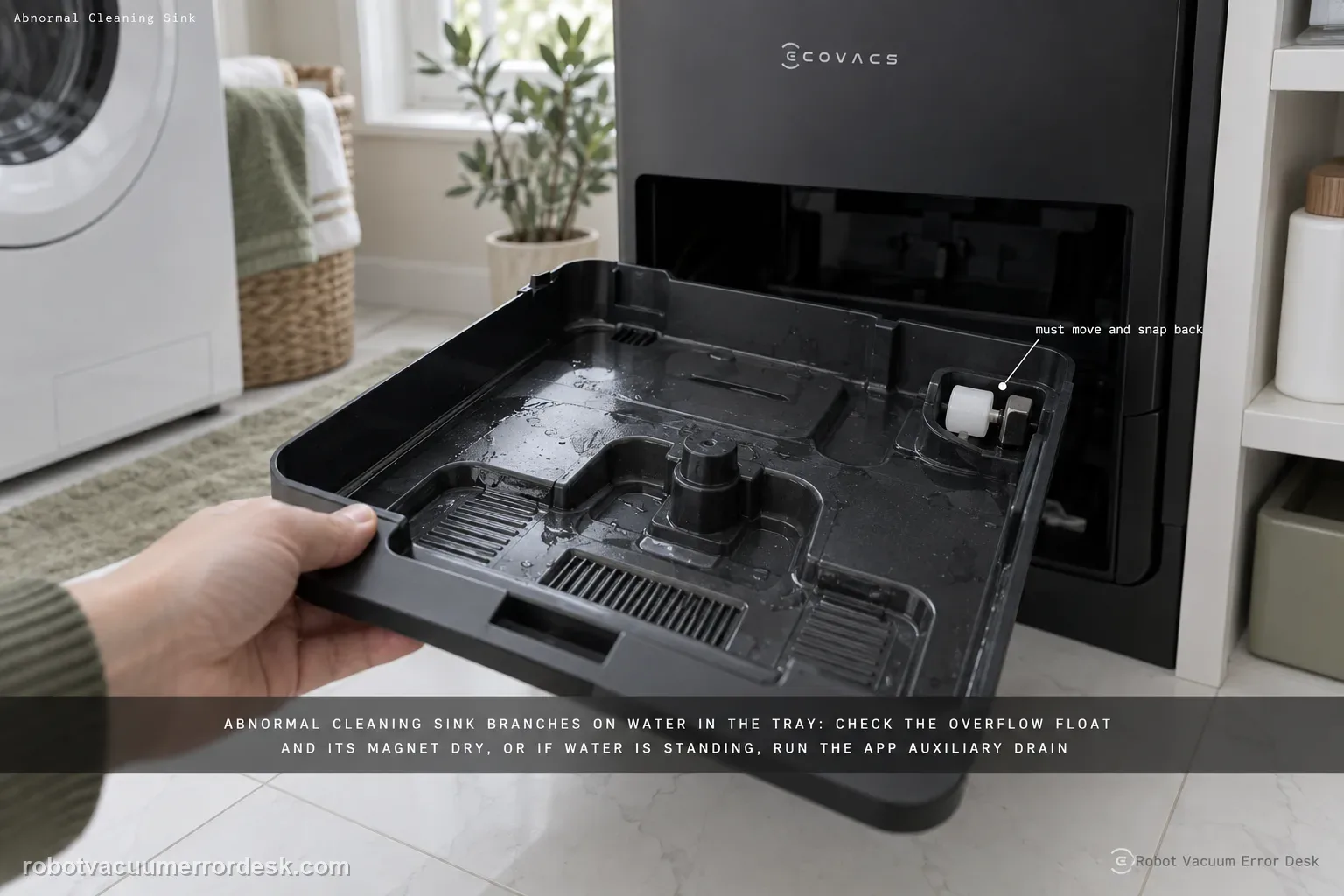
The X11 “Abnormal cleaning sink” alert branches on whether water is present in the mop-washing tray. First make sure the tray and overflow float are installed correctly and check the float magnet. If the tray is dry, clear any obstruction so the overflow float moves and snaps back. If water is standing in the tray, ECOVACS moves to dirty-water tank sealing, the tank-base plug, the app Auxiliary Drain function, tray cleaning/reinstallation and a station power-cycle before retesting drainage.
Confirm the exact model and exact code, light pattern or symptom.
Run the lowest-risk physical or software check first.
Use each pass condition to decide what the result actually narrows down.
Is this the problem you’re seeing?
- The station reports Abnormal cleaning sink during or after mop washing.
- Water remains in the mop washing tray or drainage appears inconsistent.
- The alert started after cleaning/reinstalling the tray, float or dirty-water tank.
- The station reports Abnormal cleaning sink while the tray is either unexpectedly dry or holding standing water.
- You need to choose the float/sensing branch for a dry tray or the dirty-water/drain branch for a wet tray.
Likely root causes, ranked
The mop-washing tray is not fully installed
The overflow float or its magnet is missing, obstructed or not moving freely
A dry tray is incorrectly being treated as a drain blockage instead of a float/sensing condition
Debris on the dirty-water tank sealing ring or connection plug prevents reliable drainage
Auxiliary Drain runs but standing water does not fall
A station drain/pump fault remains after tray cleaning, reseating and a station power cycle
What the result narrows down
| What you observe | What it narrows down | Next move |
|---|---|---|
| Mop-washing tray is not seated | The cleaning-sink assembly is incomplete | Reinstall the tray fully before further diagnosis. |
| Tray is dry and overflow float does not snap back | Float obstruction can create the abnormal-sink state | Clear debris and verify free float return/magnet placement. |
| Tray contains water and dirty-water tank seal is dirty/loose | Waste-water suction/sealing may be compromised | Clean the sealing ring, close the lid and reseat the tank connection. |
| Auxiliary Drain lowers the water | Drain function can operate | Clean/reseat tray and monitor for recurrence rather than assuming pump failure. |
| Auxiliary Drain fails after seal/plug/tray checks and station reboot | Documented owner drain path is exhausted | Stop repeated wet cycles and escalate with standing-water video. |
Do not factory-reset by default. Use the exact model’s reboot/network-reset procedure only when the manufacturer path calls for it.
Checks to run, in sequence
Seat the mop washing tray and overflow float
Make sure the mop washing tray is installed fully. Then verify the overflow float is installed correctly and that its magnet is present, matching ECOVACS’ first checks for this alert. Why it matters: Tray installation and overflow-float/magnet state are checked before the water/no-water branch because the station needs those parts seated correctly to interpret the cleaning-sink condition.
Branch the test based on whether the tray contains water
If the tray is dry, inspect the overflow float for debris and confirm it moves freely and springs back. If water is pooled, continue to the dirty-water tank and drain checks instead of repeatedly moving the float. When there is no water, the float itself becomes the target: it should move freely and snap back after debris is removed. That is different from diagnosing a blocked dirty-water drain.
Check the dirty-water tank seal and connection
For a wet tray, remove the dirty-water tank, wipe debris from the sealing ring, close the lid securely, then remove/clean/reinstall the plug or connection point so the tank-base path is not blocked. When water is standing in the tray, the dirty-water tank seal and connection plug matter because the station must move used water out of the sink. Clean the sealing ring and secure the lid before judging the pump.
Use Auxiliary Drain and observe the result
Run the app’s Auxiliary Drain function. Watch whether water is actually pumped out; this is more informative than only clearing the alert and immediately starting another wash cycle. Auxiliary Drain is the app-level functional test. Observe whether the water level actually drops; do not count the button press as a pass if standing water remains.
Clean/reseat the tray, then power-cycle the station
If pumping still fails, empty and clean the tray, reinstall it, unplug/replug the station power, then run one mopping cycle and observe waste-water drainage again. If pumping still fails, ECOVACS says to empty/clean/reinstall the tray and re-plug station power before another mopping/drain observation.
Keep the dry-tray and wet-tray branches separate
Before changing several parts, photograph whether the tray is dry or holding water when the alert appears. That single observation determines whether you focus on float movement or on tank/seal/drain behavior.
If the tray/float/magnet, dirty-water tank seal and connection are correct but Auxiliary Drain still cannot remove water after a station power cycle, stop repeated wash cycles and contact ECOVACS with photos of the tray/float and a video of the failed drain. Include whether the tray was dry or wet, float/magnet condition, dirty-tank seal/plug state and the observed Auxiliary Drain result.
Information to have ready for support
Support can skip the basic troubleshooting script when you provide a reproducible case. That keeps the results of your checks from getting lost.
- Exact model name and the error code / voice prompt exactly as shown
- A photo or screenshot of the app error and the time it occurred
- A short list of the checks already completed and what happened after each one
- Photo or short video of the roller/tray/sensor state plus the exact app alert
Source and evidence level
ECOVACS X11 OmniCyclone — Abnormal cleaning sink alert
ECOVACS’ exact X11 article checks tray installation, overflow float/magnet, dry-vs-wet tray state, dirty-water tank sealing and connection, Auxiliary Drain, tray cleaning and station power-cycle.
Additional official source: ECOVACS US — DEEBOT X11 OmniCyclone Support Center ↗Last editorial review: September 5, 2026Regional note: manufacturer help centers, model suffixes, mains-power requirements and warranty procedures can differ by country. If the source redirects to a local support site, confirm that the model/hardware scope still matches before following a region-sensitive step.
This guide is rated Official model support. See what each evidence label means →
Common questions
What does it mean if the tray is dry but the alert remains?
ECOVACS directs you to the overflow float: clear anything obstructing it and make sure it moves freely and snaps back. Start by looking at whether the tray is dry or contains standing water; that observation determines whether the float branch or the drain branch is relevant.
What if the tray is full of water?
Move to the dirty-water tank seal/connection and Auxiliary Drain path. Repeatedly resetting the float does not address pooled water. For a wet tray, the dirty-water tank seal, connection plug and Auxiliary Drain result matter more than repeatedly moving the overflow float. The dry-versus-wet distinction prevents you from troubleshooting a drain blockage when the real issue is float detection.
Should I keep running mop washes to see if it clears itself?
No. If water is not draining, prove the drain path first so repeated cycles do not add more water to an unresolved station problem. If Auxiliary Drain does not lower the water after the seal/connection checks, clean and reseat the tray, power-cycle the station once and preserve the repeatable drain failure.
What does “Abnormal cleaning sink” mean on a DEEBOT X11 OmniCyclone?
It points to the X11 mop-washing sink/tray system, and the official diagnosis depends on whether water is present. Check tray seating and the overflow float/magnet first. With a dry tray, focus on free float movement. With standing water, check the dirty-water tank seal and plug, use Auxiliary Drain, clean/reseat the tray and power-cycle the station.
Why does the X11 cleaning sink stay full of water after mop washing?
Standing water sends you down the drain branch of ECOVACS’ X11 procedure. Clean the dirty-water tank sealing ring, secure its lid, clean and reseat the tank-base plug, then run Auxiliary Drain and watch whether the water level actually falls. If it still will not pump after the tray is cleaned/reinstalled and the station is power-cycled, escalate rather than repeating wet cycles.
Did this diagnostic narrow the fault?
Use this as an editorial signal, not a popularity counter. If a feedback address is configured you can email the note; otherwise you can copy it for your own support record.