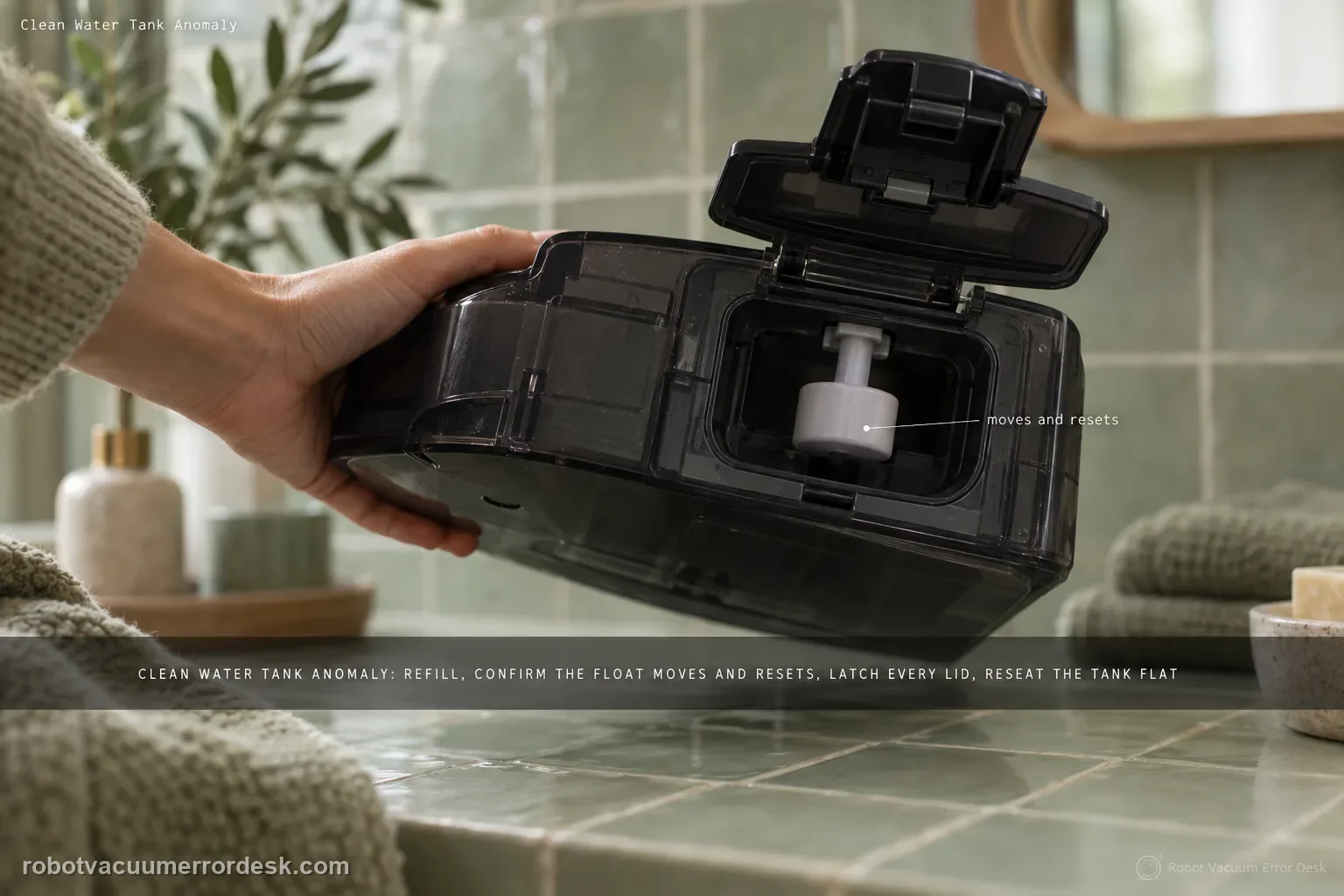
For the T80 OMNI Clean Water Tank Anomaly, stay on the tank-detection branch first: remove the fresh-water tank, refill it, verify that the float mechanism moves and resets, secure every lid latch, then reinstall the tank flat in the station. The goal of this page is to make the station recognize the tank and its level correctly. If the alert clears but fresh water still does not reach mopping or station self-cleaning, stop repeating tank-detection checks and switch to the separate clean-water-not-dispensing path, which tests the downstream seal, filter and hose. Keeping those two symptoms separate prevents a no-flow problem from being mistaken for a tank-state alert.
Confirm the exact model and exact code, light pattern or symptom.
Run the lowest-risk physical or software check first.
Use each pass condition to decide what the result actually narrows down.
Confirm this is the right issue
- The T80 OMNI reports a clean/fresh-water tank anomaly even though a tank is installed.
- The fresh-water float was displaced and may not be returning to its normal position.
- The tank lid is present but one or more latches may not be fully engaged.
- The tank alert clears but the station still produces no fresh water during mopping or self-cleaning.
- You need to separate tank detection/seating from a blocked filter, hose or sealing interface.
What’s most likely causing this
Fresh-water tank is empty or below the level needed for operation
Float mechanism is displaced and not resetting normally
Tank lid or latches are not fully secured
Tank is not seated flat in the base or debris is trapped at the interface
Station-side tank sealing plug is not fitted correctly
Fresh-water filter or hose is restricted
Persistent tank-detection or pump/valve fault after the documented owner checks
Reading your test result
| What you observe | What it narrows down | Next move |
|---|---|---|
| Alert appears with low/empty tank | The simplest documented cause is insufficient fresh water. | Remove/refill the tank, then check float reset and lid latches before reinstalling. |
| Tank is full but float does not return normally | ECOVACS specifically calls out the float mechanism in the anomaly flow. | Restore normal float movement and retest before dismantling hoses. |
| Alert clears but no water dispenses | Tank detection is working; the problem has moved to seating/sealing/filter/hose flow. | Use the T80 “Clean Water Not Dispensing” checks rather than repeating the anomaly reset. |
| Tank/float/lid/seal/filter/hose all pass but symptom remains | The documented owner-level wet-system path is exhausted. | Record whether the remaining symptom is an alert, no flow, or both and contact ECOVACS. |
| Alert changes after lifting and reseating the tank | A seating, lid or float-state change is affecting detection rather than proving a pump failure. | Repeat the tank installation carefully and keep the detection branch separate from the no-flow branch. |
Do not factory-reset by default. Use the exact model’s reboot/network-reset procedure only when the manufacturer path calls for it.
Work through these checks in order
Remove the tank and establish a known water/float state
Take the fresh-water tank out of the T80 station and open the lid. ECOVACS begins the anomaly flow by telling owners to refill the tank promptly, so do not diagnose a detection problem with an empty or nearly empty tank. While the lid is open, inspect the float mechanism and gently confirm that it returns to its normal position after displacement. Do not force the float or add weights; the goal is simply to restore free normal movement. This first step separates a basic water-level/float condition from a later seating or flow problem.
Lock every lid latch before reinstalling
Close the tank lid and verify that all latches are fully engaged. ECOVACS explicitly includes lid security in the T80 anomaly procedure, so a lid that merely looks closed is not enough. Press around the intended latch points and make sure the lid sits evenly. Then reinstall the tank in the base station in its normal orientation. Avoid slamming it into place; if it will not sit correctly, remove it and inspect the interface rather than forcing a misaligned tank. Retest the alert after this clean reseat.
If water still will not dispense, check tank seating and the sealing plug
If the tank alert is gone but the station still has no fresh water during mopping/self-cleaning, switch to ECOVACS’ separate T80 “Clean Water Not Dispensing” path. Remove the tank again, make sure no foreign objects are trapped between the tank and station and ensure the tank is placed flat. Then check the sealing plug on the station/tank interface and confirm it is installed correctly and tightly fitted. This branch is important because a detected tank can still fail to deliver water if the physical fluid interface is obstructed or not sealed.
Rinse the fresh-water filter and reconnect the hose
For persistent no-flow behavior, ECOVACS instructs owners to open the tank, remove the filter, disconnect the water hose and rinse the filter carefully with clean water. Reassemble the filter/hose exactly as intended and secure the tank again. Do not substitute improvised chemicals or poke pump components inside the powered station. This maintenance targets the owner-accessible restriction points the manufacturer names and gives you a meaningful distinction: if flow returns after cleaning, the failure was in the tank-side water path rather than the tank-presence sensor.
Run one controlled mopping/self-cleaning proof test
With the tank refilled, float free, lid latched, tank flat and filter/hose clean, run one normal wet-function test. Watch for two separate outcomes: whether the Clean Water Tank Anomaly reappears, and whether fresh water actually dispenses. Do not collapse them into one symptom. “No alert but no flow” should be reported as a delivery problem; “alert returns immediately” remains a detection/seating problem. If both persist after the documented checks, stop cycling the station and capture the app/voice alert plus the physical setup for ECOVACS support.
Escalate if the T80 still reports the clean-water tank anomaly after a refilled tank, free float, fully latched lid and normal seating, or if the alert clears but no water dispenses after the sealing plug, filter and hose checks. Tell ECOVACS which of those two symptoms remains; that distinction prevents a tank-presence issue from being confused with a pump/flow problem.
Before you contact support, gather this
A reproducible case moves a support call past the basic troubleshooting script faster than “it doesn’t work” does, and it keeps the clues from your own tests on record.
- Exact model name and the error code / voice prompt exactly as shown
- A photo or screenshot of the app error and the time it occurred
- A short list of the checks already completed and what happened after each one
- Map/station screenshot when the problem involves return-to-station or mapping
Where this comes from
ECOVACS T80 OMNI — Clean Water Tank Anomaly
ECOVACS’ exact T80 alert article tells owners to refill the fresh-water tank, verify float reset, secure every lid latch and reinstall the tank. The same T80 support set says that if fresh water is not dispensing, check for debris/flat seating, verify the sealing plug, remove the tank filter, disconnect the water hose, rinse the filter, then reconnect the hose for a controlled wet-function test.
Additional official source: ECOVACS T80 OMNI — Clean Water Not Dispensing ↗Last editorial review: September 5, 2026Regional note: manufacturer help centers, model suffixes, mains-power requirements and warranty procedures can differ by country. If the source redirects to a local support site, confirm that the model/hardware scope still matches before following a region-sensitive step.
This guide is rated Official model support. See what each evidence label means →
Questions people ask
Why does my DEEBOT T80 show Clean Water Tank Anomaly even when the tank is full?
Yes, a full tank can still trigger the alert because ECOVACS does not treat water level as the only check. Confirm that the float moves and returns normally, every lid latch is fully closed, and the tank is seated flat in the station. If those pass and the alert remains, document the exact alert instead of repeatedly adding more water.
What should I check if my DEEBOT T80 tank alert clears but no clean water comes out?
Treat that as a different branch. ECOVACS’ T80 no-dispensing guidance says to verify flat tank seating, remove debris at the interface, check the sealing plug, and rinse the owner-accessible filter and fully reconnect the water hose. A station can recognize the tank yet still fail to move water, so repeating the float/lid checks alone will not isolate the flow restriction.
Are DEEBOT T80 Clean Water Tank Anomaly and no-water dispensing the same problem?
No. They can happen in the same wet-system area, but they provide different evidence. A recurring tank anomaly points first to level, float, lid or seating detection. No water with the alert cleared points more toward the sealing interface, filter, hose or downstream delivery path. Record which symptom remains after each step so support receives a useful diagnosis.
When should I contact ECOVACS about a T80 Clean Water Tank Anomaly?
Contact ECOVACS when the clean-water tank is filled, the float moves freely, the lid is securely latched, the tank sits correctly, and the alert still returns. Also escalate a separate no-flow symptom if the sealing plug, filter and hose checks do not restore dispensing. Send the exact app or voice alert and state whether mopping, self-cleaning or both fail to receive water.
Why does my DEEBOT T80 say Clean Water Tank Anomaly after I just filled it?
A full tank does not prove the T80 can detect it correctly. ECOVACS also tells owners to check that the float returns normally, every lid latch is secure, and the tank is seated correctly. If the alert disappears but water still does not dispense, stop repeating the detection checks and move to the separate sealing-plug, filter and hose flow path.
Did this diagnostic narrow the fault?
Use this as an editorial signal, not a popularity counter. If a feedback address is configured you can email the note; otherwise you can copy it for your own support record.