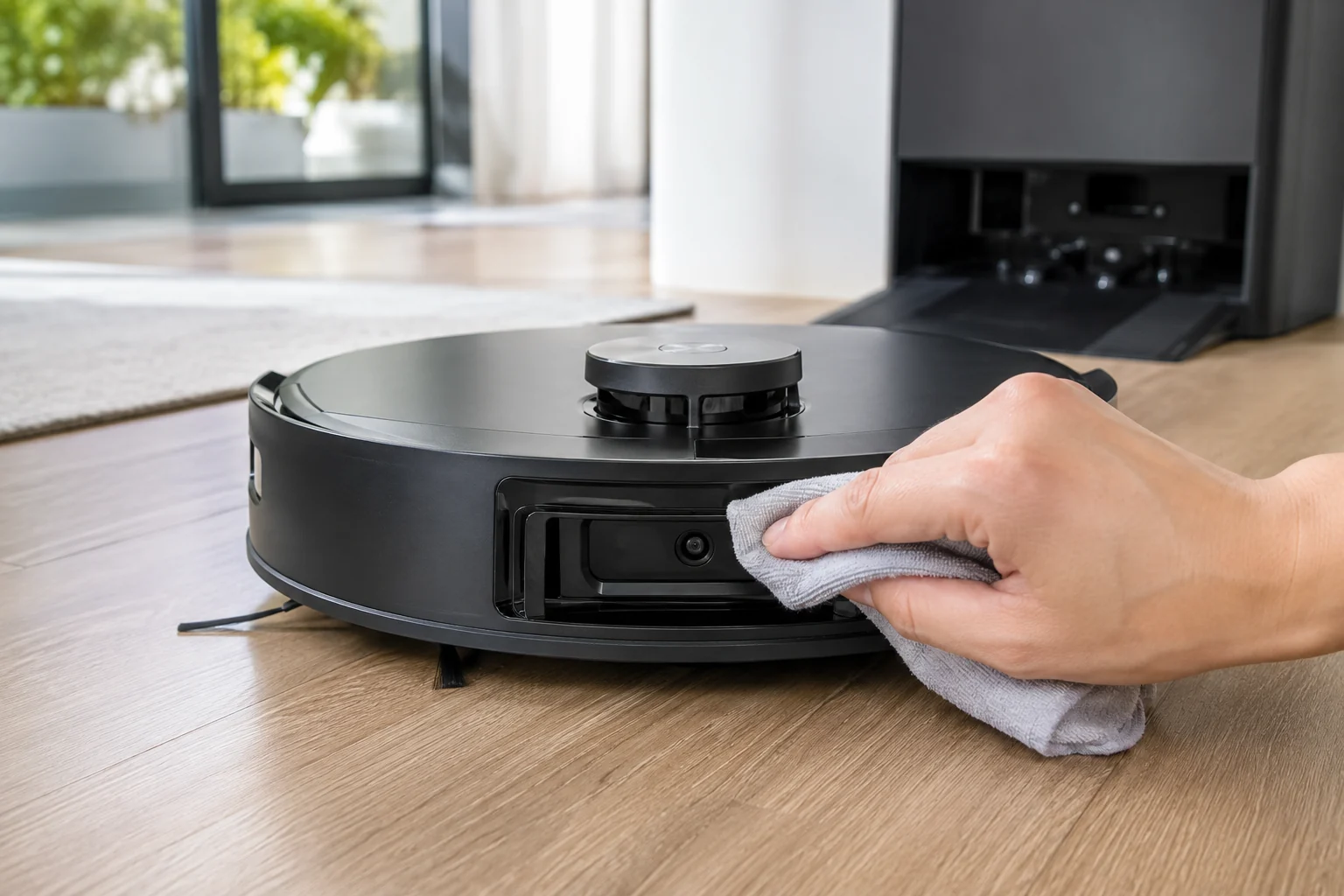
For the T80 OMNI 'Laser Sensor Abnormal' alert, ECOVACS gives a short exact-model recovery path: gently orient the laser unit so its radar lens faces forward, clean that lens with a soft brush or clean cloth, power the robot off for a few seconds, then restart it. The important additions are diagnostic: do not force a laser unit that is mechanically stuck, do not use liquids on the optical window, and prove the result with a short open-floor run. If the alert returns immediately with a clean lens and free external movement, the fault has passed the sensible owner-maintenance boundary.
Confirm the exact model and exact code, light pattern or symptom.
Run the lowest-risk physical or software check first.
Use each pass condition to decide what the result actually narrows down.
Confirm this is the right issue
- The app or voice alert specifically reports Laser Sensor Abnormal on a DEEBOT T80 OMNI.
- The robot refuses to navigate normally or stops soon after starting while the front laser/radar lens is dusty.
- The laser unit appears mis-oriented but can be moved gently without forcing it.
- The alert returns after a reboot and you need to distinguish surface contamination from a sensor/module fault.
- Erratic paths or poor obstacle behavior accompany the alert, which makes related laser-cleaning evidence relevant but does not justify opening the sensor module.
What’s most likely causing this
Dust or film on the exposed radar/laser lens interferes with the sensor's view
The external laser unit is not sitting in its expected forward-facing orientation
A temporary sensor state clears after the documented power-off/restart sequence
The sensor assembly is mechanically stuck or electronically failing even though the external lens is clean
A broader navigation symptom is being attributed to the laser without confirming the exact Laser Sensor Abnormal alert
Reading your test result
| What you observe | What it narrows down | Next move |
|---|---|---|
| Lens is visibly dusty | Surface contamination is the first reversible explanation. | Clean gently with a soft dry brush/cloth and restart before any map reset. |
| Laser unit moves gently to face forward | External orientation can be corrected without disassembly. | Orient it as ECOVACS directs, then test after a power cycle. |
| Laser unit feels hard-stuck or grinds | Forcing it risks damaging the module and is no longer routine cleaning. | Stop manipulating it and document the mechanical symptom for support. |
| Alert clears but paths remain erratic | The explicit laser fault is gone; navigation should be diagnosed on its own evidence. | Use the erratic-path guide to test clutter and wheel traction. |
| Alert returns immediately on a clean lens after restart | External maintenance has not resolved the fault. | Record the alert and sensor area and escalate to ECOVACS. |
Do not factory-reset by default. Use the exact model’s reboot/network-reset procedure only when the manufacturer path calls for it.
Work through these checks in order
Confirm the exact alert before treating every navigation issue as LiDAR
Open ECOVACS HOME and note the exact wording and timing. This path applies to the T80's Laser Sensor Abnormal alert, not every case where the robot takes a strange path. If there is no sensor alert and the map is merely messy, the T80 has separate guidance for erratic paths and map distortion. This distinction protects the map and keeps you from manipulating the laser assembly when the real cause may be clutter or wheel traction. Save a screenshot if the alert is intermittent because exact wording can disappear after a restart.
Stop the robot and inspect the exposed laser area
Place the T80 on a stable surface and look at the laser/radar lens from the front. Do not spray cleaner or blow wet compressed air into the opening. Check for dust, hair or a film that could obstruct the optical surface. If the external unit is obviously displaced, ECOVACS says it can be gently rotated so the radar lens faces forward. 'Gently' is the boundary: a module that refuses normal light movement should not be forced through a hard stop.
Orient the lens forward only if it moves freely
Using light finger pressure, rotate the laser unit only enough to put the radar lens in its normal forward-facing position. Do not use a screwdriver, lever or pliers. The purpose is not to calibrate the sensor; it is simply to restore the external orientation ECOVACS specifies before cleaning. If you hear grinding, feel a rigid jam or the unit springs back abnormally, stop here and record that symptom. Mechanical resistance is more valuable support evidence than damage caused by trying to make the module turn.
Dry-clean the optical surface
Use a soft brush or clean lint-free cloth to remove dust from the radar lens. Work lightly so you do not scratch the optical window. Avoid glass cleaner, alcohol or water unless ECOVACS explicitly instructs it for that part; the cited T80 procedure calls for a soft brush or clean cloth. Recheck under good light because a thin dust film is easy to miss. This is also a good point to clean only the adjacent exterior surface, not dismantle the bumper or sensor housing.
Use the documented power-off restart
Turn the T80 off, wait several seconds and power it back on. A restart after cleaning matters because the alert may remain latched even after the optical obstruction is removed. Start a short test in open space away from stairs and complex obstacles. Watch for two outcomes separately: whether the Laser Sensor Abnormal alert returns and whether navigation looks normal. If the alert clears but the route still looks odd, that is no longer proof the laser module itself is faulty; continue with the erratic-path diagnostic instead.
Escalate a persistent alert without opening the sensor module
If the lens is clean, the external unit is correctly oriented/free and the alert returns immediately after the restart, save a short video of the sensor area and a screenshot of the app message. Do not open the laser housing, attempt internal cleaning or repeatedly delete maps. Tell ECOVACS whether the unit can be turned gently, whether it makes abnormal noise and whether the robot starts moving at all. Those observations help distinguish a mechanical sensor obstruction from an internal electronics fault.
Contact ECOVACS when the exact Laser Sensor Abnormal alert persists after the radar lens is oriented forward without force, cleaned dry with a soft brush/cloth and followed by a power-off restart. Escalate sooner if the laser unit is hard-stuck, grinds or cannot be moved gently. Do not open the sensor housing or erase maps as a substitute for a physical sensor diagnosis. Send a screenshot of the alert and a short video showing the external sensor state and whether the robot can begin an open-floor run.
Before you contact support, gather this
A reproducible case moves a support call past the basic troubleshooting script faster than “it doesn’t work” does, and it keeps the clues from your own tests on record.
- Exact model name and the error code / voice prompt exactly as shown
- A photo or screenshot of the app error and the time it occurred
- A short list of the checks already completed and what happened after each one
- Photo or short video of the roller/tray/sensor state plus the exact app alert
Where this comes from
ECOVACS T80 OMNI — Laser Sensor Abnormal
ECOVACS' T80 Laser Sensor Abnormal article instructs owners to orient the radar lens forward, clean it with a soft brush/cloth and power-cycle. Related T80 navigation articles show that a cleared laser alert should not be conflated with every path or obstacle symptom, so the explicit sensor alert stays separate from broader navigation testing.
Additional official source: ECOVACS T80 OMNI — erratic cleaning paths ↗Additional official source: ECOVACS T80 OMNI — obstacle avoidance check ↗Additional official source: ECOVACS T80 OMNI product support hub ↗Last editorial review: September 5, 2026Regional note: manufacturer help centers, model suffixes, mains-power requirements and warranty procedures can differ by country. If the source redirects to a local support site, confirm that the model/hardware scope still matches before following a region-sensitive step.
This guide is rated Official model support. See what each evidence label means →
Questions people ask
How do I clear the DEEBOT T80 Laser Sensor Abnormal alert?
ECOVACS tells T80 owners to gently orient the laser unit so the radar lens faces forward, clean the lens with a soft brush or clean cloth, then turn the robot off for a few seconds and restart it. Test on open flooring afterward. If the same alert returns immediately, stop at that point and contact support rather than opening the sensor housing.
Can I rotate the T80 laser sensor by hand?
Only gently, and only as much as needed to face the radar lens forward as ECOVACS instructs. Do not force a unit that feels hard-stuck, grinds or resists normal light movement. A mechanically jammed sensor is itself a service clue. Using tools or leverage can turn a diagnosable fault into physical damage and is not part of the published owner procedure.
Should I use alcohol or glass cleaner on the T80 laser lens?
The cited T80 procedure calls for a soft brush or clean cloth, not a liquid cleaner. Keep the optical surface dry unless ECOVACS specifically tells you otherwise for your unit. Strong cleaners can leave residue or damage coatings. Gentle dry cleaning also gives you a clean diagnostic: if the alert persists, you know it was not simply loose surface dust.
Why did the laser alert clear but my T80 still drives strangely?
That means you should separate the symptoms. A cleared Laser Sensor Abnormal alert does not prove every navigation input is healthy, but it does mean the explicit sensor fault is no longer present. Use the erratic-path guide next, which checks clutter density, the forward laser cleanliness and drive-wheel traction before touching the saved map.
When should a T80 laser-sensor problem go to support?
Escalate when the lens is clean, the unit can face forward without force, the robot has been power-cycled and the exact Laser Sensor Abnormal alert still returns. Escalate immediately if the unit is mechanically stuck or makes abnormal grinding noise. Provide a screenshot and short video, and avoid opening the laser housing or repeatedly rebuilding maps.
Did this diagnostic narrow the fault?
Use this as an editorial signal, not a popularity counter. If a feedback address is configured you can email the note; otherwise you can copy it for your own support record.