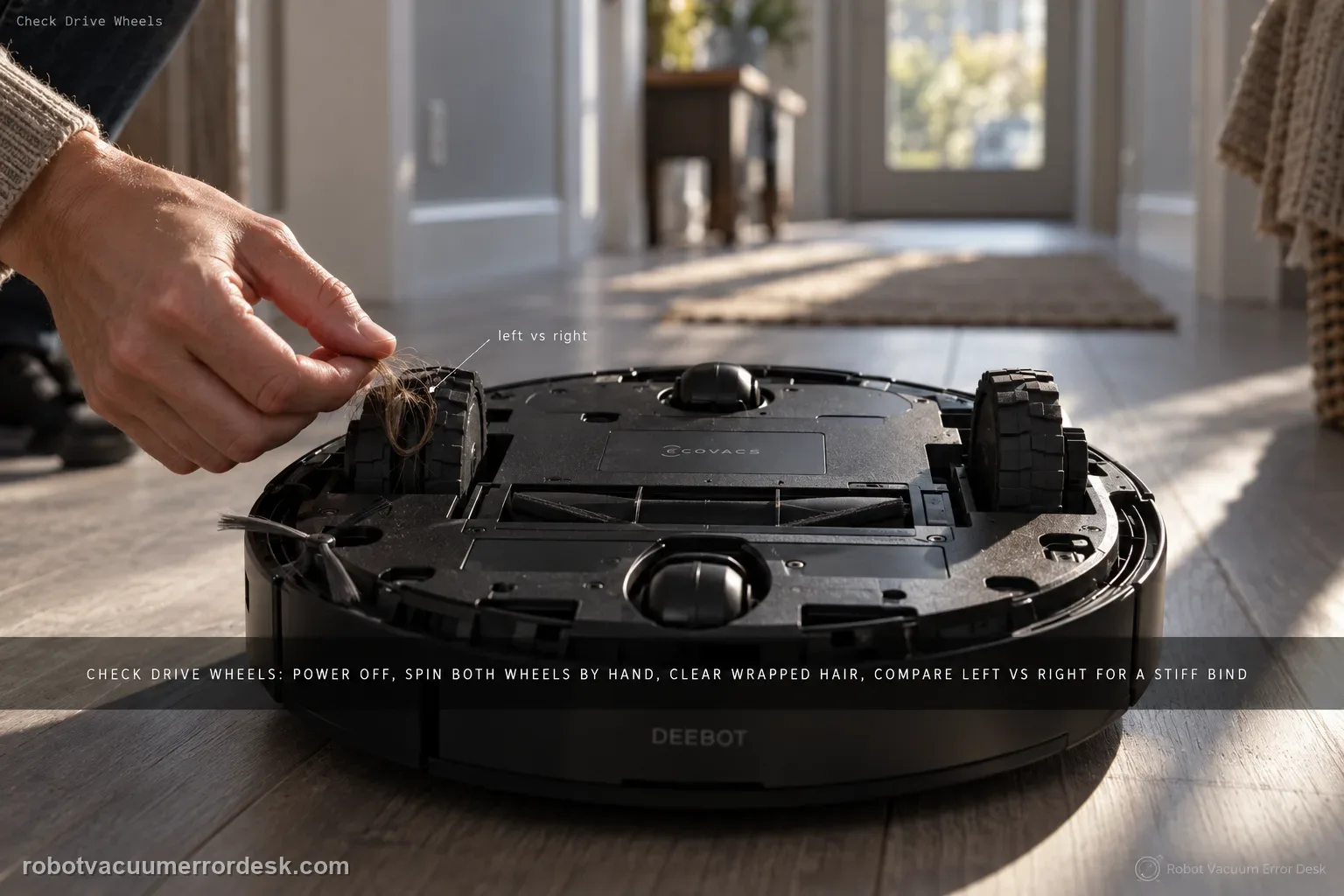
For the T80 OMNI 'difficulty running / check drive wheels' alarm, keep the first pass mechanical and comparative. Power the robot off, remove the dirty-water box before inversion, then press and rotate both drive wheels to find wrapped hair, thread or a hard bind. Clean the tread with a damp-but-wrung cloth or brush, dry it, and compare left versus right spring and rotation on a flat hard-floor test. If one wheel remains stiff or the alarm returns immediately on a clean dry surface, stop treating it as a map problem.
Confirm the exact model and exact code, light pattern or symptom.
Run the lowest-risk physical or software check first.
Use each pass condition to decide what the result actually narrows down.
Does this match your problem?
- The T80 reports difficulty running, slippery movement or a drive-wheel warning while cleaning.
- The robot drags or pivots around one side as though one drive wheel is not contributing normally.
- A wheel feels rough, compressed, slow to return or visibly wrapped with hair/thread when the robot is off.
- The symptom is strongest on otherwise flat flooring, so clutter or a tall threshold does not explain the loss of motion.
- You need to distinguish traction contamination from an actual drive-wheel mechanical/electrical fault.
Most likely causes
Hair, thread or carpet fibers wrapped around a drive wheel or its axle area
Wet residue or fine dirt on the wheel tread reduces traction and triggers repeated slipping behavior
One wheel is physically jammed and does not rotate or compress through a range comparable with the other side
The robot is being tested on a wet wash-tray approach, loose rug edge or obstacle that mimics a wheel fault
A wheel-module or drive fault remains after debris and surface contamination are removed
What your test result means
| What you observe | What it narrows down | Next move |
|---|---|---|
| One wheel is visibly wrapped or will not rotate freely | The alarm has a direct mechanical explanation. | Power off, remove the obstruction completely and compare movement with the opposite wheel. |
| Both wheels move but treads are wet or dirty | Traction loss can look like a drive failure. | Clean with a damp wrung cloth, dry thoroughly and retest on dry hard flooring. |
| Alarm occurs only at the wet station approach | The wheel may be healthy; excess water or tray seating can be the trigger. | Use the T80 slips-returning-to-station guide and dry the approach area. |
| Robot pivots repeatedly around the same side | One wheel may be contributing less torque or travel than the other. | Repeat the left/right press-and-rotate comparison and film the open-floor run. |
| Immediate alarm on a clean dry floor with free wheels | Owner cleaning no longer explains the fault. | Stop opening the wheel module and send ECOVACS the wheel comparison and test video. |
Do not factory-reset by default. Use the exact model’s reboot/network-reset procedure only when the manufacturer path calls for it.
Run these checks in order
Power the T80 off before inspecting the underside
Remove the top cover and move the physical power switch to O. Because the T80 uses a wet system, remove the dirty-water box before turning the robot over so liquid does not shift into places it should not be. Work on a stable padded surface with the robot fully stopped. This is also a good moment to note whether the alert appeared after a spill, a wet station approach, long hair pickup or a rug tangle; the context can tell you whether to prioritize tread contamination, wrapped fibers or an environmental obstruction.
Compare the left and right drive wheels, not just the noisy side
Press each drive wheel into its suspension travel and rotate it by hand. ECOVACS specifically directs owners to press and turn the drive wheels while clearing tangles. Compare both sides for spring return, roughness and the amount of force required. Hair and thread can hide close to the axle, so inspect the gap rather than only the visible tread. The comparison is important: a wheel that feels slightly firm may be normal, but a large left/right difference is a stronger clue that one module is actually binding.
Remove wrapped debris without opening the wheel module
Cut and pull away accessible hair, thread or fibers around the wheel and nearby axle gap. Use a small brush or the normal cleaning tool rather than dismantling the sealed drive assembly. Rotate the wheel several times and inspect again because long fibers can unwind in layers. If the wheel suddenly regains free travel after debris removal, repeat the comparison with the other side before powering up. Do not lubricate the wheel with household oil; lubricant can collect dust and does not fix an internal motor or gearbox fault.
Clean the wheel tread and remove traction as a confounder
ECOVACS allows a dampened, well-wrung cloth or a brush for surface stains. Wipe both drive-wheel treads, then dry them before the test. A film of dirty water from the wash tray can reduce traction enough to produce slipping or difficult-running behavior even though the wheel motor is fine. Also clean the small test area and choose flat hard flooring. Avoid judging the result on a loose mat, thick rug edge or damp tile, because those conditions can recreate the symptom and make a successful wheel cleaning look ineffective.
Run a short open-floor comparison before checking maps
Reinstall the dirty-water box, power the T80 on and run it in a simple open area. Watch whether it travels straight, turns symmetrically and clears the drive-wheel alert. If it still arcs around one side, capture video from behind so wheel behavior is visible. If open-floor motion is normal but the fault appears only near the station, move to the slip-to-dock diagnostic; if it appears only around clutter, investigate physical obstacles. Do not delete maps for a wheel alarm until you have proven that basic left/right movement is normal.
Escalate a persistent asymmetry as a wheel-module problem
If one wheel remains stiff, fails to spring back, makes grinding noise or triggers the alert immediately after all visible debris is removed, stop at the external service boundary. Record a close-up showing both wheels being pressed and rotated and a second clip of the open-floor run. Tell ECOVACS whether the issue follows one side, whether cleaning changed it and whether the robot can move at all. This evidence is more useful than repeated resets because a reset cannot free a physically jammed wheel or repair a drive module.
Escalate if both treads and the test surface are clean and dry, no hair/thread is wrapped around the wheels, yet one wheel remains mechanically stiff, fails to spring back or the T80 immediately repeats the drive-wheel alarm on open hard flooring. Do not open the wheel module or add lubricant. Send ECOVACS a video comparing left and right compression/rotation and a controlled driving clip; include whether the same robot can return to the station and whether the fault is limited to wet surfaces.
What to collect before contacting support
Give support a reproducible case instead of “it doesn’t work.” That reduces repeated basic troubleshooting and preserves the clues from your tests.
- Exact model name and the error code / voice prompt exactly as shown
- A photo or screenshot of the app error and the time it occurred
- A short list of the checks already completed and what happened after each one
- Map/station screenshot when the problem involves return-to-station or mapping
Manufacturer evidence
ECOVACS T80 OMNI — Drive Wheel Difficulty Alarm
ECOVACS' T80 drive-wheel article says to power off, remove the dirty-water box, turn the robot over, press/rotate the wheels to clear tangles and clean surface stains. The related return-slip article independently reinforces wheel cleaning/drying, giving a model-specific way to separate a contaminated tread from a persistent wheel-module fault.
Additional official source: ECOVACS T80 OMNI — slipping on final station return ↗Additional official source: ECOVACS T80 OMNI product support hub ↗Last editorial review: September 5, 2026Regional note: manufacturer help centers, model suffixes, mains-power requirements and warranty procedures can differ by country. If the source redirects to a local support site, confirm that the model/hardware scope still matches before following a region-sensitive step.
This guide is rated Official model support. See what each evidence label means →
FAQ
Why does my DEEBOT T80 say to check the drive wheels?
ECOVACS uses this alert when the robot has difficulty running or slipping. The first owner checks are mechanical: power off, press and rotate the drive wheels, remove wrapped debris, then clean surface stains. The key diagnostic is whether both wheels move and spring similarly on a clean dry floor. A map reset cannot correct a wheel that is physically bound.
Can wet drive wheels cause the T80 drive-wheel alarm?
They can contribute to slipping and difficult-running behavior. ECOVACS also tells owners to clean and dry the drive wheels when the T80 slips while returning to the station. If the warning happens only around a wet wash tray, dry the tray/floor and wheel treads before deciding the motor is bad. Reproduce the issue on dry hard flooring first.
Should both T80 drive wheels feel exactly the same by hand?
They do not need to feel laboratory-identical, but a pronounced difference is useful evidence. Press and rotate both wheels with the robot powered off. If one side is smooth and springy while the other remains hard, rough or reluctant to return after visible debris is removed, that asymmetry makes a wheel-module fault more plausible and is worth filming for support.
Will deleting the map fix a DEEBOT T80 drive-wheel warning?
Not if the wheel is actually jammed or losing traction. Do the external wheel comparison and open-floor test first. A robot that drags the same side in a simple room has a movement problem independent of its saved map. Only investigate mapping after the robot proves it can drive and turn normally without the wheel alarm.
When should I contact ECOVACS about the T80 drive wheel?
Contact support when wrapped debris is removed, both wheel treads are clean/dry, the robot is tested on clear hard flooring, and one wheel still binds, fails to spring or immediately triggers the same alert. Send a left-versus-right hand comparison plus a short driving video. Avoid opening the sealed wheel module or adding oil as an unverified fix.
Did this diagnostic narrow the fault?
Use this as an editorial signal, not a popularity counter. If a feedback address is configured you can email the note; otherwise you can copy it for your own support record.