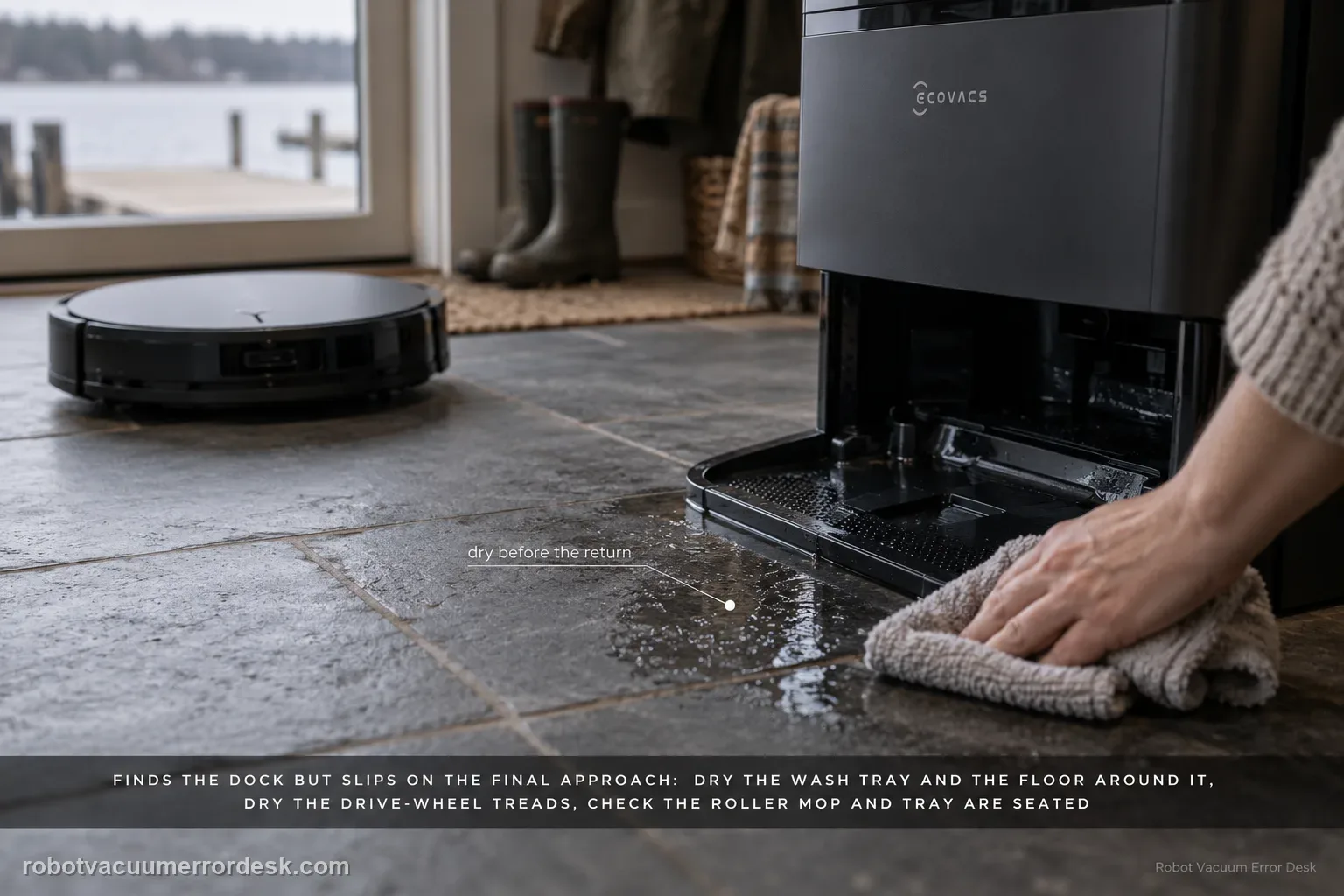
When a T80 OMNI finds the station but slips during the final approach, do not delete the map first—the robot has already demonstrated that it can locate the dock. ECOVACS' exact-model path is physical: dry excess water from the mop-washing tray and surrounding floor, clean then dry the drive-wheel treads, verify the roller mop is correctly installed, verify the mop-washing tray is seated, then place the robot directly in front of the base and press AUTO for a close return test. That test separates final traction/seating from long-range navigation.
Confirm the exact model and exact code, light pattern or symptom.
Run the lowest-risk physical or software check first.
Use each pass condition to decide what the result actually narrows down.
Confirm this is the right issue
- The T80 reaches the station area correctly but loses traction on the final ramp/approach.
- The mop-washing tray or nearby floor is visibly wet after a wash cycle.
- The robot's drive wheels have wet residue and the failure is strongest immediately after mopping.
- The roller mop or washing tray was recently removed and may not be seated correctly.
- A close-range return from directly in front of the station is the right test because long-range map finding already works.
What’s most likely causing this
Excess water in the mop-washing tray or on the floor reduces final-approach traction
Drive-wheel treads are dirty or wet and slip under the load of climbing/seating into the station
The roller mop is installed incorrectly and changes clearance or drag on the approach
The mop-washing tray is not fully seated and physically interferes with the final return
A persistent station approach/alignment or wheel problem remains after the entire physical path is dry and correctly installed
Reading your test result
| What you observe | What it narrows down | Next move |
|---|---|---|
| Robot reaches dock area but spins/slips at the last moment | Long-range navigation is working; final traction/seating is the priority. | Dry tray/floor, clean wheel treads and inspect roller/tray installation. |
| Visible water is pooled at the tray or approach | Traction is confounded by a wet surface. | Dry the tray and surrounding floor fully before another test. |
| Close-range return works after drying | The core docking mechanism is healthy under controlled traction. | Investigate what is making the approach wet again rather than deleting the map. |
| One drive wheel still slips on dry flooring | The issue may be a wheel/tread problem, not the station itself. | Use the drive-wheel alarm guide and compare left/right wheel movement. |
| Close-range return fails on a dry correctly assembled station | The simple physical causes have been removed. | Film the final approach and escalate to ECOVACS. |
Reset can erase maps/settings on this path. Use lower-risk checks first and document the current state before resetting.
Work through these checks in order
Confirm the robot can actually find the station
Watch the return from the point where the T80 enters the station area. This path fits when the robot locates the base but fails during the last physical approach because it slips or cannot climb/seat normally. If the robot wanders elsewhere and never reaches the dock area, use a cannot-find-station/navigation guide instead. This classification matters because a robot that already found the station does not need its map deleted just to test traction on the last few centimeters.
Dry the mop-washing tray and the floor around it
Inspect the tray, ramp/approach and nearby floor for excess water. ECOVACS tells T80 owners to wipe the mop-washing tray and surrounding area with a dry cloth when the robot finds the station but slips returning. Remove standing water rather than letting the wheels spread it around during another attempt. If water immediately reappears in unusual quantity, note that separately because a wet-system leak or drainage issue may be creating the traction problem.
Clean and dry both drive-wheel treads
Power the robot off and turn it over safely. Wipe the drive wheels with a dampened, well-wrung cloth, then dry them with a clean cloth as ECOVACS specifies. Inspect for hair or thread at the wheel edges while you are there. The critical point is the final dry step: testing on wet wheels can recreate the symptom and make you think the cleaning did nothing. If one wheel feels mechanically different from the other, move to the drive-wheel diagnostic before blaming station alignment.
Re-seat the roller mop and washing tray
Check that the T80 roller mop is properly installed; if there is doubt, remove and reinstall it through the documented expansion/click path. Then inspect the mop-washing tray and reseat it fully in the station. A tray that is slightly raised or a roller assembly that is not sitting normally can alter clearance during the final approach. Do not force the robot into the dock to overcome that interference; correct the removable parts and let the robot approach under its own power.
Run the ECOVACS close-range return test
Place the T80 directly in front of the base and press AUTO to command a return. This controlled test removes most long-range navigation from the equation and focuses on the last approach, wheel traction and seating. Observe whether the robot centers itself, climbs/seats and begins charging. If it succeeds now, repeat once after a normal short mopping run to see whether water is returning to the approach. If the close test fails on a dry, correctly assembled station, record the slip point from the side.
Use the result to choose the next branch
A successful close return after drying points toward water/traction rather than map corruption. Recheck why the approach became wet, especially after wash cycles. A failure driven by one wheel on dry flooring belongs in the drive-wheel guide. A robot that reaches the correct position but cannot physically seat despite normal wheel traction and correctly fitted tray/roller should go to ECOVACS with video. Avoid factory resets because they erase navigation context without changing water on the floor or the mechanical seating of the tray.
Document persistent final-approach failure for support
Film one return from directly in front of the station with the floor and tray visibly dry. Include the robot's wheel behavior and whether charging starts after the failed/successful seating attempt. Tell ECOVACS that the roller mop and washing tray were reinstalled and whether a manual placement on the station can charge. These details distinguish a traction problem, physical alignment issue and charging-contact problem more clearly than a general 'won't dock' description.
Contact ECOVACS when the robot clearly finds the station, the tray and surrounding floor are dry, both drive wheels are clean/dry and move normally, the roller mop and wash tray are correctly installed, and a direct-in-front AUTO return still slips or cannot seat. Do not delete the map as the first response to a final-approach traction problem. Send a side-view video of the controlled return and state whether the robot charges when placed on the station manually.
Before you contact support, gather this
A reproducible case moves a support call past the basic troubleshooting script faster than “it doesn’t work” does, and it keeps the clues from your own tests on record.
- Exact model name and the error code / voice prompt exactly as shown
- A photo or screenshot of the app error and the time it occurred
- A short list of the checks already completed and what happened after each one
- Map/station screenshot when the problem involves return-to-station or mapping
Where this comes from
ECOVACS T80 OMNI — Slips Returning to Station
ECOVACS' T80 return-slip article explicitly checks excess tray/floor water, drive-wheel cleaning/drying, roller-mop seating and wash-tray seating, then uses a return test from directly in front of the station. The wheel and roller articles supply the model-specific next branches if traction or installation remains abnormal.
Additional official source: ECOVACS T80 OMNI — drive wheel difficulty alarm ↗Additional official source: ECOVACS T80 OMNI — roller mop removal and installation ↗Additional official source: ECOVACS T80 OMNI product support hub ↗Last editorial review: September 5, 2026Regional note: manufacturer help centers, model suffixes, mains-power requirements and warranty procedures can differ by country. If the source redirects to a local support site, confirm that the model/hardware scope still matches before following a region-sensitive step.
This guide is rated Official model support. See what each evidence label means →
Questions people ask
Why does my DEEBOT T80 find the station but slip before docking?
ECOVACS treats this as a physical final-approach problem first. Dry excess water from the wash tray and surrounding floor, clean and dry the drive wheels, verify the roller mop and wash tray are installed correctly, then place the robot directly in front of the station and press AUTO. Because it already found the dock, map deletion is not the first diagnostic step.
Does a successful close-range dock test mean the T80 map is fine?
It proves the robot can complete final homing and physical seating from nearby under controlled conditions. That strongly reduces the value of blaming the station hardware for every failed return. It does not prove the entire map is perfect, but when the original symptom is slipping at the dock, a close-pass result points more strongly toward wet approach conditions or long-route context than a broken charging base.
Should I dry the T80 drive wheels after wiping them?
Yes. ECOVACS specifically tells owners to wipe the wheels with a dampened/wrung cloth and then dry them with a clean cloth for this slip-to-station symptom. Testing on still-wet wheel treads can recreate the loss of traction. Also make sure the station approach floor is dry, otherwise clean wheels can become wet again before the robot reaches the contacts.
Can a badly installed roller mop make the T80 slip at the station?
ECOVACS includes roller-mop installation in the exact return-slip procedure, so it should be checked. Reinstall it through the documented expansion/click path and also reseat the mop-washing tray. If either removable part is not sitting normally, it can change clearance or drag during the last approach even when navigation correctly points the robot at the station.
When should I stop troubleshooting T80 docking slip myself?
Stop after the approach is dry, drive wheels are clean/dry and normal, the roller and wash tray are correctly seated, and the robot still cannot complete a direct-in-front AUTO return. Record the final approach from the side and tell ECOVACS whether manual placement begins charging. Do not open the station or repeatedly delete maps for a failure that is already localized to the final approach.
Did this diagnostic narrow the fault?
Use this as an editorial signal, not a popularity counter. If a feedback address is configured you can email the note; otherwise you can copy it for your own support record.