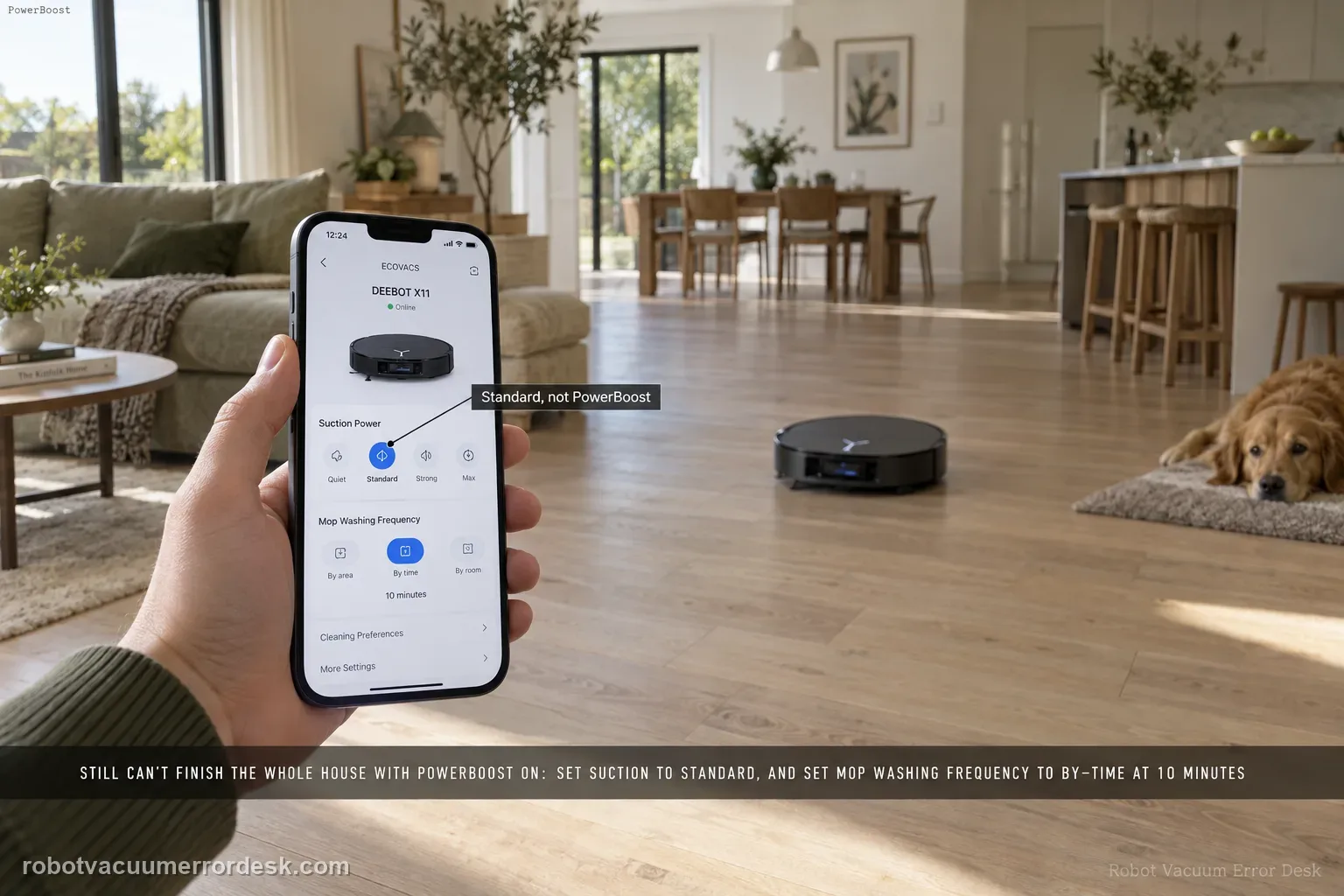
If the X11 still cannot finish a whole-home mission even after PowerBoost Charging is enabled, ECOVACS gives two model-specific settings to reduce the load on the mission: set suction to Standard from the control page, then go to Settings > Station Advanced Settings and set Mop Washing Frequency to “by time” at 10 minutes. Test a comparable full-house route after those changes. If it still cannot complete, preserve battery/job history rather than repeatedly changing several performance settings at once.
Confirm the exact model and exact code, light pattern or symptom.
Run the lowest-risk physical or software check first.
Use each pass condition to decide what the result actually narrows down.
Does this match your problem?
- PowerBoost Charging is already enabled but a whole-home job still ends unfinished.
- The robot returns to the station during the run but does not complete all planned areas.
- The issue appears on large vacuum-and-mop jobs rather than short room cleans.
- The X11 uses PowerBoost Charging but still ends a whole-home job before every planned area is covered.
- You want one controlled comparison using the exact Standard-suction and 10-minute mop-wash settings ECOVACS specifies.
Most likely causes
PowerBoost Charging is enabled but suction remains above the Standard setting used in ECOVACS’ troubleshooting path
Mop Washing Frequency is not set to the time-based 10-minute option used in the same path
Too many settings are changed at once, making the comparison inconclusive
The full-house run is being judged before the recharge/resume sequence is allowed to finish
The cleaning history shows a repeatable incomplete mission with the recommended settings
A persistent endurance/control-state issue remains after one clean Standard/10-minute comparison
What your test result means
| What you observe | What it narrows down | Next move |
|---|---|---|
| Suction is above Standard | Energy demand is higher than ECOVACS’ troubleshooting baseline | Set suction to Standard for the proof run. |
| Mop Washing Frequency is not time-based 10 min | Station behavior differs from the documented X11 test setup | Set Station Advanced Settings to by-time, 10 minutes. |
| PowerBoost is not enabled | The feature has not actually been part of the failed test | Enable PowerBoost before comparing full-house endurance. |
| Robot finishes more coverage after the two settings changes | Mission load/settings were contributing | Keep the stable settings and reintroduce performance changes one at a time. |
| Comparable run still ends incomplete | The documented PowerBoost troubleshooting path did not resolve it | Save battery/job history and contact ECOVACS. |
Do not factory-reset by default. Use the exact model’s reboot/network-reset procedure only when the manufacturer path calls for it.
Run these checks in order
Confirm PowerBoost is actually enabled
In Station Advanced Settings, verify PowerBoost Charging is on before changing the workload. This keeps the diagnosis focused on a full-house task that is already using the intended rapid recharge feature. Why it matters: Higher suction consumes more power during the route. ECOVACS specifically asks for Standard mode on this X11 troubleshooting path, so use that as the controlled energy baseline.
Set suction to Standard
On the robot control page, swipe up and set suction to Standard. ECOVACS uses this as the first exact-model adjustment when full-house cleaning remains incomplete with PowerBoost enabled. Mop-washing behavior adds station visits and task overhead. Setting the wash frequency to a 10-minute time basis is the second documented change for the PowerBoost full-house issue.
Set mop washing to every 10 minutes by time
Open Settings > Station Advanced Settings and change Mop Washing Frequency to the time-based 10-minute option, matching ECOVACS’ published X11 troubleshooting path. Change only the two manufacturer variables for the proof run. If you also alter maps, room order and multiple cleaning passes, the next result will not show whether the PowerBoost troubleshooting settings mattered.
Run one unchanged full-house test
Start a normal whole-home task and avoid changing suction, wash frequency, map or zones mid-run. This creates a clean comparison with the previous failed mission. Compare the same or very similar whole-home route and save the cleaning history. The useful evidence is whether coverage improves, where recharge occurs and whether the task ends or remains incomplete.
Save the task history if it still fails
If the task remains incomplete, capture the task map/history and the PowerBoost, suction and mop-wash settings before contacting ECOVACS. That preserves the exact configuration support asked you to test. Preserve the second run as a support-ready comparison. Note the battery state, the room where the mission ended, whether the app marked the job complete, and whether PowerBoost returned the robot to cleaning after its recharge stop.
Classify the end state before changing anything else
When the controlled run ends, check whether the app marks the job complete, paused for recharge or stopped with areas still uncovered. Keep PowerBoost enabled, Standard suction and the 10-minute wash interval unchanged while you capture the cleaning history. That end state tells support whether the issue is energy budgeting, resume behavior or a different coverage problem instead of merely saying the house was not finished.
If the X11 still cannot complete the full-house task with PowerBoost on, Standard suction and 10-minute time-based mop washing, contact ECOVACS rather than repeatedly deleting maps or changing several settings at once. Include PowerBoost enabled, Standard suction, 10-minute time-based mop washing and the full cleaning-history map from the controlled comparison.
What to collect before contacting support
Give support a reproducible case instead of “it doesn’t work.” That reduces repeated basic troubleshooting and preserves the clues from your tests.
- Exact model name and the error code / voice prompt exactly as shown
- A photo or screenshot of the app error and the time it occurred
- A short list of the checks already completed and what happened after each one
- Map/station screenshot when the problem involves return-to-station or mapping
Manufacturer evidence
ECOVACS X11 OmniCyclone — full-house cleaning incomplete after PowerBoost
ECOVACS’ exact X11 article says to use Standard suction and set Mop Washing Frequency to time-based 10 minutes when full-house cleaning still cannot complete after PowerBoost is enabled.
Additional official source: ECOVACS US — DEEBOT X11 OmniCyclone Support Center ↗Last editorial review: September 5, 2026Regional note: manufacturer help centers, model suffixes, mains-power requirements and warranty procedures can differ by country. If the source redirects to a local support site, confirm that the model/hardware scope still matches before following a region-sensitive step.
This guide is rated Official model support. See what each evidence label means →
FAQ
Should I switch to Max suction to finish faster?
No. ECOVACS specifically tells X11 users with this symptom to set suction to Standard for the troubleshooting test. ECOVACS specifically asks for Standard suction in this X11 path; switching to Max increases energy demand and makes the comparison less useful. Keep the same map and room plan during that run so energy-setting changes are the only meaningful variables.
Does PowerBoost mean the robot should never return to the station?
No. PowerBoost is a charging strategy; the robot can still return during a long job. The question is whether it resumes and completes the planned task. PowerBoost can still involve station returns. What matters is whether the robot recharges and ultimately covers the planned whole-home task under the controlled settings.
Should I delete the map if the job remains incomplete?
Not as the first response to this exact symptom. Preserve the map and task history while you test ECOVACS’ two specified settings. Change only Standard suction and the time-based 10-minute mop-wash frequency for the proof run; map edits and other changes make the result harder to attribute.
Why can’t my DEEBOT X11 finish the whole house even with PowerBoost Charging on?
ECOVACS’ X11 troubleshooting article changes two workload settings: set suction to Standard and set Station Advanced Settings > Mop Washing Frequency to a time-based 10-minute interval. Confirm PowerBoost is enabled, then repeat a comparable whole-home mission without changing several other variables. If it still stops incomplete, save the battery and cleaning-history evidence for support.
Does higher suction make an X11 PowerBoost full-house test less useful?
Yes for this specific troubleshooting path. ECOVACS tells owners to set the X11 to Standard suction when a PowerBoost-enabled robot still cannot complete full-house cleaning. That creates the manufacturer’s lower-demand baseline. After the robot proves it can finish reliably, you can evaluate stronger suction separately instead of combining endurance diagnosis with a maximum-power setting.
Did this diagnostic narrow the fault?
Use this as an editorial signal, not a popularity counter. If a feedback address is configured you can email the note; otherwise you can copy it for your own support record.